 ailia Tech BLOG
PaddleOCR: 最新の軽量OCRシステム
ailia SDKで使用できる機械学習モデルである「PaddleOCR」のご紹介です。ailia SDKはエッジ向け推論フレームワークであり、ailia MODELSに公開されている機械学習モデルを使用することで、簡単にAIの機能をアプリケーションに実装することができます。
PaddleOCRの概要
PaddleOCRは、中国の検索大手 Baidu(百度)が、ディープラーニングフレームワーク「PaddlePaddle(PArallel Distributed Deep LEarning)」を用いて開発した、最新のOCRモデルです。
リリース版プログラムと論文が、2020年9月に公開されました。
実用に向け、認識精度と演算負荷とのバランスを多大に配慮した、素晴らしい内容となっています。
論文では、その配慮以外にも、学習の際に工夫したことや、実験に基づく各種設計の最適化なども紹介してくれています。
PaddleOCRが対応する言語の種類
多言語対応を目指すOCRとのことで、2021年3月時点にて、27言語が対応されています。
日本語も対応されています。
PaddleOCRで用いられるモデルの種類
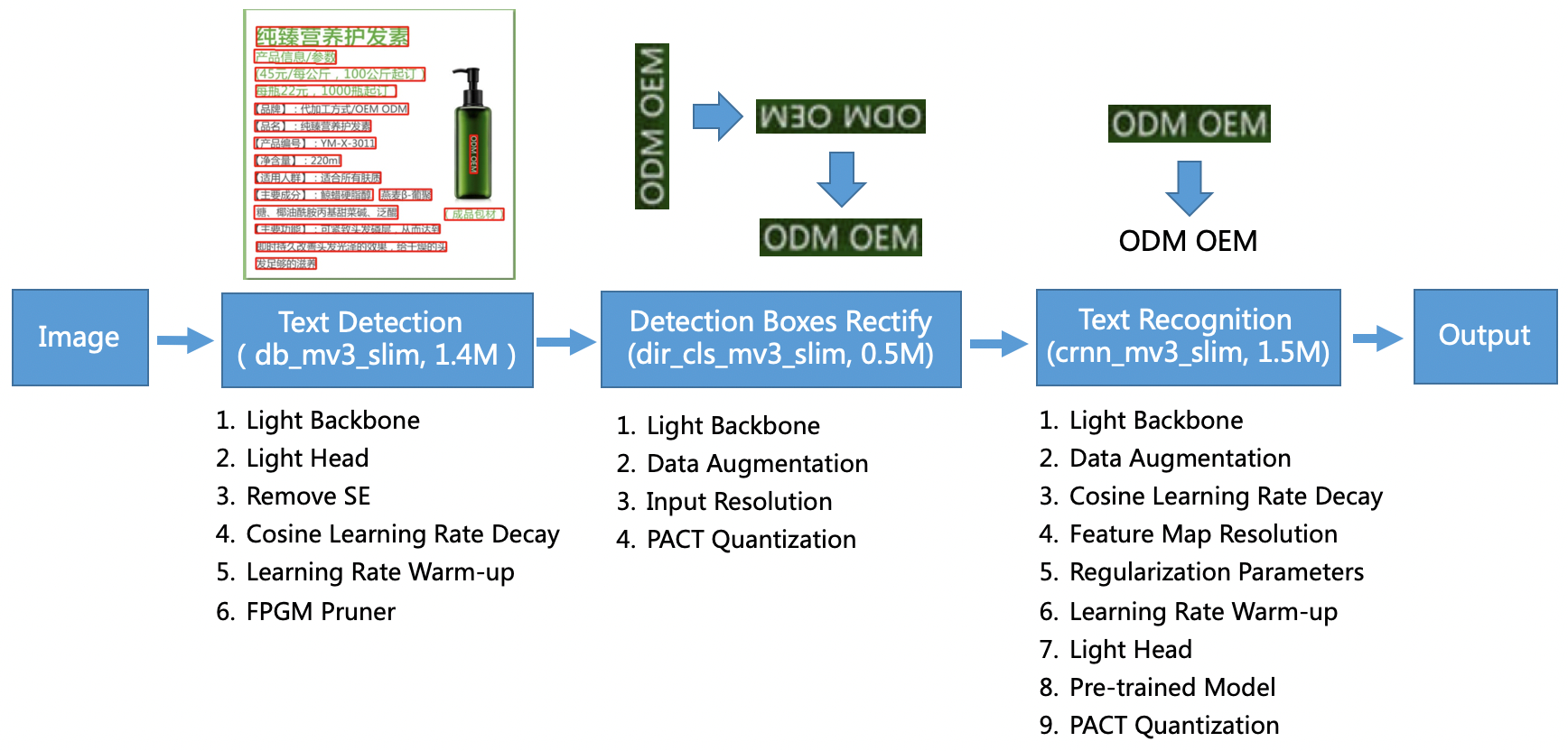
PaddleOCRの処理の流れは、以下の構成となっています。
出典:https://github.com/PaddlePaddle/PaddleOCR/blob/release/2.0/doc/ppocr_framework.png

図に示されるように、大きく3段階の処理があります。
それは、「①文字位置検出 → ②文字向き認識、及び、修正 → ③文字内容認識」の3つです。
その為、GitHubリポジトリ上には、各処理別のモデルが用意されています。
尚、「①文字位置検出」と「②文字向き認識」とを行うためのモデルは、全言語共通となっています。
「③文字内容認識」を行うためのモデルが、言語別に存在します。
PaddleOCRの出力
先ずは、入出力のイメージを確認していただくと、直感的に分かりやすいかと思います。
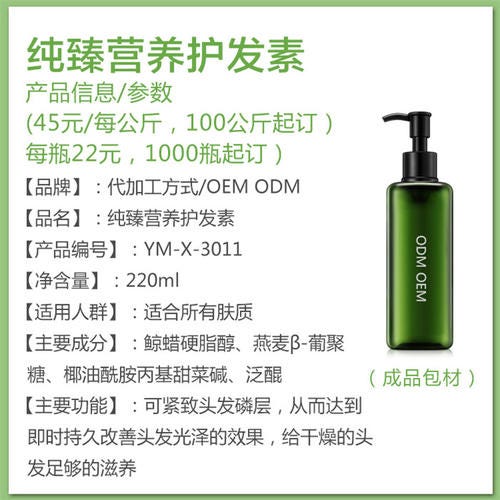
GitHub上に用意されている以下の画像を入力に、中国語の認識をしてみます。
出典:https://github.com/PaddlePaddle/PaddleOCR/blob/release/2.0/doc/imgs/11.jpg

PaddleOCRの出力は、以下となります。
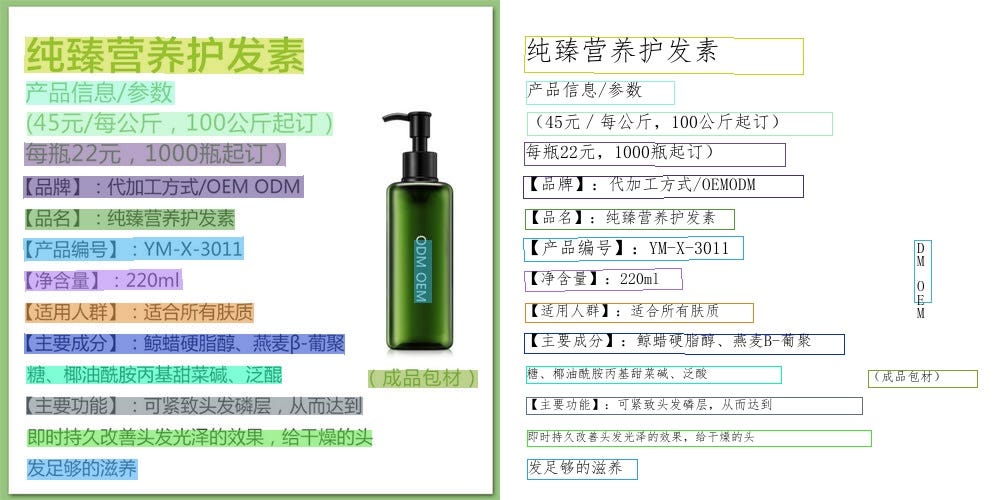
ほぼ完璧に認識ができています。
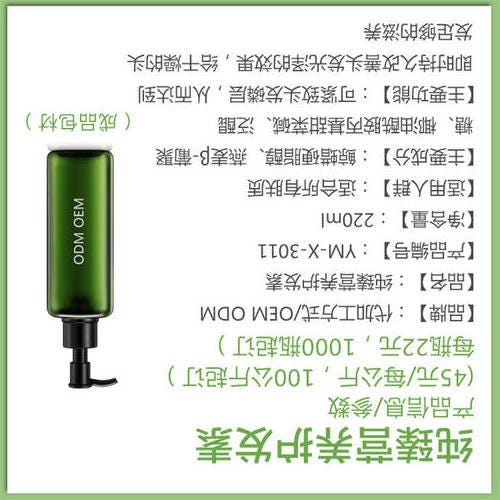
次に、先程の画像を反転させたものを、入力としてみます。
PaddleOCRの出力は、以下となります。
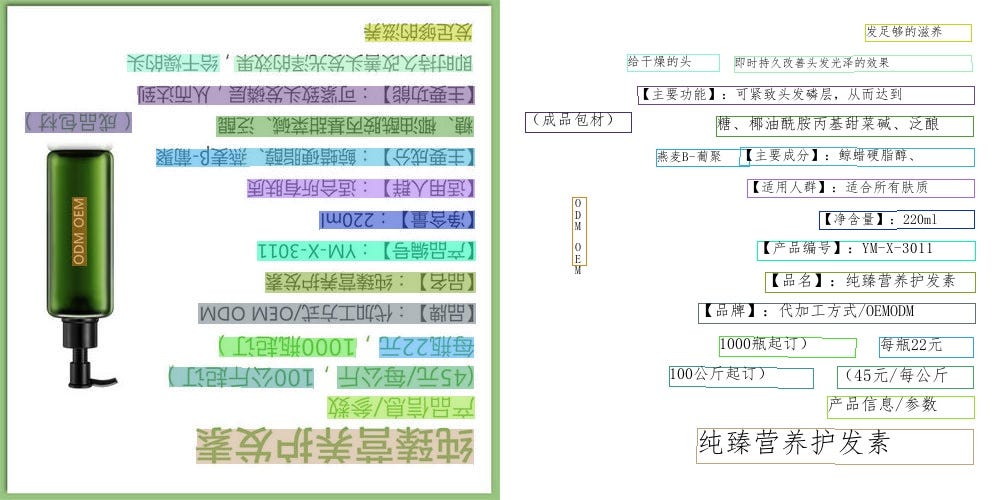
逆さまになっても、ほぼ完璧に認識ができています。
「②文字向き認識、及び、修正」という処理がある為、このような結果を導出することができます。
最後に、GitHub上に用意されている以下の画像を入力に、日本語の認識をしてみます。
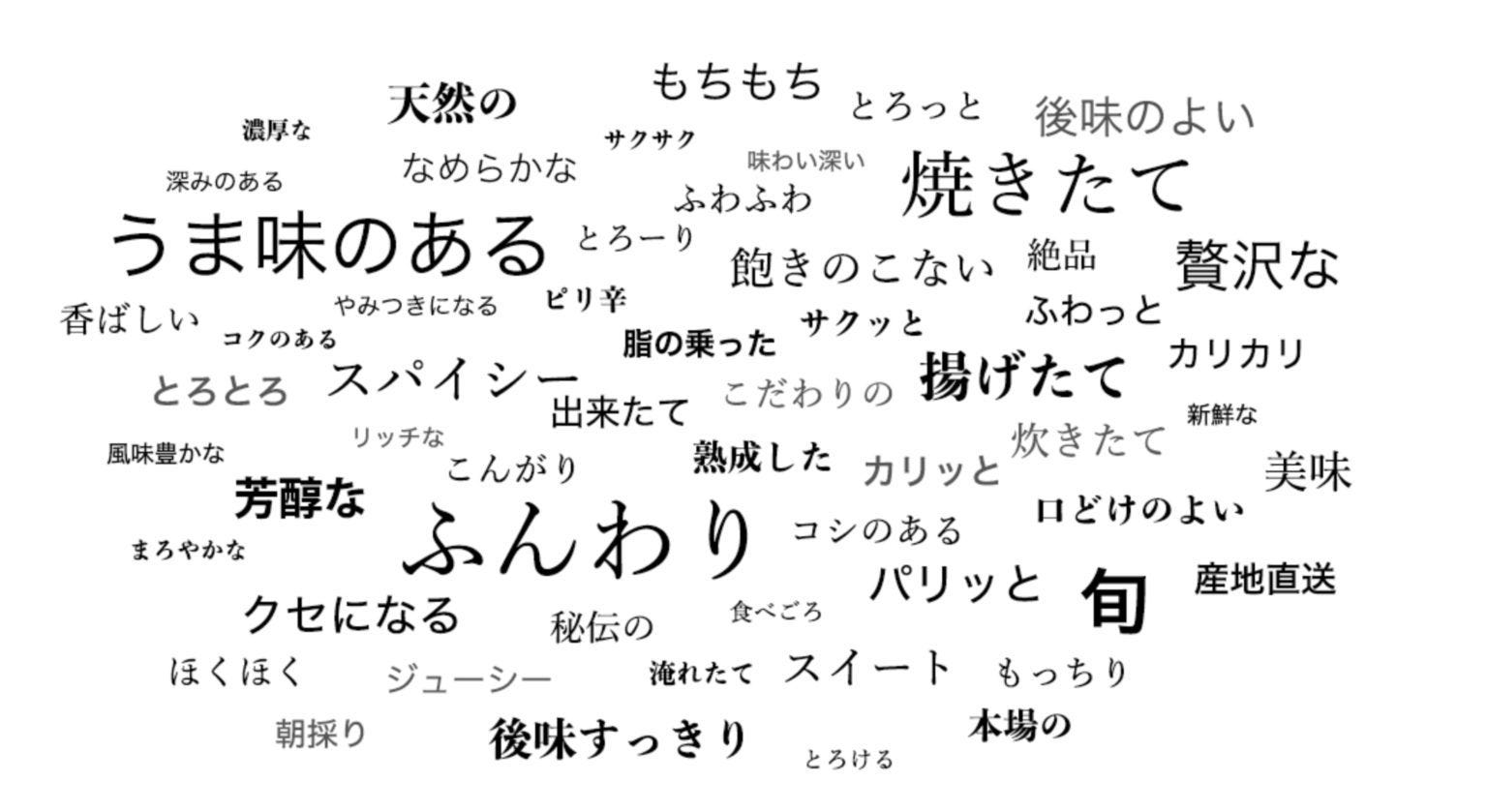
出典:https://github.com/PaddlePaddle/PaddleOCR/blob/release/2.0/doc/imgs/japan_2.jpg

PaddleOCRの出力は以下となります。
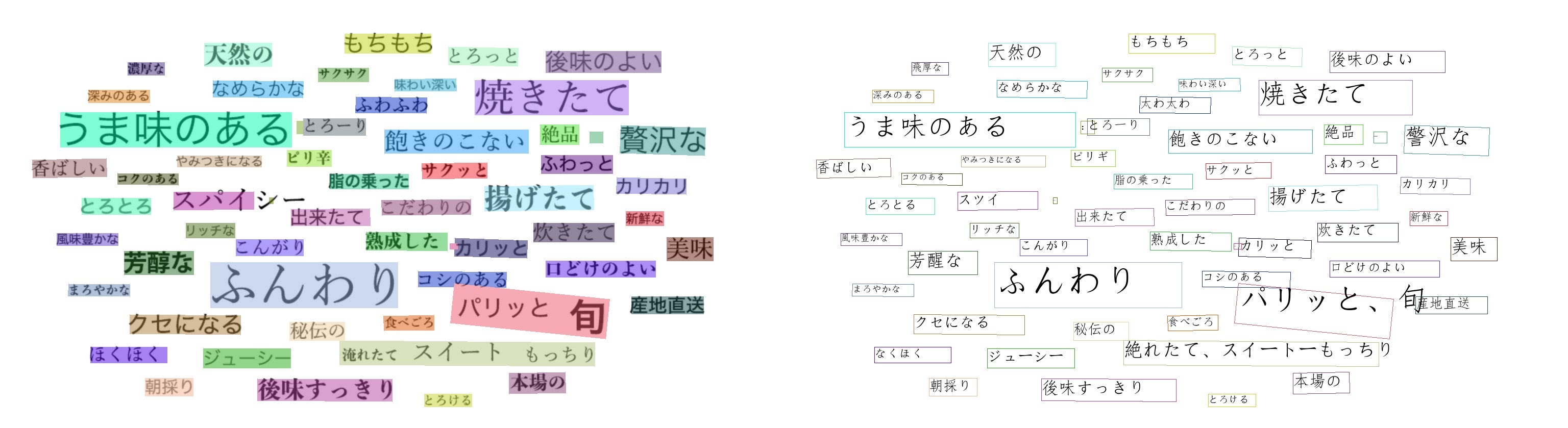
概ね間違えずに、認識ができています。
プログラム中の具体的な話をすると、先程の日本語の画像を入力とした場合、下記の2つの変数が出力されます。
np.shape(dt_boxes) = (58, 4, 2)
np.shape(rec_res) = (58, 2)
上記、dt_boxesは、detection bounding boxの略で、文字検出位置を示す矩形の四隅を、XY座標で表現した数値が格納されています。
矩形四隅のXY座標が、58個あることで、(58, 4, 2)という要素数になっています。
一例をあげると、以下となります。
[[675., 66.], [844., 66.], [844., 104.], [675., 104.]]
rec_resは、recognition resultの略で、認識予測された文字列と、その自信度合いを「0〜1」の範囲にて表現した数値とが、格納されています。
一例をあげると、以下となります。
(‘もちもち’, 0.98491704)
PaddlePaddleから使用する
PaddlePaddleから、PaddleOCRを使用するには、GitHubリポジトリ内にQuick Startを参考に進めれば、実現できます。
概ねの手順としては、requirements.txtに記載されるライブラリと、paddlepaddleとをインストールした上で、スクリプトを実行する形です。尚、paddlepaddleは、CPU版と、GPU版とがありますので、環境に合う方をインストールすると良いかと思います。
例えば、中国語認識を行いたい場合、スクリプトを実行するコマンドは、以下となります。
# Predict a single image specified by image_dir
python3 tools/infer/predict_system.py \
        --image_dir="./doc/imgs/11.jpg" \
        --det_model_dir="./inference/ch_ppocr_mobile_v2.0_det_infer/"  \
        --rec_model_dir="./inference/ch_ppocr_mobile_v2.0_rec_infer/" \
        --cls_model_dir="./inference/ch_ppocr_mobile_v2.0_cls_infer/" \
        --use_angle_cls=True \
        --use_space_char=True
日本語認識を行いたい場合、スクリプトを実行するコマンドは、以下となります。
# Predict a single image specified by image_dir
python3 tools/infer/predict_system.py \
        --image_dir="./doc/imgs/japan_2.jpg" \
        --det_model_dir="./inference/ch_ppocr_mobile_v2.0_det_infer/"  \
        --rec_model_dir="./inference/japan_mobile_v2.0_rec_infer/" \
        --cls_model_dir="./inference/ch_ppocr_mobile_v2.0_cls_infer/" \
        --use_angle_cls=True \
        --use_space_char=True
モデルファイルは、事前に用意しておく必要があります。
例えば、以下のコマンドで実現することができます。
# Download the detection model of the ultra-lightweight Chinese OCR model and uncompress it
wget https://paddleocr.bj.bcebos.com/dygraph_v2.0/ch/ch_ppocr_mobile_v2.0_det_infer.tar && tar xf ch_ppocr_mobile_v2.0_det_infer.tar# Download the recognition model of the ultra-lightweight Chinese OCR model and uncompress it
wget https://paddleocr.bj.bcebos.com/dygraph_v2.0/ch/ch_ppocr_mobile_v2.0_rec_infer.tar && tar xf ch_ppocr_mobile_v2.0_rec_infer.tar# Download the angle classifier model of the ultra-lightweight Chinese OCR model and uncompress it
wget https://paddleocr.bj.bcebos.com/dygraph_v2.0/ch/ch_ppocr_mobile_v2.0_cls_infer.tar && tar xf ch_ppocr_mobile_v2.0_cls_infer.tar# Download the angle classifier model of the ultra-lightweight Japanese OCR model and uncompress it
wget https://paddleocr.bj.bcebos.com/dygraph_v2.0/multilingual/japan_mobile_v2.0_rec_infer.tar && tar xf japan_mobile_v2.0_rec_infer.tar
尚、上記コマンドは、以下4つのモデルをダウンロードするコマンドです。
(1)軽量の文字検出モデル
(2)文字向き認識モデル
(3)中国語の文字内容認識モデル
(4)日本語の文字内容認識モデル
上記以外にも、精度重視の重めの文字検出モデルや、他の言語のモデルなどが、先程も紹介させていただいたモデル一覧に記載されています。
必要に応じて、上記コマンドをカスタマイズして、ダウンロードしていただくと良いかと思います。
PaddleOCRのONNXへのエクスポート
PaddleOCRをONNXにエクスポートする方法ですが、実は、直接的な方法が、2021年3月時点にて、フォローされていません。
そのことは、GitHubリポジトリのIssuesにある幾つかのやり取りにて、確認をすることができます。
ONNXをフォローしていない理由は、PaddlePaddleが独自でONNXのようなMobile対応を行っている為かと思われます。
その為、PaddlePaddleをONNXにエクスポートするには、一度、PaddlePaddleをPytorchに変換した上で、PytorchからONNXにエクスポートを行う必要があります。
尚、PaddlePaddleをPytorchに変換する方法ですが、こちらについても公式のフォローは無いようで、力技で実現する必要があります。
PaddlePaddleで構築したモデルと同一構造のネットワークを、Pytorch上にて構築し、重みの値をPaddlePaddleのネットワークからPytorchのネットワークへと、1つ1つ順繰りにコピーする、という方法です。
PaddleOCRに関しては、有り難いことに、以下のGitHubリポジトリが、PaddlePaddleからPytorchへの変換プログラムを用意してくれています。
こちらのリポジトリを使って、所望のモデルを、PaddlePaddleからPytorchへと変換します。
尚、中国語以外の言語での、「③文字内容認識」を行うモデルについては、変換コードが無いのですが、最終層のクラス数だけを各言語の文字数に変換すれば、変換が行えます。
つまり、文字内容を認識するモデルのネットワーク構造は、最終層以外は、全言語間で共通となっています。
PaddlePaddleからPytorchに変換した後には、公式の手順にて、ONNXへのエクスポートを実現できます。
「①文字位置検出」を行うモデルについては、入力画像サイズが様々考えられる為、画像の縦横サイズに動的対応できるように、エクスポートを行います。
# Input to the model
x = torch.randn(1, 3, 960, 1280, requires_grad=True)

# Export the model
torch.onnx.export(converter.net,             # model being run
                  x,                         # model input (or a tuple for multiple inputs)
                  "./onnx/ch_ppocr_server_v2.0_det_train.onnx",  # where to save the model (can be a file or file-like object)
                  export_params=True,        # store the trained parameter weights inside the model file
                  opset_version=10,          # the ONNX version to export the model to
                  do_constant_folding=True,  # whether to execute constant folding for optimization
                  input_names = ['input'],   # the model's input names
                  output_names = ['output'], # the model's output names
                  dynamic_axes={'input' : {0 : 'batch_size',
                                           2 : 'height_size',
                                           3 : 'width_size'},  # variable lenght axes
                                'output' : {0 : 'batch_size',
                                            2 : 'height_size',
                                            3 : 'width_size'}})
「②文字向き認識」を行うモデルについては、入力画像サイズをconfigの指定に従い固定サイズにリサイズをする為、動的対応は不要です。
configにて指定される固定サイズにて、エクスポートを行います。
# Input to the model
x = torch.randn(1, 3, 48, 192, requires_grad=True)

# Export the model
torch.onnx.export(converter.net,             # model being run
                  x,                         # model input (or a tuple for multiple inputs)
                  "./onnx/ch_ppocr_mobile_v2.0_cls_train.onnx",  # where to save the model (can be a file or file-like object)
                  export_params=True,        # store the trained parameter weights inside the model file
                  opset_version=10,          # the ONNX version to export the model to
                  do_constant_folding=True,  # whether to execute constant folding for optimization
                  input_names = ['input'],   # the model's input names
                  output_names = ['output'], # the model's output names
                  dynamic_axes={'input' : {0 : 'batch_size'},  # variable lenght axes
                                'output' : {0 : 'batch_size'}})
「③文字内容認識」を行うモデルについては、検出した文字位置部分の画像をクロップした上で、configの指定に従い高さのみ固定サイズにリサイズをする為、画像の横サイズに対してのみ、動的対応が必要です。
configにて指定される固定の高さにて、エクスポートを行います。
# Input to the model
x = torch.randn(1, 3, 32, 320, requires_grad=True)

# Export the model
torch.onnx.export(converter.net,             # model being run
                  x,                         # model input (or a tuple for multiple inputs)
                  "./onnx/japan_mobile_v2.0_rec_infer.onnx",  # where to save the model (can be a file or file-like object)
                  export_params=True,        # store the trained parameter weights inside the model file
                  opset_version=10,          # the ONNX version to export the model to
                  do_constant_folding=True,  # whether to execute constant folding for optimization
                  input_names = ['input'],   # the model's input names
                  output_names = ['output'], # the model's output names
                  dynamic_axes={'input' : {0 : 'batch_size',
                                           3 : 'width_size'},    # variable lenght axes
                                'output' : {0 : 'batch_size',
                                            1 : 'width_size'}})
ailia SDKからの利用
ailia SDKから利用するには、下記のコマンドを使用します。入力画像に対して日本語の認識が行われます。
$ python paddleocr.py -i input.png
-c serverオプションを付与することで、axで独自に学習した高精度モデルも使用可能です。
$ python paddleocr.py -i input.png -c server
実行例です。
アイリア株式会社はAIを実用化する会社として、クロスプラットフォームでGPUを使用した高速な推論を行うことができるailia SDKを開発しています。アイリア株式会社ではコンサルティングからモデル作成、SDKの提供、AIを利用したアプリ・システム開発、サポートまで、 AIに関するトータルソリューションを提供していますのでお気軽にお問い合わせください