 ailia Tech BLOG
MotionPortrait : LLMと合わせて使えるaxのアバターソリューション
LLMと合わせて使えるaxのアバターソリューションであるMotionPortraitのご紹介です。
MotionPortraitの概要
MotionPortraitは、1枚の画像から簡単にアバターを生成できるソリューションです。近年、LLMを使用してアバターとの対話が実現できるようになりましたが、テキストだけだとシンプルなため、同時にアバターを表示したいというニーズが高まっています。
アイリア株式会社の提供するMotionPortraitを使用することで、1枚の画像からアバターを生成し、簡単に表示可能です。MotionPortraitは非常に軽量で、ブラウザやモバイルデバイスで実行可能です。
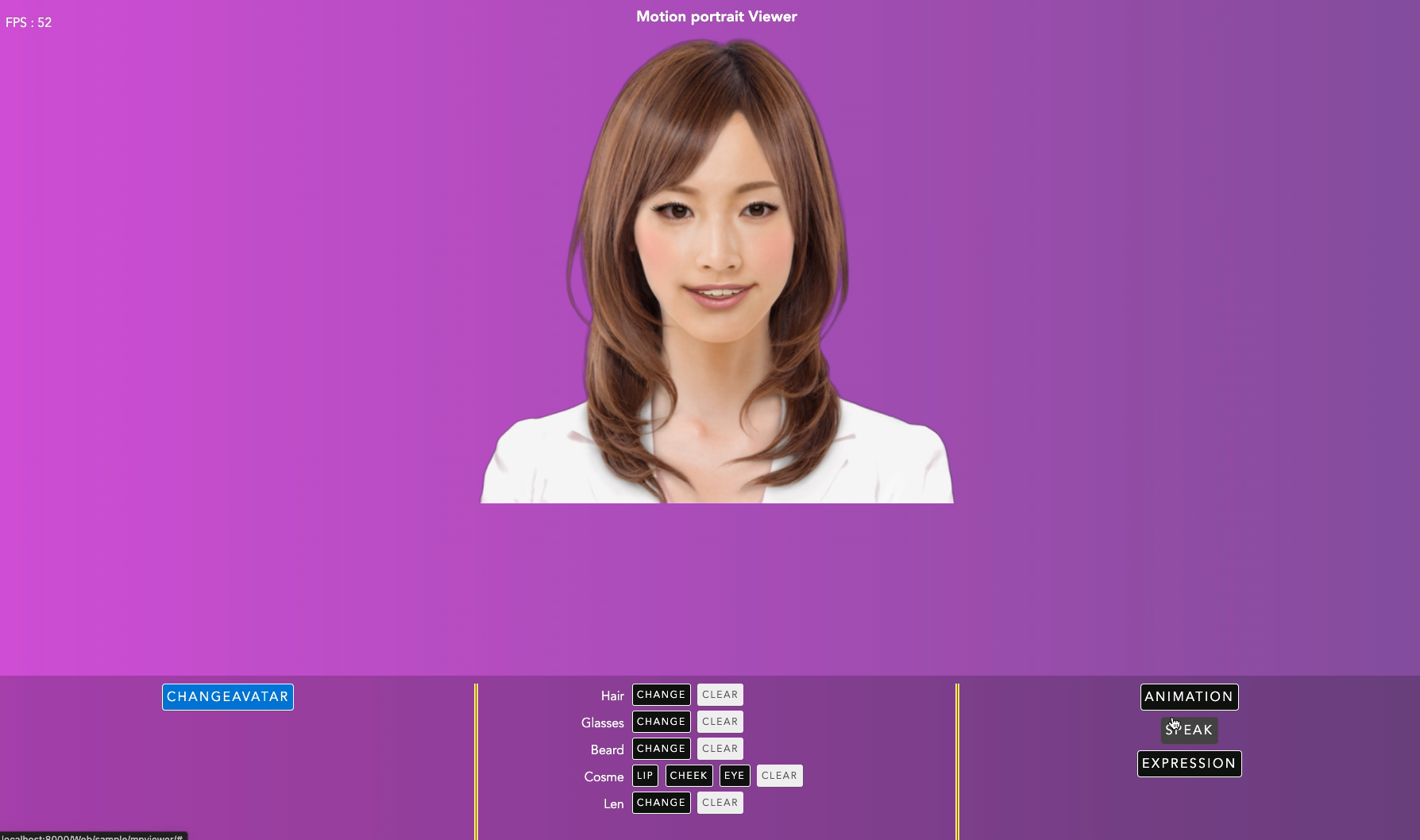
Motion Portraitの実行例
モーションポートレート株式会社モーションポートレート株式会社のホームページ。モーションポートレート技術を紹介しています。www.motionportrait.com
アイリア株式会社では、ailia AI Speechの音声認識、ailia AI Voiceの音声合成、Open AIやailia LLMによる対話生成と合わせて、MotionPortraitを使用することで、一貫したアバターソリューションを提供しています。
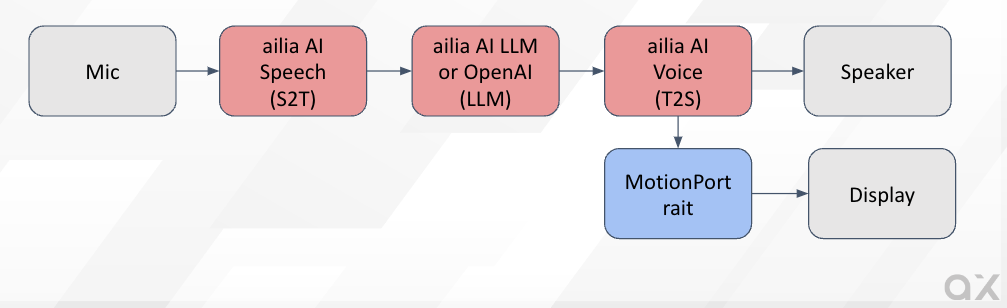
Avatar Solution
MotionPortraitの提供する機能
MotionPortraitは下記の機能を提供します。
・1枚の画像からアバターの生成
・アバターの描画
・アニメーション再生
・表情変化
・リップシンク
・アイテム付加(髪、帽子、眼鏡など)
・化粧
MotionPortraitの使用例
ailia.aiのサイトのチャットボットのアバターに使用しています。右下に、アニメーション可能なアバターを、MotionPortraitを使用して表示しています。ブラウザで非常に軽量に動作します。
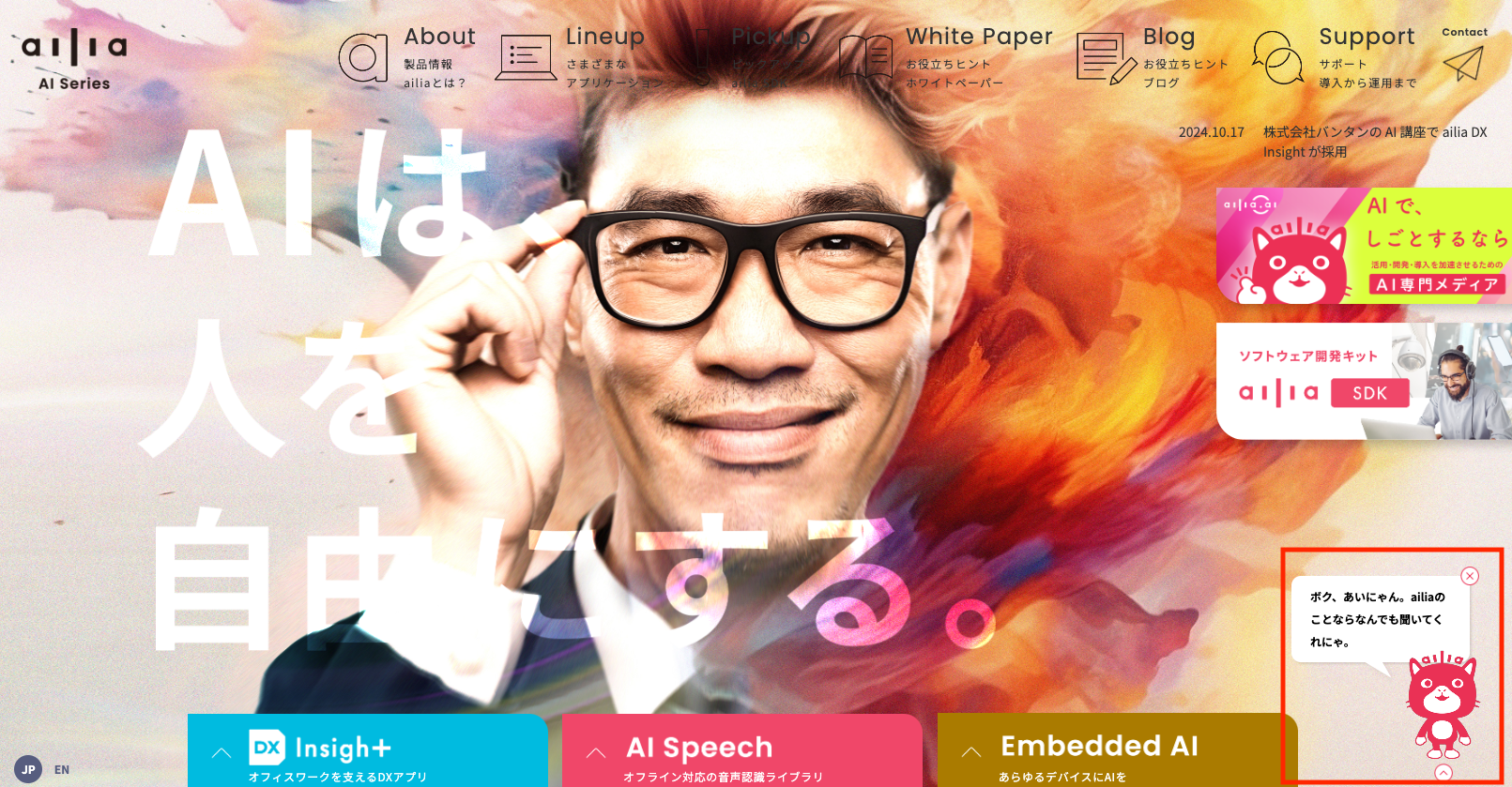
ailia AI Series株式会社アクセルのAI製品サイトです。「AIは、人を自由にする。」を胸に、先進のAI技術を開発・提供する国産のAIトータルソリューションです。世界最速クラスの推論エンジン「ailia SDK(アイリア…ailia.ai
MotionPortraitのトップページでもメガネの試着やバーチャル化粧を含めたテストが可能です。
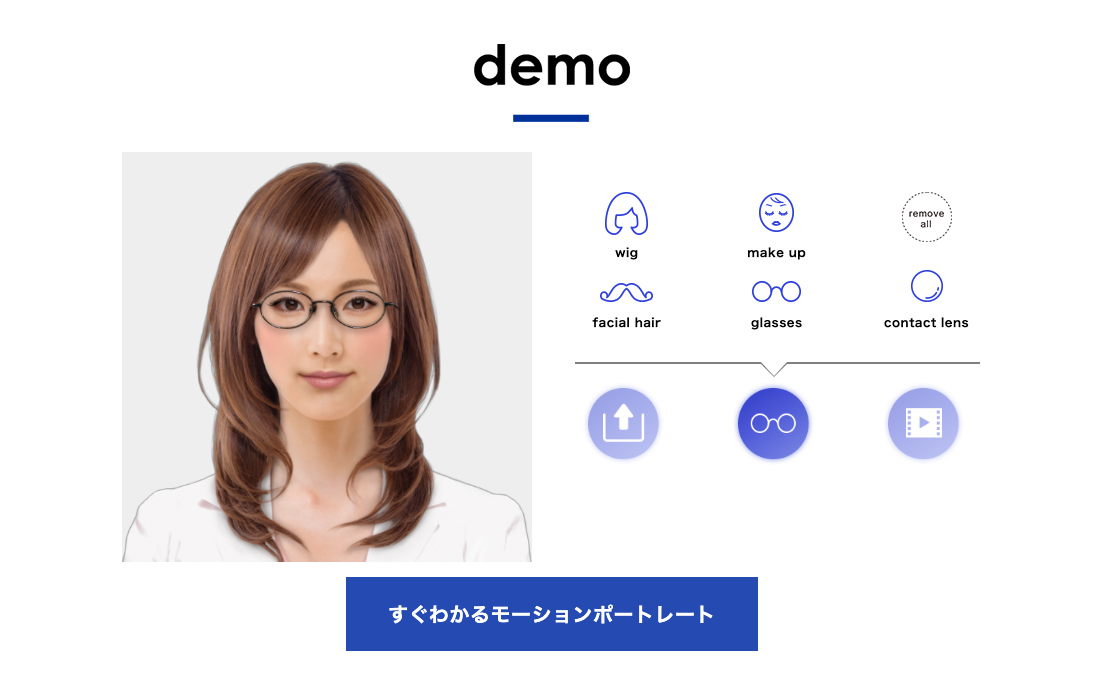
MotionPortraitの採用実績
MotionPortraitは、涼宮ハルヒの憂鬱のPSP版やアプリ版や、神次元ゲイム ネプテューヌのキャラクターアニメーションに採用されています。他、様々なゲームやTV番組で使用されています。
MotionPortraitの使用方法
アバターの生成
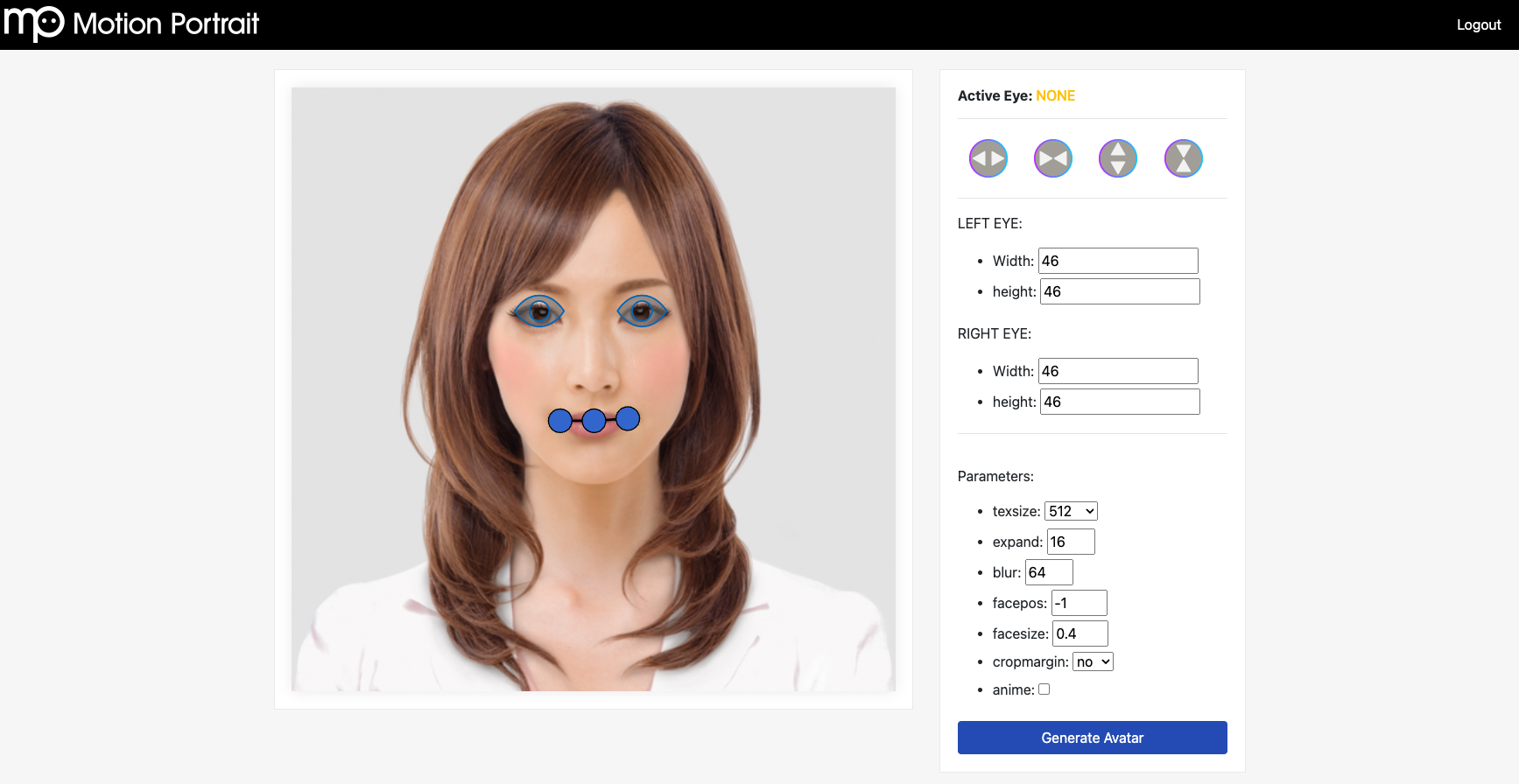
アバターを生成するには、ブラウザ向けのアバター生成ツールを使用します。アバター生成ツールに画像をアップロードするだけで、自動的にアバターを生成可能です。
画像をアップロードすると、特徴点の編集画面になります。人物の場合は自動で特徴点を検出しますので、必要があれば調整してください。また、アバターの解像度をtexsizeで設定可能です。最後に、Generate Avatarを押して、アバターのbinファイルをダウンロードします。
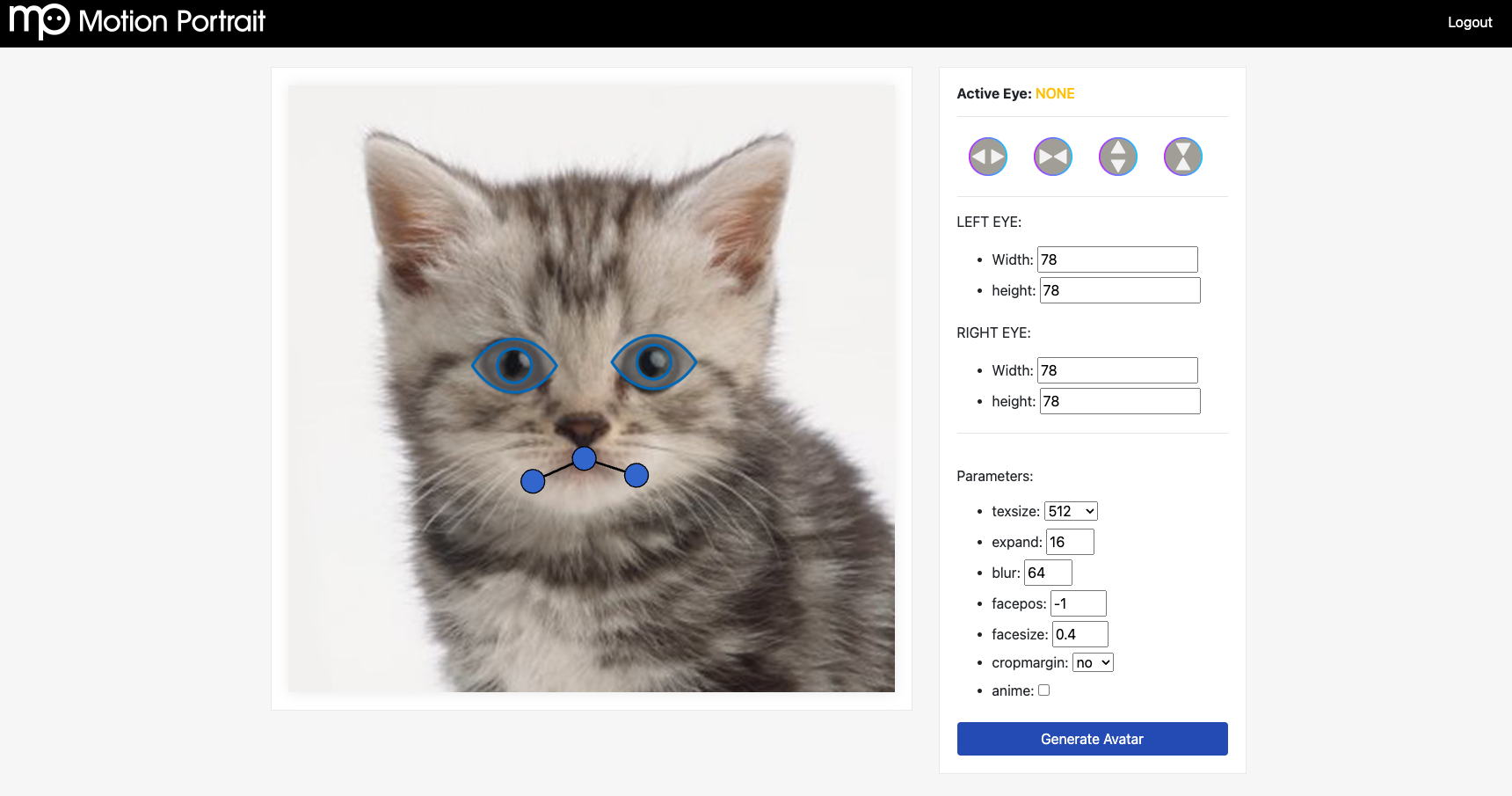
MotionPortraitは動物にも対応しています。動物の場合、特徴点がうまく検出できない場合があるため、その場合、特徴点を手動で調整してください。
注意事項として、アルファ付きのPNGを使用した場合、アルファ値をキャラクターの輪郭として使用します。そのため、アルファ付きで背景が全て255の画像を与えた場合、正方形のキャラクター画像が生成されます。キャラクターの輪郭を自動で推定させたい場合は、JPEGなど、アルファなしの画像を与えてください。また、より高精度なアバターを作成した場合は、アルファチャンネルにキャラクターのマスク値を含めてください。
アバターの利用
アバターを利用するには、Motion Portrait SDKを使用します。
WebGLのサンプル
ブラウザ向けでは、mpsdk/sample.WebGL/で下記のコマンドでWEBサーバを立ち上げます。
python3 -m http.server 8000
アバターのbinファイルは下記に配置します。
mpsdk/sample.WebGL/Web/sample/mpviewer/items/face
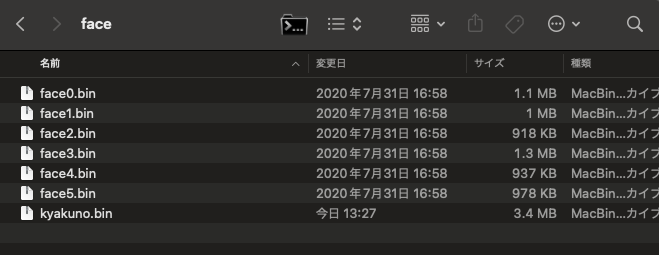
アバターのbinファイルのリストは、js/mp_fileio.jsに追加します。
var faceFiles = ["web_version.bin", "kyakuno.bin", "face0.bin", "face1.bin", "face2.bin", "face3.bin", "face4.bin", "face5.bin"];
ブラウザでアクセスすることで、アニメーションを実行可能です。
実際のコードはmp_demo.jsに記載されています。音声ファイルからのリップシンクも、しゃべらせたいmp3ファイルを指定するだけの、非常に簡単なコードで実装可能です。
function onVoiceStart() {
    if (voiceFiles == undefined || voiceFiles == null || voiceFiles.length <= 0)
        return;
    var typevoice = 2;
    var isPlaying = mpwebgl.instance.isanimplaying(typevoice);
    if (isPlaying == typevoice) {
        mpwebgl.instance.pauseaudio();
        mpwebgl.instance.unloadanimation();
        mpwebgl.instance.destroyvoice();
        return;
    }
    var voiceId = mpwebgl.instance.loadvoice('items/voice/' + voiceFiles[voiceIndex]);
    if (voiceId > 0) {
        if (++voiceIndex == voiceFiles.length)
            voiceIndex = 0;
    }
    else
        console.error("load voice fail");
}
C++のサンプル
ネイティブアプリ向けでは、C++のAPIを提供しています。下記は、アバターをOpenGLを使用してレンダリングするサンプルプログラムです。アバターファイルをMpFaceに読み込み、MpRenderにアバターを設定し、OpenGLの描画ループでDrawを呼び出すことで描画可能です。
#include <OpenGL/gl.h>
#include "mprender.h"
#include "mpface.h"
#include "mpctlanimation.h"
#include "mpctlitem.h"
#include "mpctlspeech.h"
#include "mpcosme.h"

#include <time.h>
#include <sys/timeb.h>
#include <stdio.h>
#include <opencv2/opencv.hpp>

#include <GLUT/GLUT.h>

const GLfloat lightPosition1[4] = {0.0f,3.0f, 5.0f, 1.0f};
const GLfloat green[] = { 0.0, 1.0, 0.0, 1.0 };
const GLfloat lightPosition2[4] = {5.0f,3.0f, 0.0f, 1.0f};
const GLfloat red[] = { 1.0, 0.0, 0.0, 1.0 };

const GLfloat teapotAmbient[4] = {0.3f,0.5f, 0.0f, 1.0f};
const GLfloat teapotDiffuse[4] = {1.0f,1.0f, 0.3f, 1.0f};
const GLfloat teapotSpecular[4] = {1.0f,1.0f, 1.0f, 1.0f};
const GLfloat teapotShininess[4] = {20.0f};

void setup(void) {
   glClearColor(0.0f, 0.0f, 0.0f, 1.0f);
   glEnable(GL_DEPTH_TEST);
   glEnable(GL_LIGHTING);
   glEnable(GL_LIGHT0);
   glEnable(GL_LIGHT1);

   glLightfv(GL_LIGHT0, GL_POSITION, lightPosition1);
   glLightfv(GL_LIGHT0, GL_DIFFUSE, red);
   glLightfv(GL_LIGHT0, GL_SPECULAR, red);
   glLightfv(GL_LIGHT1, GL_POSITION, lightPosition2);
   glLightfv(GL_LIGHT1, GL_DIFFUSE, green);
   glLightfv(GL_LIGHT1, GL_SPECULAR, green);
   glMaterialfv(GL_FRONT, GL_AMBIENT, teapotAmbient);
   glMaterialfv(GL_FRONT, GL_DIFFUSE, teapotDiffuse);
   glMaterialfv(GL_FRONT, GL_SPECULAR, teapotSpecular);
   glMaterialfv(GL_FRONT, GL_SHININESS, teapotShininess);
}

void resize(int width, int height) {
   glViewport(0, 0, width, height);
   glMatrixMode(GL_PROJECTION);
   glLoadIdentity();
   gluPerspective(45.0,
                  (double)width/height,
                  0.1,
                  100.0);
   glMatrixMode(GL_MODELVIEW);
   glLoadIdentity();
   gluLookAt(-0.5, 2.1, 2.0,
             0.0, 0.0, 0.0,
             0.0, 4.0, 0.0);
}

class mpView {
    bool isFaceLoaded_;
    long animStartTime_;

    // MP instance
    motionportrait::MpRender *render_;
    motionportrait::MpFace   *face_;
    motionportrait::MpCosme  *cosme_;

    // MP controller
    motionportrait::MpCtlAnimation *ctlAnim_;

    motionportrait::MpCtlSpeech    *ctlSpeech_;
    motionportrait::MpCtlSpeech::VoiceId voice_;
    motionportrait::MpCtlItem      *ctlGlasses_;
    motionportrait::MpCtlItem::ItemId glasses_;
    motionportrait::MpCtlItem      *ctlHair_;
    motionportrait::MpCtlItem::ItemId hair_;

    //NSMutableArray *beardID_;

    // cosme ID
    motionportrait::MpCosme::CosmeId cosmeIdEye_;
    motionportrait::MpCosme::CosmeId cosmeIdCheek_;
    motionportrait::MpCosme::CosmeId cosmeIdLip_;

    motionportrait::MpCtlAnimation::AnimDataId animData_;

    motionportrait::mpVector2 eyesCenter_;

public:

bool initMPRenderer(void) {

    // MpRender::Init() must be called before any MP functions
    render_ = new motionportrait::MpRender();
    render_->Init();

    int width = 640;
    motionportrait::mpRect viewport = {0, 0, width, width};
    render_->SetViewport(viewport);

    // initialize MpFace instance
    face_ = new motionportrait::MpFace();

    // init cosme
    cosme_ = new motionportrait::MpCosme();
    cosmeIdEye_ = NULL;
    cosmeIdCheek_ = NULL;
    cosmeIdLip_ = NULL;

    // get controllers
    ctlSpeech_ = face_->GetCtlSpeech();
    ctlAnim_ = face_->GetCtlAnimation();
    ctlGlasses_ = face_->GetCtlItem(motionportrait::MpFace::ITEM_TYPE_GLASSES);
    ctlHair_ = face_->GetCtlItem(motionportrait::MpFace::ITEM_TYPE_HAIR);

    return true;
}

bool loadFace(const char *face) {
    if (face_->Load(face)) {
        printf("can't load specied face");
        return false;
    }

    // set face to renderer
    render_->SetFace(face_);

    // set neck rotation parameters
    motionportrait::MpCtlAnimation *anim = face_->GetCtlAnimation();
    anim->SetParamf(motionportrait::MpCtlAnimation::NECK_X_MAX_ROT, 2.0f);
    anim->SetParamf(motionportrait::MpCtlAnimation::NECK_Y_MAX_ROT, 2.0f);
    anim->SetParamf(motionportrait::MpCtlAnimation::NECK_Z_MAX_ROT, 0.3f);

    // calculate eyes center position
    motionportrait::MpFace::PartsPosition partsPos;
    motionportrait::MpFace::GetPartsPosition(face, partsPos);
    eyesCenter_.x = (partsPos.eyeLeft.x + partsPos.eyeRight.x) / 2;
    eyesCenter_.y = (partsPos.eyeLeft.y + partsPos.eyeRight.y) / 2;

    return true;
}

bool startAnimation(const char *animation) {
    stopAnimation();
    animData_ = ctlAnim_->CreateAnimation(animation);
    if (animData_) {
        animStartTime_ = getmsec();
        return true;
    } else {
        return false;
    }
}

void stopAnimation(void) {
    if (animData_) {
        ctlAnim_->DestroyAnimation(animData_);
        animData_ = 0;
    }
}

void drawBackground(bool draw) {
    render_->EnableDrawBackground(draw);
}

void setBackgroundColor(float red, float green, float blue, float alpha) {
    //[glContext_ makeCurrentContext];
    glClearColor(red, green, blue, alpha);
}

void lookAt(float x, float y, float time) {
    motionportrait::mpVector2 pos = {x - eyesCenter_.x + 0.5f, y - eyesCenter_.y + 0.5f};
    ctlAnim_->LookAt(time, pos, 1.0f);
}

 void drawRect(void) {
    // update unconcious animation
    long cTime = getmsec();
    motionportrait::MpCtlAnimation *anim = face_->GetCtlAnimation();
    anim->Update(cTime);

    if (animData_) {
        // play animation file
        int playing = ctlAnim_->AnimateData(animStartTime_, cTime, animData_);
        if (playing == 0) {
            // clean up after animation finish
            stopAnimation();
        }
    }

    // render
    glClear(GL_COLOR_BUFFER_BIT);
    render_->Draw();
    glFlush();
}

long getmsec(void) {
    static bool first = true;
    static double start;
    double now;
    struct timeb time;

    ftime(&time);
    now = (double)time.time * 1000 + time.millitm;
    if (first) {
        start = now;
        first = false;
    }
    return (long)(now - start);
}

};

mpView* mpView_ = NULL;
float t = 0.0f;

void draw(void) {
   glClear(GL_COLOR_BUFFER_BIT | GL_DEPTH_BUFFER_BIT);
   glutSolidTeapot(0.5 + t);
   if (mpView_ != NULL){
    mpView_->drawRect();
   }
   t = t + 0.01f;
   glFlush();
   glutPostRedisplay();
}

int main(int argc, char ** argv) {
    glutInit(&argc, argv);
    glutInitWindowSize(600,600);
    glutInitDisplayMode(GLUT_SINGLE | GLUT_RGBA | GLUT_DEPTH);
    glutCreateWindow("Wire_teapot");
    glutReshapeFunc(resize);
    glutDisplayFunc(draw);

    mpView_ = new mpView();

    mpView_->initMPRenderer();

    mpView_->drawBackground(false);
    mpView_->setBackgroundColor(0.5f, 0.5f, 0.5f, 1.0f);
    bool status = mpView_->loadFace("items/face.bin");
    if (!status){
        return -1;
    }

    status = mpView_->startAnimation("anim0/anim.ani2");
    if (!status){
        return -1;
    }

    mpView_->lookAt(-0.5f, 0.0f, 1.0f);

    setup();

    glutMainLoop();

    return 0;
}
MotionPortraitの評価版のお問い合わせ
MotionPortraitの変換ツールとSDKの入手方法は、下記からお問い合わせください。
製品サービスに関するお問い合わせEdit descriptionwww.ailia.ai
評価版の提供物は下記となります。
- WEB版のアバター生成ツールのアカウント
- 各プラットフォーム向けのSDK(mpsdk.zip)
まとめ
MotionPortraitを使用することで、非常に簡単に、LLMと連携したアバターアプリを開発することが可能です。ぜひ、ご検討ください。
アイリア株式会社はAIを実用化する会社として、クロスプラットフォームでGPUを使用した高速な推論を行うことができるailia SDKを開発しています。アイリア株式会社ではコンサルティングからモデル作成、SDKの提供、AIを利用したアプリ・システム開発、サポートまで、 AIに関するトータルソリューションを提供していますのでお気軽にお問い合わせください。
AIで、しごとするなら『ailia.ai(アイリア ドット エーアイ)』は、AIの開発を行う企業、株式会社アクセルおよびアイリア株式会社が展開するAI専門メディアです。ビジネスやライフスタイルを取り巻く最新のAI関連製品やサービスを深く読み解くとともに、ailiaブランドが展開する最新のサービスや、AIの活用・開発・導入を加速させるための情報を幅広く網羅。
近い未来、AIが私たちにもたらすであろう“本質的な自由“について、さまざまな角度から情報を発信します。