 ailia Tech BLOG
Use AI Models Trained in Pytorch on iOS and Android
This article explains how to use AI models trained with Pytorch on iOS and Android using the ailia SDK.
Challenges of AI models on edge devices
Using an AI model that has been trained on a PC using Pytorch can present some challenges to use it on edge devices such as iPhone or Android, challenges that ailia SDK can help solving.
Platform-specific frameworks
iOS devices usually run AI models using CoreML provided by Apple, while Android developers usually choose TensorFlowLite. Different APIs must be used for each platform and must be optimized for each.
ailia SDK is a unified framework that can run inference on Windows, macOS, Linux, iOS, and Android with a common API.
Platform-specific languages
ObjectiveC or Swift must be used for iOS, and Java or Kotlin for Android, while ailia SDK is compatible with the Unity game engine and can be interacted with in C#, that can then be executed on both iOS and Android devices.
Model conversion errors
When porting from Pytorch to a different framework, model conversion errors may occur. AI models have become increasingly complex in recent years, and are particularly prone to problems when using 5D tensors or in cases where the tensor shapes change dynamically from frame to frame.
With ailia SDK, common ONNX models can be used on PCs and smartphones without the need for model conversion. Therefore, if the model is confirmed to work on a PC, it is guaranteed to run on iOS and Android as is, without suffering from model conversion errors.
GPU not available
The GPU delegate in TensorFlowLite has only a few supported layers, and as a result, GPUs often cannot be used efficiently on Android.
With ailia SDK, GPU inference is available in Vulkan for Android, and Metal is available for iOS as well as CoreML.
Development flow using ailia SDK
After converting the Pytorch model to ONNX, you can start using it directly in Python to confirm that the inference is working properly. The next step is to use this same model in Unity and run the application on smartphones.
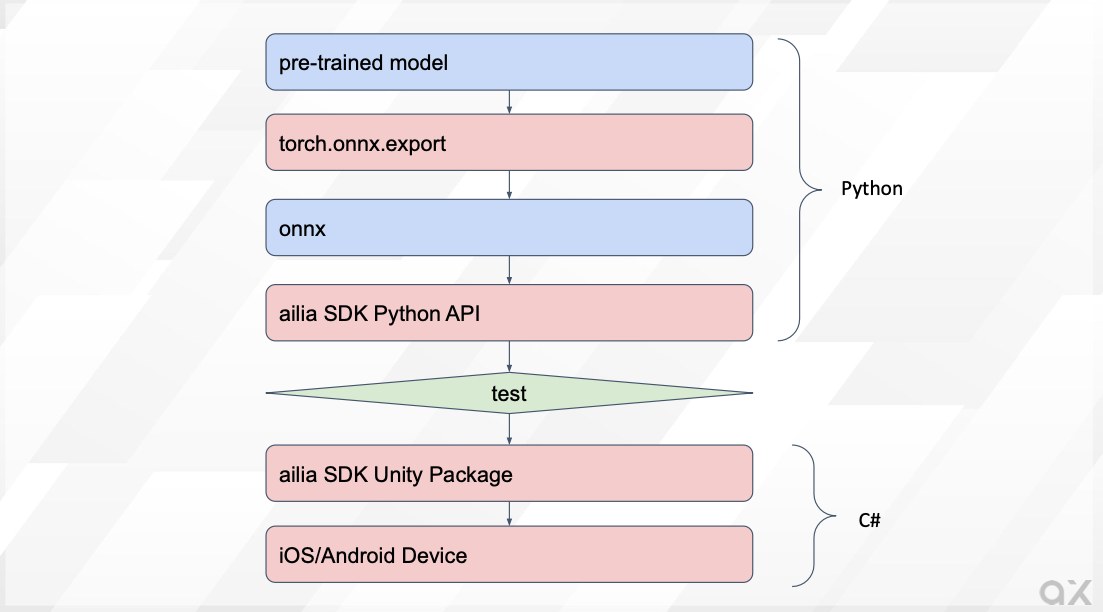
ailia SDK development flow
Convert Pytorch models to ONNX
Since ailia SDK uses the ONNX format, first convert the Pytorch model to ONNX using torch.onnx.export.
When the input has a fixed shape, it is possible to output ONNX by calling export with the torch model, argumentmodel in the command below, and the input tensor, indicated by x, as arguments.
torch.onnx.export(model, x, 'output.onnx', verbose=False, opset_version=11)
If the shape of the input is specified dynamically, use dynamic_axes. In this example, two variables, x1 and x2, are used as inputs, with axis0 and axis3 of x1 being variable.
torch.onnx.export(model, (x1, x2), 'output.onnx', verbose=False, opset_version=11, input_names=["input1", "input2"], dynamic_axes={"input1": {0: "batch_size", 3:"samples"}})
Inference from ONNX
The exported ONNX model can be tested using ONNX Runtime or ailia SDK.
With ONNX Runtime:
import onnxruntime
model = onnxruntime.InferenceSession("input.onnx")
output = model.run(None, {"input1":tensor.numpy()})[0]
output = torch.from_numpy(output.astype(np.float32)).clone()
With ailia SDK
import ailia
model = ailia.Net(None, "input.onnx")
output = model.run({"input1":tensor.numpy()})[0]
output = torch.from_numpy(output.astype(np.float32)).clone()
ailia SDK can be downloaded from the link below:
The Python environment to run ailia SDK can be easily setup with the following command:
cd ailia_sdk/python
python3 bootstrap.py
pip3 install .
If the test above did not reveal any issue, move on to device implementation.
Inference from Unity
Import the Unity Package of ailia SDK into Unity. Place the converted ONNX files in the StreamingAsstes folder. An example inference code is shown below:
float [] infer(float [] input1){
    // Open model file
    AiliaModel model=new AiliaModel();
#if UNITY_ANDROID
    model.OpenFile(null,Application.temporaryCachePath+"/input.onnx");
#else
    model.OpenFile(null,Application.streamingAssetsPath+"/input.onnx");
#endif

    // Set input
    Ailia.AILIAShape shape=new Ailia.AILIAShape();
    shape.x=input1.Length;
    shape.y=1;
    shape.z=1;
    shape.w=1;
    shape.dim=4;
    model.SetInputBlobShape(shape, model.FindBlobIndexByName("input1"));
    model.SetInputBlobData(input1, model.FindBlobIndexByName("input1"));

    // Infer
    model.Update();

    // Get output
    Ailia.AILIAShape output_shape=model.GetOutputShape();
    float [] output=new float[output_shape.x * output_shape.y * output_shape.z * output_shape.w];
    model.GetBlobData(output,(int)model.GetOutputBlobList()[0]);
    model.Close();
    return output;
}
For Android, copy the StreamingAssets file to temporaryCachePath since it is not directly accessible.
private void CopyModelToTemporaryCachePath (string file_name)
{
#if UNITY_ANDROID && !UNITY_EDITOR
    string prefix="";
#else
    string prefix="file://";
#endif

    string path = prefix+Application.streamingAssetsPath + "/" + file_name;
    string toPath = Application.temporaryCachePath + "/" + file_name;

    Debug.Log("Copy "+path+" to "+toPath);

    if (System.IO.File.Exists(toPath) == true)
    {
        FileInfo fileInfo = new System.IO.FileInfo(toPath);
        if (fileInfo.Length != 0)
        {
            Debug.Log("Already exists : " + toPath + " " + fileInfo.Length);
            return;
        }
    }

    WWW www = new WWW(path);
    while (!www.isDone)
    {
        // NOP.
    }
    File.WriteAllBytes(toPath, www.bytes);
}
Finally deploy this Unity program to your smartphone for final testing.
ailia SDK support libraries
Overview
Pytorch models can be used with ailia SDK using the above procedure, however some features such as torch_audio, tokenizer of Transformers may be used, and those are only accessible from Python. This is where ailia SDK support libraries can help.
ailia.audio
This library is equivalent to torch_audio and librosa. It supports mel-spectrum conversion of audio, etc.
ailia.tokenizer
This library is equivalent to tokenizer of Transformers. It can convert text into Japanese BERT tokens, etc.
ailia Tokenizer : NLP Tokenizer for Unity and C++Introducing ailia Tokenizer, a tokenizer for NLP that can be used from Unity or C++, without the need for an Python…medium.com
Conclusion
By using ailia SDK and its support libraries, models trained with Pytorch can be easily run on edge devices. ailia Inc. can assist you for any issues you might encounter. Feel free to contact us for any inquiry.
ailia Inc. has developed ailia SDK, which enables cross-platform, GPU-based rapid inference.
ailia Inc. provides a wide range of services from consulting and model creation, to the development of AI-based applications and SDKs. Feel free to contact us for any inquiry.