 ailia Tech BLOG
ST-GCN : A Machine Learning Model for Detecting Human Actions from Skeletons
This is an introduction to「ST-GCN」, a machine learning model that can be used with ailia SDK. You can easily use this model to create AI applications using ailia SDK as well as many other ready-to-use ailia MODELS.
Overview
ST-GCN (Spatial-Temporal Graph Convolutional Networks) is a machine learning model that detects human actions based on skeletal information obtained from OpenPose and other sources proposed in January 2018.
It is trained on NTU RGB-D or Kinetics datasets and can detect the following 60 categories of actions.
The dataset consists of 60 labelled actions. Specifically: drink water, eat meal/snack, brushing teeth, brushing hair, drop, pickup, throw, sitting down, standing up (from sitting position), clapping, reading, writing, tear up paper, wear jacket, take off jacket, wear a shoe, take off a shoe, wear on glasses, take off glasses, put on a hat/cap, take off a hat/cap, cheer up, hand waving, kicking something, put something inside pocket / take out something from pocket, hopping (one foot jumping), jump up, make a phone call/answer phone, playing with phone/tablet, typing on a keyboard, pointing to something with finger, taking a selfie, check time (from watch), rub two hands together, nod head/bow, shake head, wipe face, salute, put the palms together, cross hands in front (say stop), sneeze/cough, staggering, falling, touch head (headache), touch chest (stomachache/heart pain), touch back (backache), touch neck (neckache), nausea or vomiting condition, use a fan (with hand or paper)/feeling warm, punching/slapping other person, kicking other person, pushing other person, pat on back of other person, point finger at the other person, hugging other person, giving something to other person, touch other person’s pocket, handshaking, walking towards each other and walking apart from each other.
ST-GCN input and output
ST-GCN input is formatted as (1, 3, 300, 18, 2), which corresponds to (batch, channel, frame, joint, person). channel=0 is the x-coordinate of the joint normalized within than range [-0.5, 0.5], channel=1 is the corresponding y-coordinate, channel=2 is the confidence value, joint is the joint index in the skeleton, and person is person index.
The output will be the confidence value of (batch,class,output_frame,joint,person). To detect an action, sum up the confidence values for each class and select the class with the highest value. output_frame will be the number of input frames divided by 4.
voting_label = output.sum(axis=3).sum(axis=2).sum(axis=1).argmax(axis=0)
The features output is only used to visualize which keypoints have contributed to the detected action.
Architecture
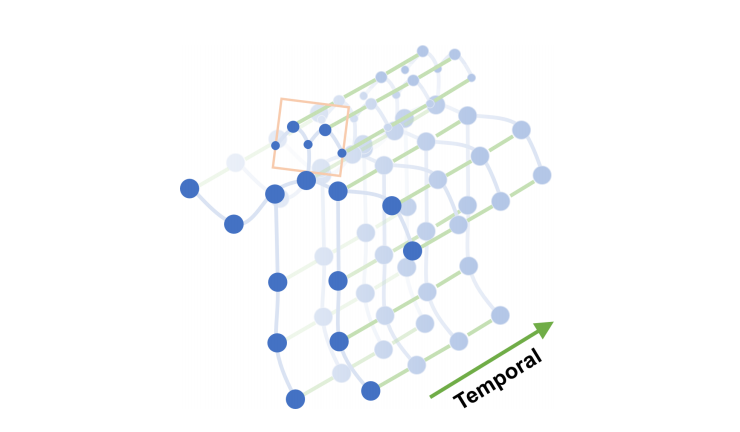
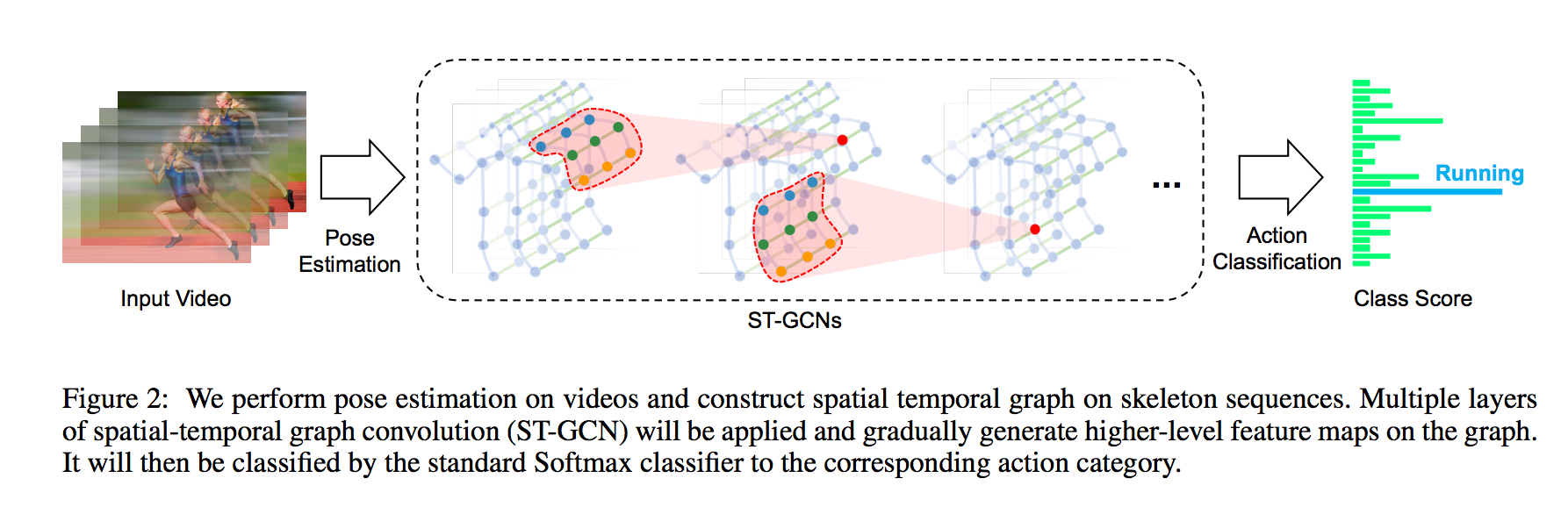
ST-GCN uses graph convolution to estimate actions from the spatial temporal graph of a skeleton sequence.
Source: https://arxiv.org/pdf/1801.07455.pdf
Blue dots denote the body joints and blue edges between body joints defines natural connections in human bodies.
Source: https://arxiv.org/pdf/1801.07455.pdf
Graph convolution performs convolutions based on the connection information between nodes. If node B and node C are connected to node A, it performs convolution on the values of A, B, and C. This makes it possible to apply machine learning to the vertex information of 3D models. Graph convolution is a higher level concept of conventional convolution, and when nodes are connected in a mesh, the operation is equivalent to conventional convolution.
Compared to the conventional 3D convolution for action detection, ST-GCN is much faster because it can estimate actions based on skeletal information only. Also, rather than simply applying 2D convolution to the skeletal information alone, graph convolution also takes into account the relationship between key points of the skeleton, resulting in higher accuracy.
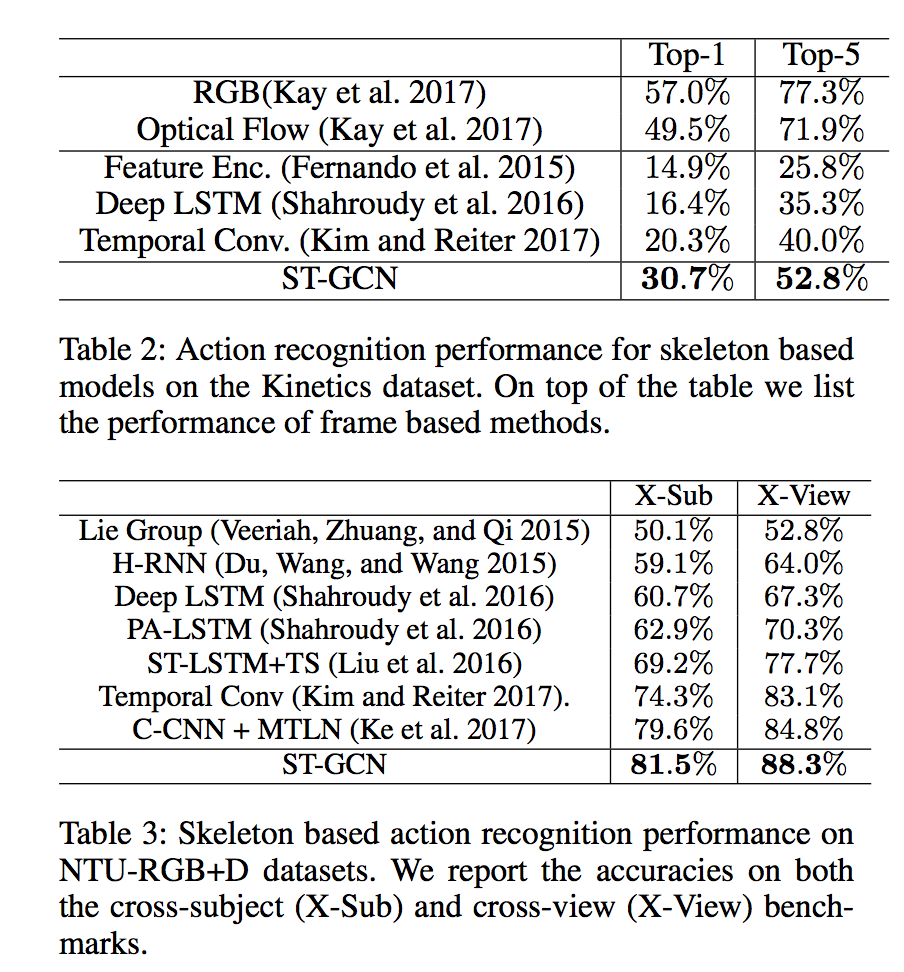
ST-GCN takes a 5-dimension input (batch,channel,frame,joint,person). Applied to the NTU-RGB+D datasets it represents a (1,3,300,18,2) input and performs as shown in the table below.
Source: https://arxiv.org/pdf/1801.07455.pdf
The current state-of-the-art action detection models are listed in the link below.
ST-GCN needs to handle tensors in 5 dimensions even during inference, therefore it requires a framework that supports 5D tensors. It also uses the einsum operator, which requires the use of ONNX opset=12 or a rewrite using supported operators. See details about ONNX export in the dedicated section below.
Training datasets
ST-GCN has been trained using 3D skeletons from NTU-RGB+D (5.8GB) and skeletons extracted using OpenPose from the Kinetics action video dataset (7.5GB).
The data and labels to be used for training are specified in the yaml file below.
Training on your own dataset
The kinetics_train folder contains json data containing the pose keypoints. If you want to train on your own data set, create a file equivalent to this json file according to the following format.
{“data”: [{“frame_index”: 1, “skeleton”: [{“pose”: [0.518, 0.139, 0.442, 0.272, 0.399, 0.288, 0.315, 0.400, 0.350, 0.549, 0.487, 0.264, 0.507, 0.356, 0.548, 0.408, 0.413, 0.584, 0.401, 0.785, 0.383, 0.943, 0.497, 0.582, 0.485, 0.750, 0.479, 0.908, 0.514, 0.119, 0.000, 0.000, 0.483, 0.128, 0.000, 0.000], “score”: [0.305, 0.645, 0.647, 0.865, 0.841, 0.505, 0.361, 0.726, 0.487, 0.708, 0.546, 0.575, 0.695, 0.713, 0.343, 0.000, 0.395, 0.000]}]}, {“frame_index”: 2, “skeleton”: [{“pose”: [0.516, 0.155, 0.438, 0.272, 0.395, 0.288, 0.315, 0.405, 0.352, 0.552, 0.483, 0.261, 0.505, 0.351, 0.548, 0.416, 0.413, 0.590, 0.401, 0.791, 0.383, 0.946, 0.499, 0.587, 0.487, 0.750, 0.481, 0.910, 0.516, 0.136, 0.000, 0.000, 0.495, 0.141, 0.000, 0.000], “score”: [0.249, 0.678, 0.624, 0.838, 0.858, 0.506, 0.293, 0.706, 0.471, 0.728, 0.567, 0.566, 0.665, 0.719, 0.367, 0.000, 0.593, 0.000]}]}, …, “label”: “jumping into pool”, “label_index”: 172}
The pose of the skeleton contains 18 keypoints in xyxy order. score contains the confidence values. skeleton is an array to handle the case where the video contains several people. frame_index should start from 1. Note that data must be less than 300 frames.
The label information can be found in kinetics_train_label.json, in the format described below. The key is the file name from where it will read the pose information as described above. label_index starts from 0.
“ — -QUuC4vJs”: {
“has_skeleton”: true,
“label”: “testifying”,
“label_index”: 354
},
“ — 3ouPhoy2A”: {
“has_skeleton”: true,
“label”: “eating spaghetti”,
“label_index”: 116
},
Before training, generate the npy file from the above json.
$ python3 tools/kinetics_gendata.py — data_path /dataset/kinetics-skeleton — out_folder /dataset/kinetics-skeleton
Then run the training command below.
$ python3 main.py recognition -c ../train_kinetics.yaml — use_gpu False
Since drop_last=True is specified in the DataLoader during training, Loss becomes NaN when the amount of data is small. In that case, set batch_size to 1 in the configuration yaml file.
Export to ONNX
You need to replace the einsum operator in net/utils/tgcn.py
#x = torch.einsum(‘nkctv,kvw->nctw’, (x, A))
x = x.permute(0, 2, 3, 1, 4).contiguous()
n, c, t, k, v = x.size()
k, v, w = A.size()
x = x.view(n * c * t, k * v)
A = A.view(k * v, w)
x = torch.mm(x, A)
x = x.view(n, c, t, w)
If the error RuntimeError: Failed to export an ONNX attribute ‘onnx::Gather’, since it’s not constant, please try to make things (e.g., kernel size) static if possible still occurs, you also need to alter st_gcn.py as shown below.
#x = F.avg_pool2d(x, x.size()[2:])
x = F.avg_pool2d(x, (75,18))
After making the above changes, the following code performs the export.
self.model.eval()
class ExportStgcnModel(torch.nn.Module):
def __init__(self, model):
super(ExportStgcnModel, self).__init__()
self.model = model
def forward(self, x):
return self.model.extract_feature(x)from torch.autograd import Variable
x = Variable(torch.randn(1, 3, 300, 18, 2)) # (1, channel, frame, joint, person)
output = self.model(x)
export_model = ExportStgcnModel(self.model)
torch.onnx.export(export_model, x, ‘st-gcn_pytorch.onnx’, verbose=True, opset_version=10)
torch 1.5.0 must be used for the export because the following error occurs intorch 1.6.0 caused by the internal optimization process.
# File “/usr/local/lib/python3.7/site-packages/torch/onnx/utils.py”, line 409, in _model_to_graph
#_export_onnx_opset_version)
#RuntimeError: expected 1 dims but tensor has 2
Usage
The following command can be used to perform the OpenPose skeleton detection followed by the ST-GCN action detection with ailia SDK.
$ python3 st-gcn.py -v 0
ailia Inc. has developed ailia SDK, which enables cross-platform, GPU-based rapid inference.
ailia Inc. provides a wide range of services from consulting and model creation, to the development of AI-based applications and SDKs. Feel free to contact us for any inquiry.