 ailia Tech BLOG
SegmentAnything2: Segmentation Model for Arbitrary Objects in Videos
This is an introduction to「SegmentAnything2」, a machine learning model that can be used with ailia SDK. You can easily use this model to create AI applications using ailia SDK as well as many other ready-to-use ailia MODELS.
Overview
SegmentAnything2 is a new version of the segmentation model developed by Meta and released in July 2024. Compared to SegmentAnything (see our past article on the topic here), which was released in April 2023, it offers improved accuracy and can now also be applied to videos.
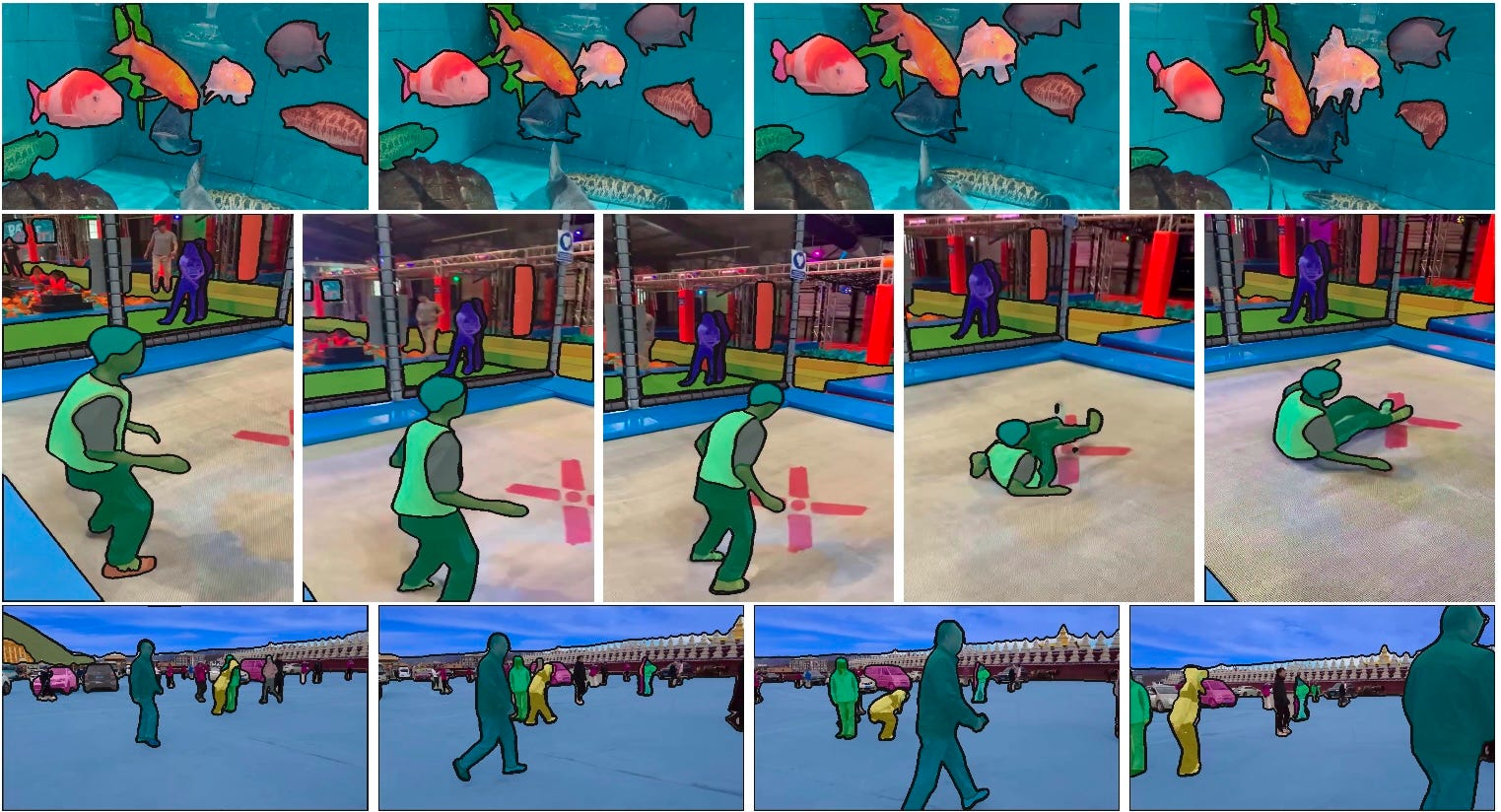
Source: https://github.com/facebookresearch/segment-anything-2
Architecture
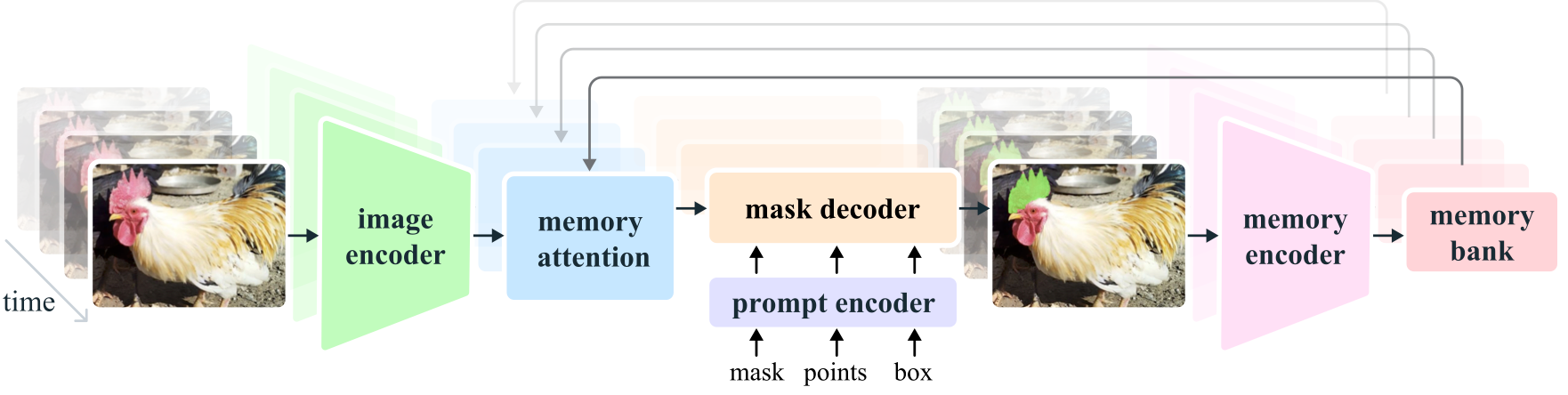
The following is the architecture of SegmentAnything2. In still image mode, after embedding the image using the image encoder, the prompt is vectorized by the prompt encoder, and the mask decoder generates the mask image. The segmentation area can be specified using a mask, points, or a box.
Source: https://github.com/facebookresearch/segment-anything-2
In video mode, the embedding of the current frame is corrected using memory attention based on the embeddings of past and future frames. Additionally, after segmenting the video in step 1, it supports a process in step 2 where key points are added to improve areas that were not successfully segmented.
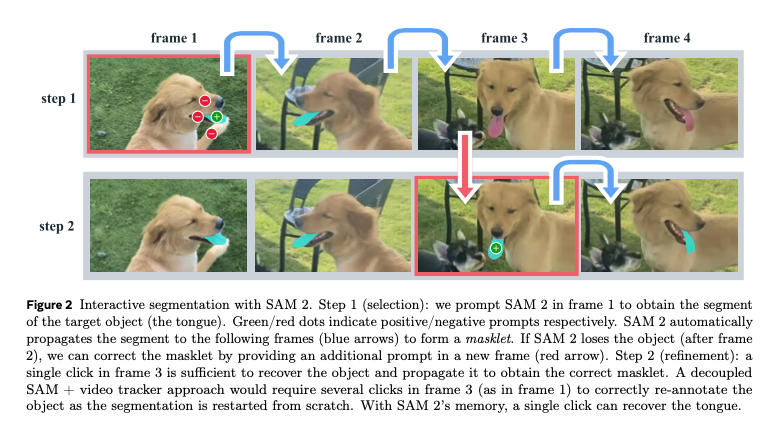
Source: https://ai.meta.com/research/publications/sam-2-segment-anything-in-images-and-videos/
Below is the architecture of the first version of SegmentAnything1 for comparison. Apart from the addition of memory attention and a memory encoder for videos, its structure is quite similar. It is worth noting that in SegmentAnything2, text input, which was theoretically supported in the first version, is no longer supported. However, even in SegmentAnything1, the text implementation was never publicly released.
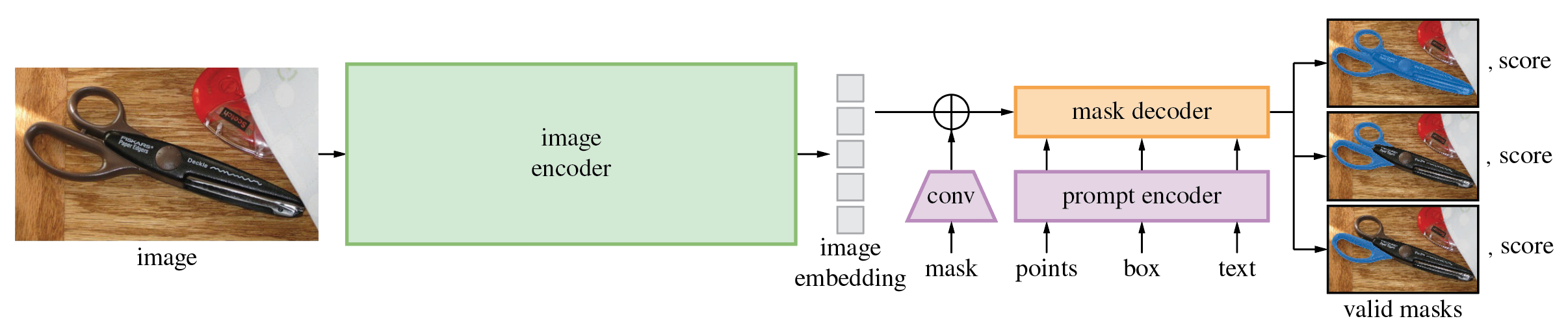
Source: https://github.com/facebookresearch/segment-anything
The image encoder in SegmentAnything1 used ViT, while SegmentAnything2 uses Hiera. Hiera is a hierarchical Vision Transformer (ViT) developed by Meta. In ViT, the spatial resolution remains constant throughout the network. However, in the early layers, not many feature representations are needed, and conversely, in the later layers, high spatial resolution isn’t as necessary, making it inefficient. In contrast, Hiera employs an architecture that progressively reduces spatial resolution, similar to ResNet.
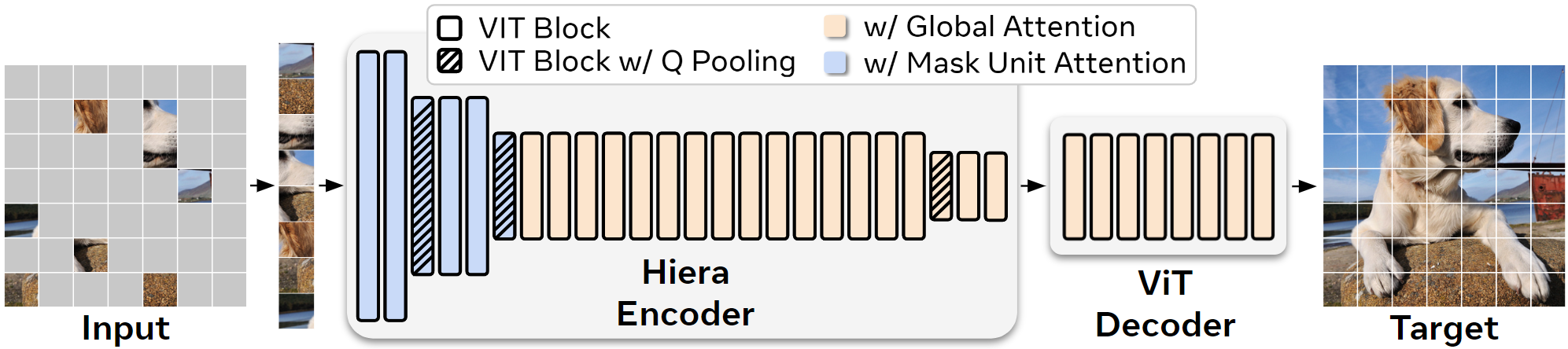
Hiera architecture (Source: https://github.com/facebookresearch/hiera)
Hiera enables faster inference compared to ViT. As a result, SegmentAnything2 can perform inference more quickly than SegmentAnything1.
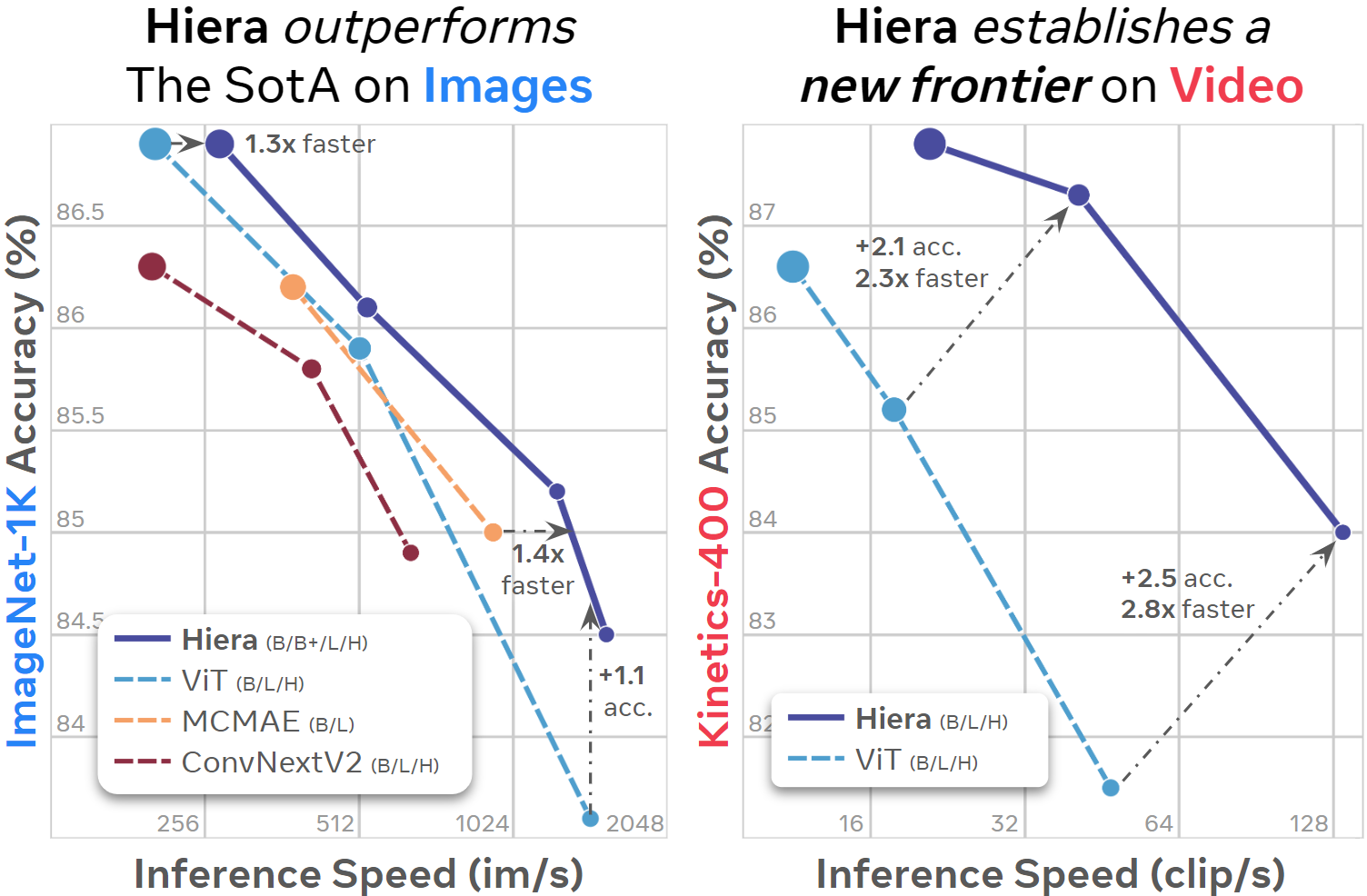
Hiera benchmark ( Source: https://github.com/facebookresearch/hiera)
Dataset
SegmentAnything2 uses a video dataset called SA-V, which was created specifically for it. This dataset consists of 50.9K videos and 642.6K masks.
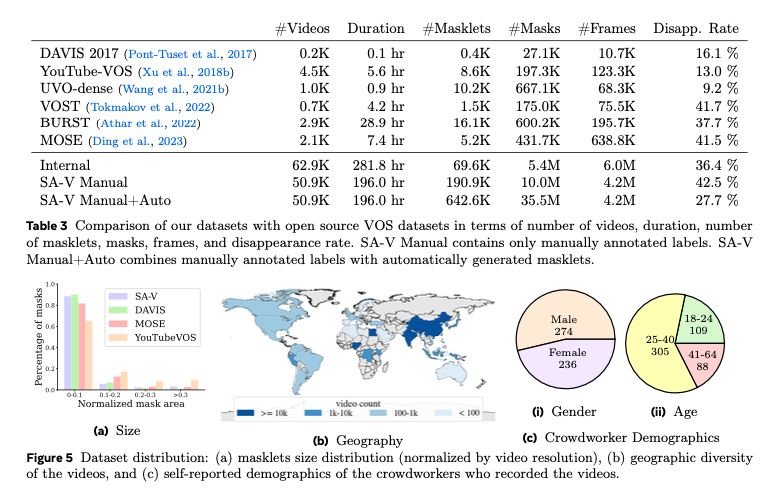
Dataset comparison(Source: https://ai.meta.com/research/publications/sam-2-segment-anything-in-images-and-videos/)
SegmentAnything1 was trained using the SA-1B dataset, which contains 11 million still images and 1 billion masks. In contrast, SegmentAnything2 is trained using a mix of both the SA-1B and SA-V datasets.
Precision
In still image mode, SegmentAnything2 is more accurate and faster than SegmentAnything1. The row “our mix” in the table below shows that by training with a combination of the SA-1B and SA-V datasets, the accuracy has improved.
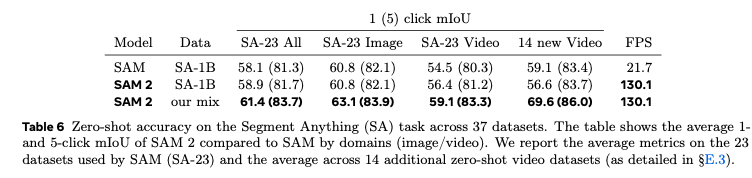
Source: https://ai.meta.com/research/publications/sam-2-segment-anything-in-images-and-videos/
In video mode, SegmentAnything2 delivers the highest performance in video segmentation tasks comapred to other models.
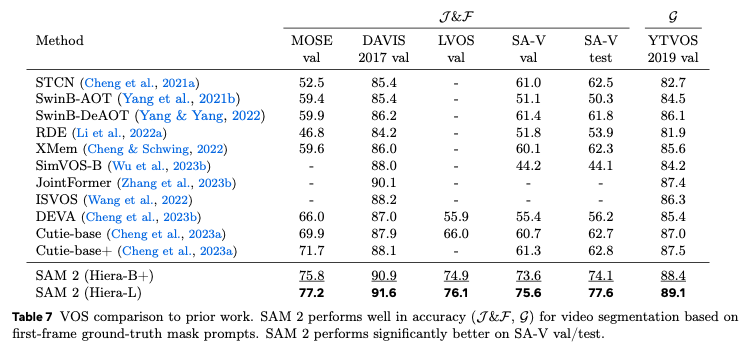
Source: https://ai.meta.com/research/publications/sam-2-segment-anything-in-images-and-videos/
On still images
In the Image Encoder, the input image is preprocessed in sam2/utils/transforms.py, using RGB order, and is normalized with mean = [0.485, 0.456, 0.406] and std = [0.229, 0.224, 0.225]. The size of the image to be processed is 1024x1024. The aspect ratio is NOT preserved during resizing. The shape of the transformed input image becomes (1, 3, 1024, 1024).
The output of the Image Encoder consists of vision_features (features from the final layer), vision_pos_enc (three layers including the final one), and backbone_fpn (features including three layers from the final one, where the final layer is equivalent to vision_features). This data is passed through post-processing in _prepare_backbone_features to be converted into embeddings across three layers. The upper layers are called high_res_feats, and the lower layer is called image_embed. The shapes are as follows: high_res_feats = [(1, 32, 256, 256), (1, 64, 128, 128)], and image_embed = (1, 256, 64, 64)
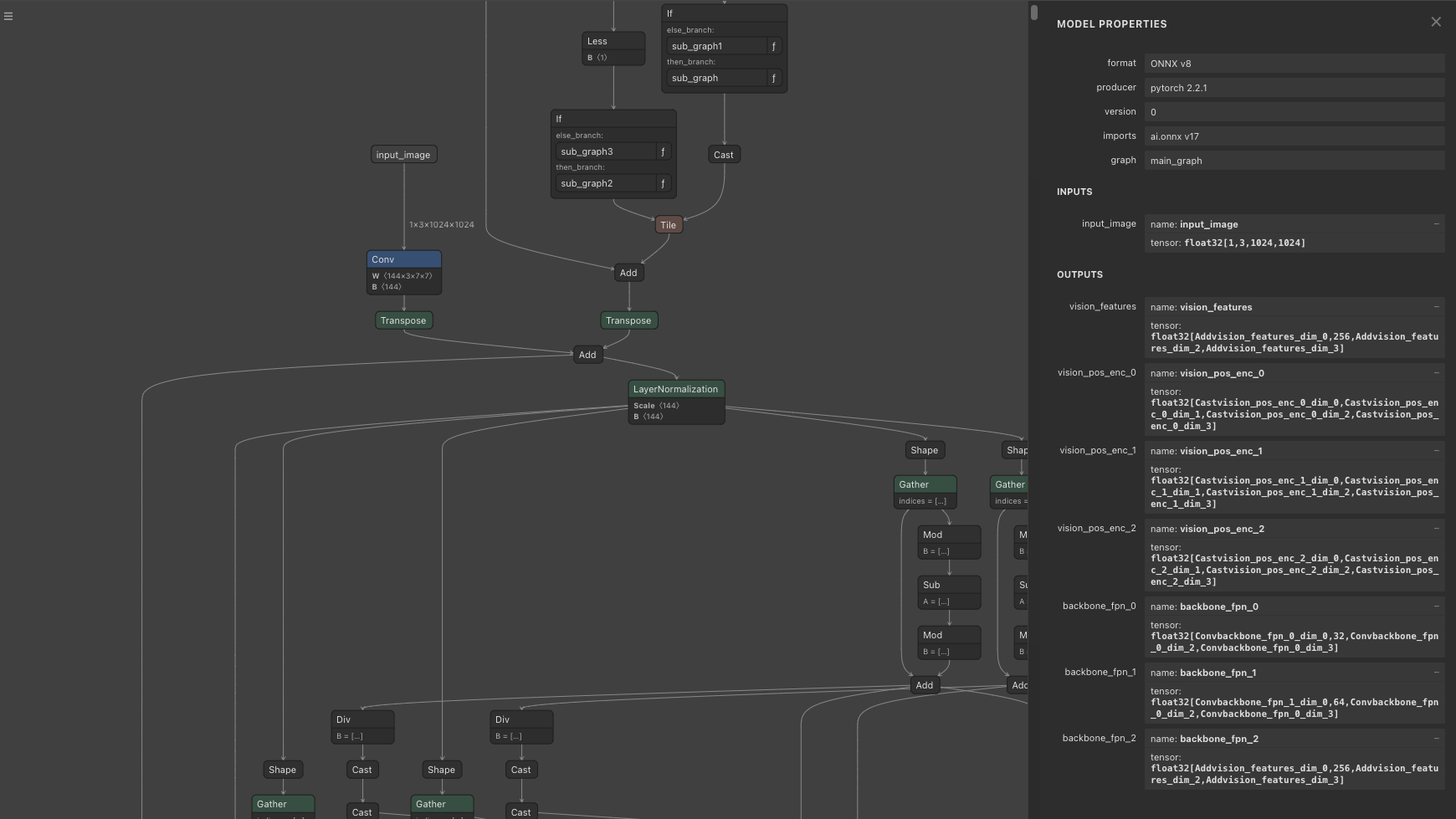
Image Encoder
The output of the Prompt Encoder consists of sparse_embeddings and dense_embeddings. sparse_embeddings are computed from points and box, while dense_embeddings are computed from the mask. The shapes are sparse_embeddings = (1, N, 256)and dense_embeddings=(1, 256, 64, 64)
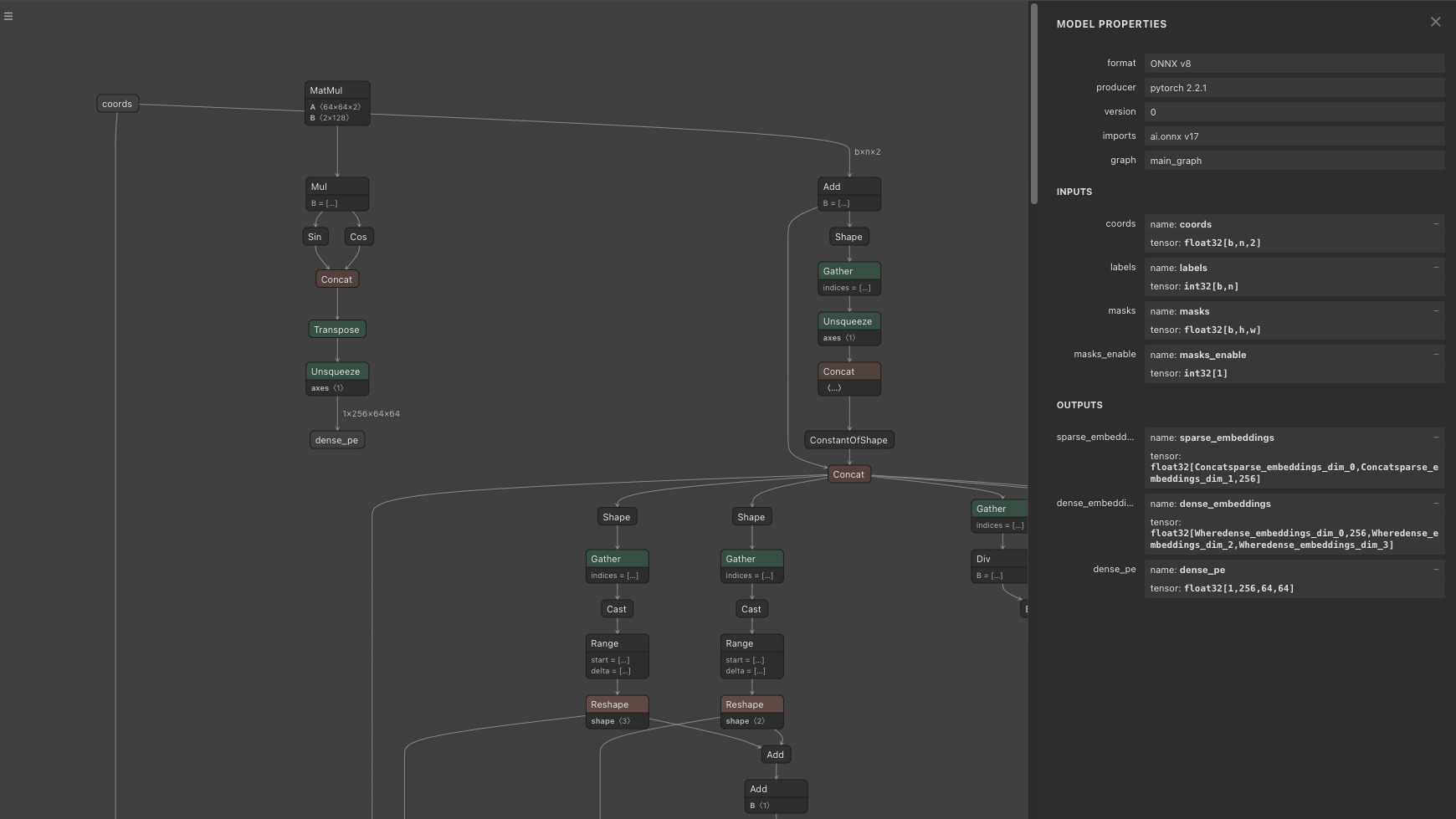
Prompt Encoder
The output of the Mask Decoder, when multi_mask_output = True, consists of three 256x256 mask images and confidence scores. The shape of low_res_masks is (1, 3, 256, 256), and the shape of iou_predictions is (1, 3). The low_res_masks are clamped within the range of -32 to 32. Since the default mask_threshold is 0, the low_res_masks are binarized: values less than or equal to 0 are set to 0, and values greater than 0 are set to 1. When multi_mask_output = False, the output consists of one 256x256 mask image and a confidence score. The model produces four images, and when multi_mask_output = False, the first image is output, while when multi_mask_output = True, the first is excluded, and the next three images are output.
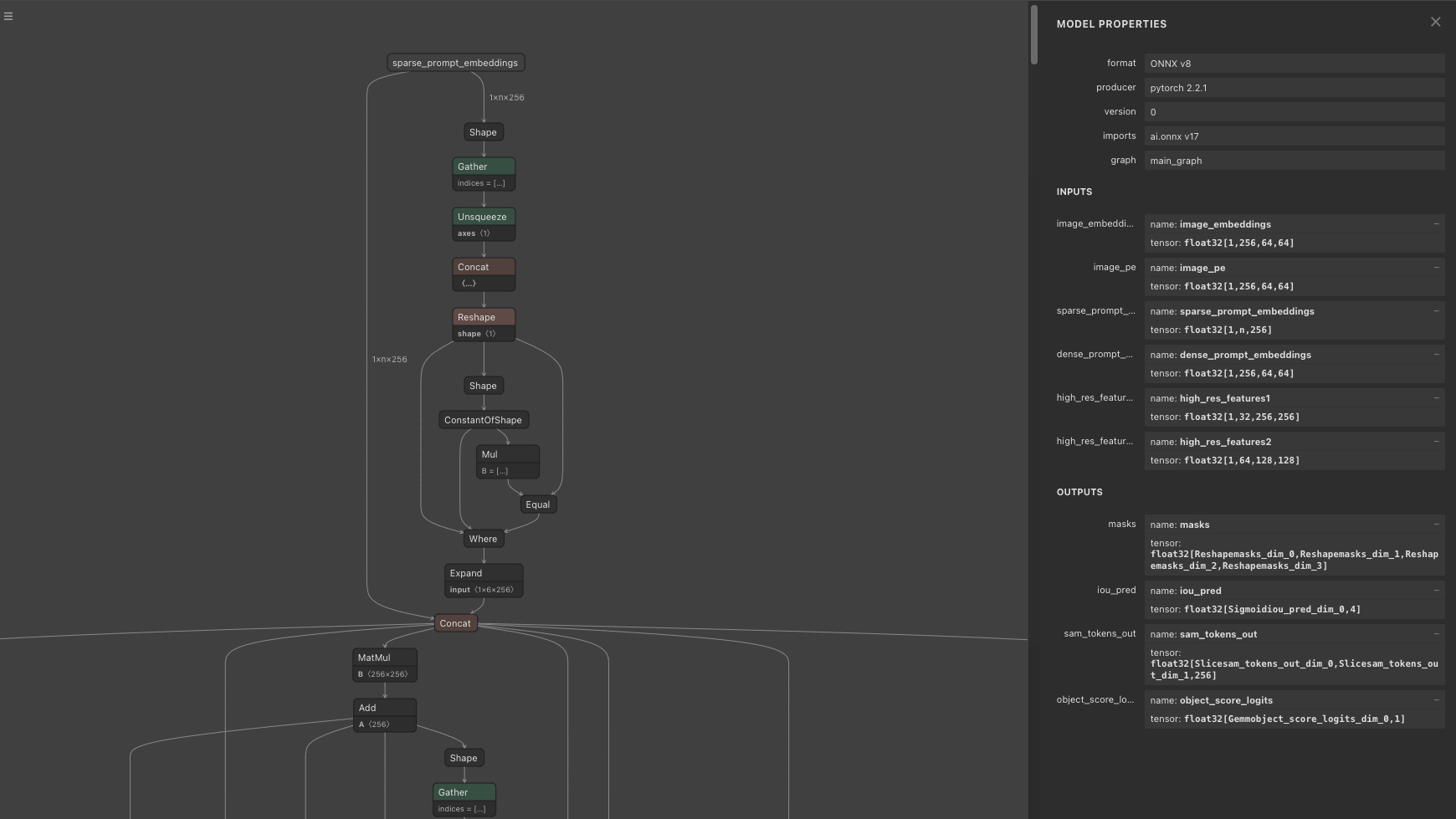
Mask Decoder
When options like max_hole_area or max_sprinkle_area are enabled, an algorithm is applied to correct the mask images by filling in holes. By default, these options are disabled.
In the Prompt Encoder, PositionEmbeddingRandom is used to encode positional information with random values. The Position Embedding array provided to the Prompt Encoder must match the Position Embedding array given to the Mask Decoder. The shape of the Position Embedding is (1, 256, 64, 64)
On videos
When applied to videos, the same logic as still images still applies, with the addition of Memory Attention.
The logic for generating features to be given to the Mask Decoder differs between still images and videos. For still images, the output of the Image Encoder’s Backbone from the current frame is passed to the Mask Decoder. For videos, the final features are generated by applying Memory Attention to both the current_vision_feats, which is the output of the Image Encoder’s Backbone from the current frame (same as still image), and the features from previous frames stored in memory. The memory stores one frame that is the focus of the prompt and the N frames immediately preceding the current frame (up to a maximum of 6 frames).
Memory Attention is used starting from the second frame. The input for the second frame is curr = (4096, 1, 256), curr_pos = (4096, 1, 256), memory = (4100, 1, 64), and memory_pos = (4100, 1, 64). For the third frame, the input is curr = (4096, 1, 256), curr_pos = (4096, 1, 256), memory = (8200, 1, 64), and memory_pos = (8200, 1, 64)
In the memory, embeddings of size (4096, 64) for cond_frames are stored, up to a maximum of num_maskmem = 7. After that, embeddings of size (4, 64) are stored, up to a maximum of num_obj_ptrs_in_encoder=16. The embeddings for important frames are stored in larger quantities, while the embeddings for less important past frames are compressed and stored accordingly.
In Memory Attention, Rotary Position Embedding (RoPE) Attention is used, where a rotation matrix is applied to each element of the Attention’s Query and Key to perform Position Embedding. The RoPE Attention’s Position Embedding is applied only to the region corresponding to cond_frames (a region in multiples of 4096). The rotation matrix for RoPE Attention is prepared for 4096 elements, but since the length of Key (memory) is larger, it is repeated and expanded for use. The number of elements in Query (current_vision_feats) is always 4096.
In Memory Attention, Self Attention is calculated in _forward_sa, and Cross Attention is calculated in _forward_ca. In Self Attention, processing is applied to current_vision_feats. In Cross Attention, processing is applied to the result of Self Attention and the memory.
The output of Memory Attention and the output of the Prompt Encoder are fed into the Mask Decoder to generate the mask.
The generated mask is used to calculate embeddings for the next frame. Specifically, the embeddings are calculated by applying the Memory Encoder to the output of the current frame’s Image Encoder and the generated mask. This embedding is then stored and used in the Memory Attention for the next frame.
Changing the processing image resolution
In the following issue, there is a discussion about improving speed by lowering the inference resolution from 1024 to 512, or obtaining a near pixel-perfect mask by increasing the resolution to 4096.
When the resolution is lowered to 512x512, the dimensionality of the Image Encoder’s embedding is reduced from 4096 to 1024.
Export to ONNX
To convert Memory Attention to ONNX, the Complex Tensor used in RoPE Attention needs to be replaced with a 2D Tensor.
Usage
To use SegmentAnything2 on a still image with ailia SDK, you can use the following command. Specify the coordinates of the segmentation target in pos
python3 segment-anything-2.py --pos 500 375 -i truck.jpg
To use SegmentAnything2 with a web camera, you can use the following command:
python3 segment-anything-2.py --pos 960 540 -v 0
To use SegmentAnything2 on a video, you can use the following command:
python3 segment-anything-2.py -v demo
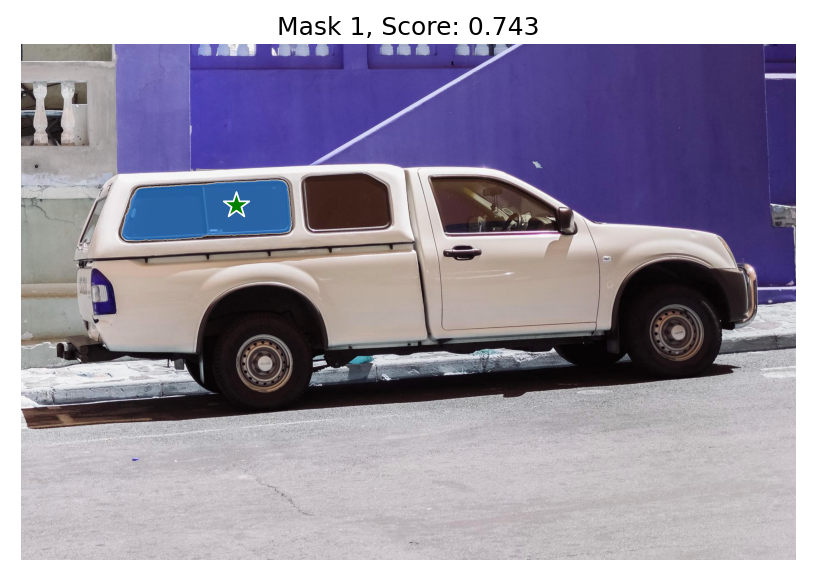
Output example
ailia Inc. has developed ailia SDK, which enables cross-platform, GPU-based rapid inference.
ailia Inc. provides a wide range of services from consulting and model creation, to the development of AI-based applications and SDKs. Feel free to contact us for any inquiry.