 ailia Tech BLOG
Motion Portrait: Avatar Solution Combined with LLM
Introducing Motion Portrait, an avatar solution developed by ailia Inc. that can be used with LLMs.
Overview
In recent years, it has become possible to interact with avatars using LLMs, but since text alone can feel limited, there is a growing demand for displaying avatars simultaneously.
By using Motion Portrait, developed by ailia Inc., you can generate and display an avatar from a single image with ease. Motion Portrait is extremely lightweight and can run on browsers and mobile devices.
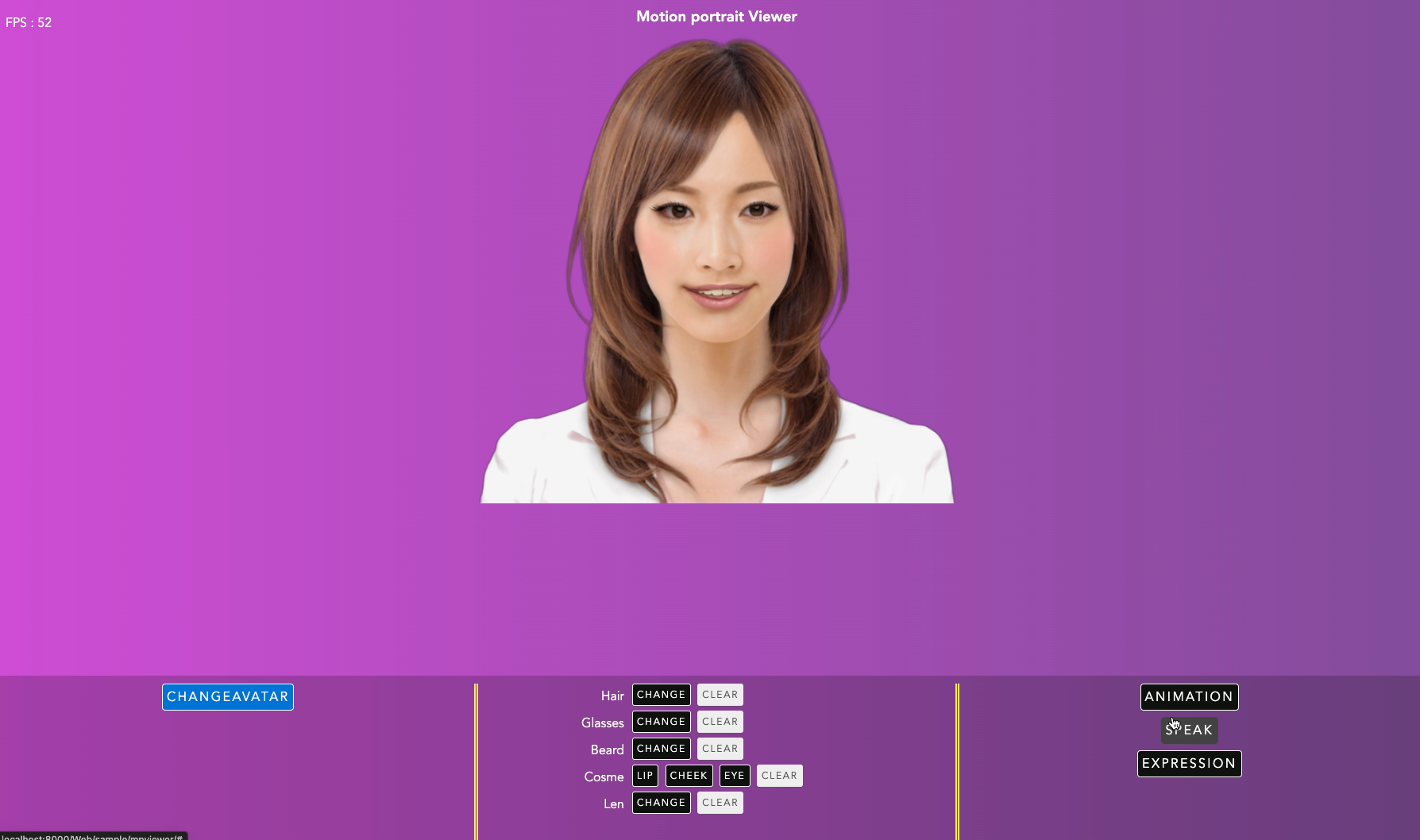
Motion Portrait example
By combining Motion Portrait, with other ax products such as ailia AI Speech for speech recognition, ailia AI Voice for speech synthesis, and conversational generation using OpenAI or ailia LLM, a seamless avatar solution is provided.
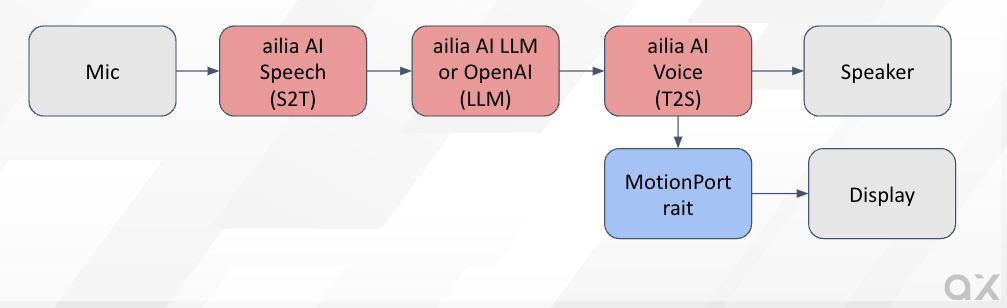
Avatar Solution Overview
Motion Portrait features
- Generating an avatar from a single image
- Avatar rendering
- Animation playback
- Facial expression changes
- Lip sync
- Addition of accessories (hair, hats, glasses, etc.)
- Makeup
Usage examples
Motion Portrait is used for the chatbot avatar displayed in the bottom right corner of the ailia.ai website. It operates very efficiently within the browser.

The Motion Portrait homepage lets you test features such as virtual makeup and trying on glasses.
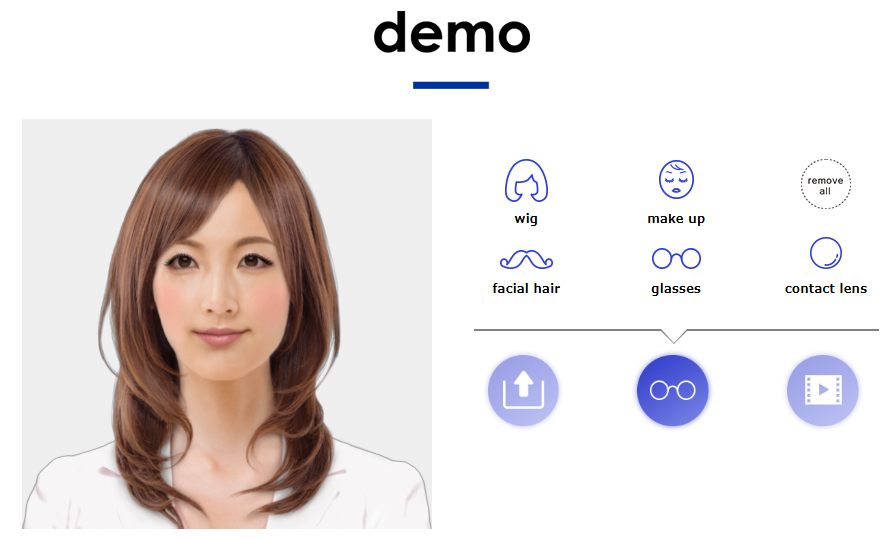
Motion Portrait also has been used for character animations in several games, as well as TV programs.
How-to
Avatar creation
To generate an avatar, you can use the browser-based avatar generation tool. Simply upload an image, and an avatar will be automatically generated.
Once the image is uploaded, the feature point editing screen will appear. For portraits of people, the tool automatically detects feature points, you can adjust them if necessary. You can also set the avatar’s resolution using the texsize option. Finally, click “Generate Avatar” to download the avatar’s bin file.
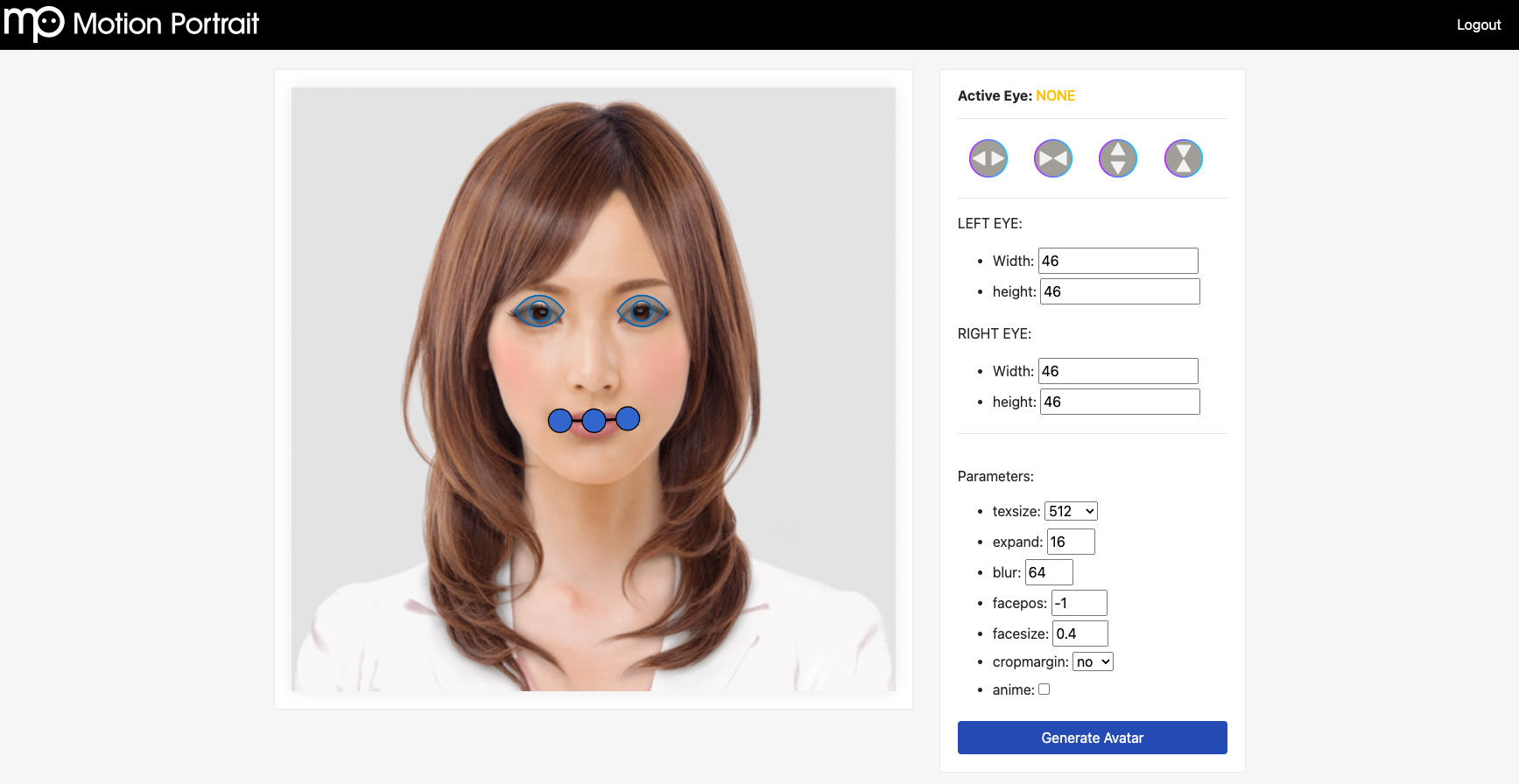
Motion Portrait also supports animals. In this case, feature points may not be detected correctly, so please manually adjust the feature points if necessary.
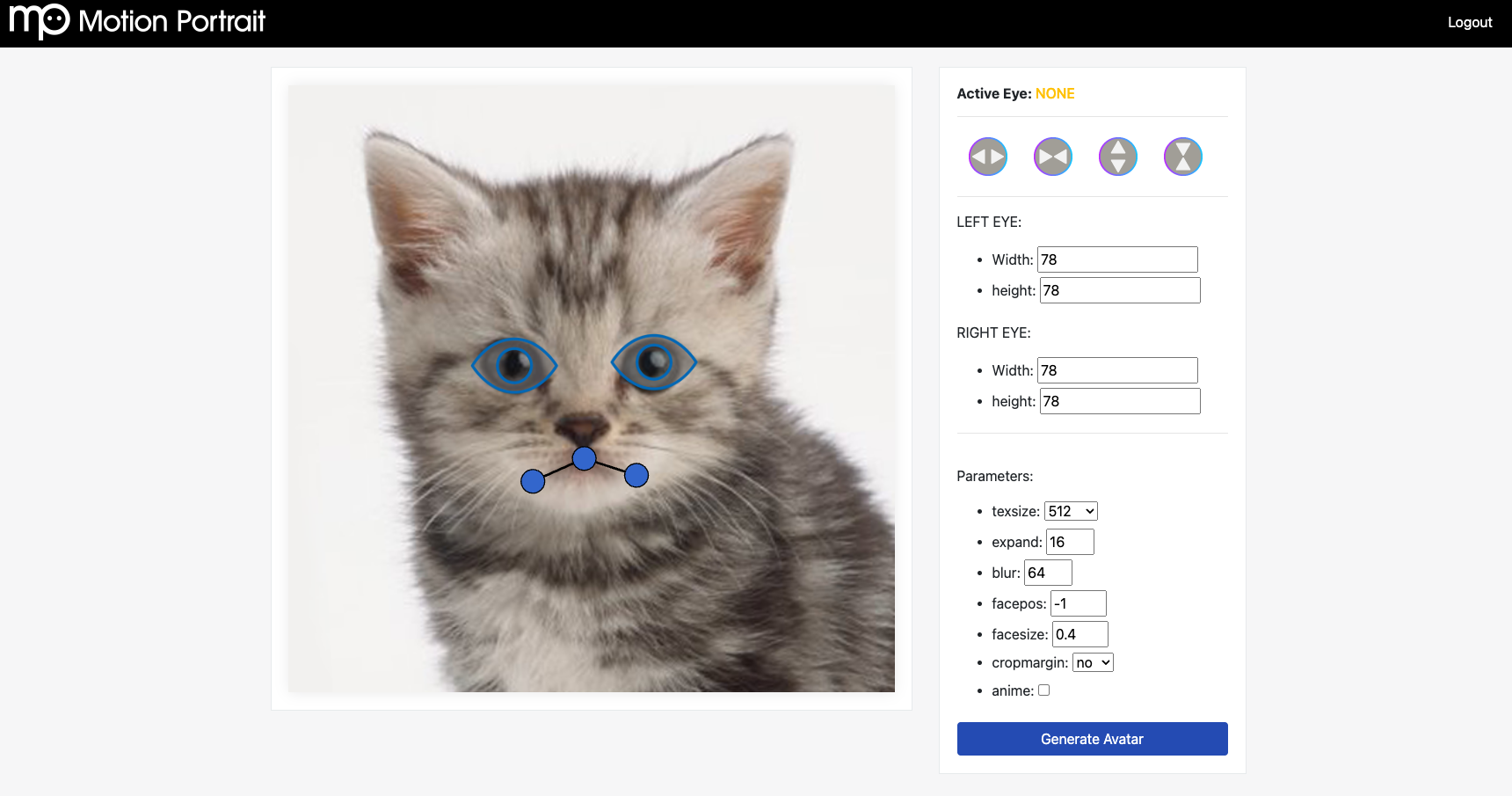
When using PNG images with an alpha channel, the alpha value will be used as the character’s outline. Therefore, if you provide an image with a fully opaque background (alpha value of 255), a square-shaped character image will be generated. If you want the outline of the character to be automatically estimated, use an image format without an alpha channel, such as JPEG. Additionally, for creating higher-precision avatars, include the character’s mask values in the alpha channel.
Avatar usage
The Motion Portrait SDK gives you all the control you need.
WebGL sample
For using your avatar in a web browser, you can start a web server with the following command frommpsdk/sample.WebGL/
python3 -m http.server 8000
Place the avatar’s bin file in the following location.
mpsdk/sample.WebGL/Web/sample/mpviewer/items/face
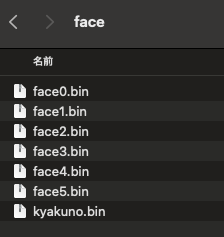
Add the list of avatar bin files to js/mp_fileio.js
var faceFiles = ["web_version.bin", "kyakuno.bin", "face0.bin", "face1.bin", "face2.bin", "face3.bin", "face4.bin", "face5.bin"];
This interface also allows you to try out predefined animations.
The actual code is written in mp_demo.js. Lip sync from audio files can also be implemented by simply specifying the MP3 file you want the avatar to speak.
function onVoiceStart() {
    if (voiceFiles == undefined || voiceFiles == null || voiceFiles.length <= 0)
        return;
    var typevoice = 2;
    var isPlaying = mpwebgl.instance.isanimplaying(typevoice);
    if (isPlaying == typevoice) {
        mpwebgl.instance.pauseaudio();
        mpwebgl.instance.unloadanimation();
        mpwebgl.instance.destroyvoice();
        return;
    }
    var voiceId = mpwebgl.instance.loadvoice('items/voice/' + voiceFiles[voiceIndex]);
    if (voiceId > 0) {
        if (++voiceIndex == voiceFiles.length)
            voiceIndex = 0;
    }
    else
        console.error("load voice fail");
}
C++ sample
For native applications, a C++ API is provided. Below is a sample program for rendering an avatar using OpenGL. By loading the avatar file into MpFace, setting the avatar to MpRender, and calling Draw in the OpenGL rendering loop, the avatar can be rendered.
#include <OpenGL/gl.h>
#include "mprender.h"
#include "mpface.h"
#include "mpctlanimation.h"
#include "mpctlitem.h"
#include "mpctlspeech.h"
#include "mpcosme.h"

#include <time.h>
#include <sys/timeb.h>
#include <stdio.h>
#include <opencv2/opencv.hpp>

#include <GLUT/GLUT.h>

const GLfloat lightPosition1[4] = {0.0f,3.0f, 5.0f, 1.0f};
const GLfloat green[] = { 0.0, 1.0, 0.0, 1.0 };
const GLfloat lightPosition2[4] = {5.0f,3.0f, 0.0f, 1.0f};
const GLfloat red[] = { 1.0, 0.0, 0.0, 1.0 };

const GLfloat teapotAmbient[4] = {0.3f,0.5f, 0.0f, 1.0f};
const GLfloat teapotDiffuse[4] = {1.0f,1.0f, 0.3f, 1.0f};
const GLfloat teapotSpecular[4] = {1.0f,1.0f, 1.0f, 1.0f};
const GLfloat teapotShininess[4] = {20.0f};

void setup(void) {
   glClearColor(0.0f, 0.0f, 0.0f, 1.0f);
   glEnable(GL_DEPTH_TEST);
   glEnable(GL_LIGHTING);
   glEnable(GL_LIGHT0);
   glEnable(GL_LIGHT1);

   glLightfv(GL_LIGHT0, GL_POSITION, lightPosition1);
   glLightfv(GL_LIGHT0, GL_DIFFUSE, red);
   glLightfv(GL_LIGHT0, GL_SPECULAR, red);
   glLightfv(GL_LIGHT1, GL_POSITION, lightPosition2);
   glLightfv(GL_LIGHT1, GL_DIFFUSE, green);
   glLightfv(GL_LIGHT1, GL_SPECULAR, green);
   glMaterialfv(GL_FRONT, GL_AMBIENT, teapotAmbient);
   glMaterialfv(GL_FRONT, GL_DIFFUSE, teapotDiffuse);
   glMaterialfv(GL_FRONT, GL_SPECULAR, teapotSpecular);
   glMaterialfv(GL_FRONT, GL_SHININESS, teapotShininess);
}

void resize(int width, int height) {
   glViewport(0, 0, width, height);
   glMatrixMode(GL_PROJECTION);
   glLoadIdentity();
   gluPerspective(45.0,
                  (double)width/height,
                  0.1,
                  100.0);
   glMatrixMode(GL_MODELVIEW);
   glLoadIdentity();
   gluLookAt(-0.5, 2.1, 2.0,
             0.0, 0.0, 0.0,
             0.0, 4.0, 0.0);
}

class mpView {
    bool isFaceLoaded_;
    long animStartTime_;

    // MP instance
    motionportrait::MpRender *render_;
    motionportrait::MpFace   *face_;
    motionportrait::MpCosme  *cosme_;

    // MP controller
    motionportrait::MpCtlAnimation *ctlAnim_;

    motionportrait::MpCtlSpeech    *ctlSpeech_;
    motionportrait::MpCtlSpeech::VoiceId voice_;
    motionportrait::MpCtlItem      *ctlGlasses_;
    motionportrait::MpCtlItem::ItemId glasses_;
    motionportrait::MpCtlItem      *ctlHair_;
    motionportrait::MpCtlItem::ItemId hair_;

    //NSMutableArray *beardID_;

    // cosme ID
    motionportrait::MpCosme::CosmeId cosmeIdEye_;
    motionportrait::MpCosme::CosmeId cosmeIdCheek_;
    motionportrait::MpCosme::CosmeId cosmeIdLip_;

    motionportrait::MpCtlAnimation::AnimDataId animData_;

    motionportrait::mpVector2 eyesCenter_;

public:

bool initMPRenderer(void) {

    // MpRender::Init() must be called before any MP functions
    render_ = new motionportrait::MpRender();
    render_->Init();

    int width = 640;
    motionportrait::mpRect viewport = {0, 0, width, width};
    render_->SetViewport(viewport);

    // initialize MpFace instance
    face_ = new motionportrait::MpFace();

    // init cosme
    cosme_ = new motionportrait::MpCosme();
    cosmeIdEye_ = NULL;
    cosmeIdCheek_ = NULL;
    cosmeIdLip_ = NULL;

    // get controllers
    ctlSpeech_ = face_->GetCtlSpeech();
    ctlAnim_ = face_->GetCtlAnimation();
    ctlGlasses_ = face_->GetCtlItem(motionportrait::MpFace::ITEM_TYPE_GLASSES);
    ctlHair_ = face_->GetCtlItem(motionportrait::MpFace::ITEM_TYPE_HAIR);

    return true;
}

bool loadFace(const char *face) {
    if (face_->Load(face)) {
        printf("can't load specied face");
        return false;
    }

    // set face to renderer
    render_->SetFace(face_);

    // set neck rotation parameters
    motionportrait::MpCtlAnimation *anim = face_->GetCtlAnimation();
    anim->SetParamf(motionportrait::MpCtlAnimation::NECK_X_MAX_ROT, 2.0f);
    anim->SetParamf(motionportrait::MpCtlAnimation::NECK_Y_MAX_ROT, 2.0f);
    anim->SetParamf(motionportrait::MpCtlAnimation::NECK_Z_MAX_ROT, 0.3f);

    // calculate eyes center position
    motionportrait::MpFace::PartsPosition partsPos;
    motionportrait::MpFace::GetPartsPosition(face, partsPos);
    eyesCenter_.x = (partsPos.eyeLeft.x + partsPos.eyeRight.x) / 2;
    eyesCenter_.y = (partsPos.eyeLeft.y + partsPos.eyeRight.y) / 2;

    return true;
}

bool startAnimation(const char *animation) {
    stopAnimation();
    animData_ = ctlAnim_->CreateAnimation(animation);
    if (animData_) {
        animStartTime_ = getmsec();
        return true;
    } else {
        return false;
    }
}

void stopAnimation(void) {
    if (animData_) {
        ctlAnim_->DestroyAnimation(animData_);
        animData_ = 0;
    }
}

void drawBackground(bool draw) {
    render_->EnableDrawBackground(draw);
}

void setBackgroundColor(float red, float green, float blue, float alpha) {
    //[glContext_ makeCurrentContext];
    glClearColor(red, green, blue, alpha);
}

void lookAt(float x, float y, float time) {
    motionportrait::mpVector2 pos = {x - eyesCenter_.x + 0.5f, y - eyesCenter_.y + 0.5f};
    ctlAnim_->LookAt(time, pos, 1.0f);
}

 void drawRect(void) {
    // update unconcious animation
    long cTime = getmsec();
    motionportrait::MpCtlAnimation *anim = face_->GetCtlAnimation();
    anim->Update(cTime);

    if (animData_) {
        // play animation file
        int playing = ctlAnim_->AnimateData(animStartTime_, cTime, animData_);
        if (playing == 0) {
            // clean up after animation finish
            stopAnimation();
        }
    }

    // render
    glClear(GL_COLOR_BUFFER_BIT);
    render_->Draw();
    glFlush();
}

long getmsec(void) {
    static bool first = true;
    static double start;
    double now;
    struct timeb time;

    ftime(&time);
    now = (double)time.time * 1000 + time.millitm;
    if (first) {
        start = now;
        first = false;
    }
    return (long)(now - start);
}

};

mpView* mpView_ = NULL;
float t = 0.0f;

void draw(void) {
   glClear(GL_COLOR_BUFFER_BIT | GL_DEPTH_BUFFER_BIT);
   glutSolidTeapot(0.5 + t);
   if (mpView_ != NULL){
    mpView_->drawRect();
   }
   t = t + 0.01f;
   glFlush();
   glutPostRedisplay();
}

int main(int argc, char ** argv) {
    glutInit(&argc, argv);
    glutInitWindowSize(600,600);
    glutInitDisplayMode(GLUT_SINGLE | GLUT_RGBA | GLUT_DEPTH);
    glutCreateWindow("Wire_teapot");
    glutReshapeFunc(resize);
    glutDisplayFunc(draw);

    mpView_ = new mpView();

    mpView_->initMPRenderer();

    mpView_->drawBackground(false);
    mpView_->setBackgroundColor(0.5f, 0.5f, 0.5f, 1.0f);
    bool status = mpView_->loadFace("items/face.bin");
    if (!status){
        return -1;
    }

    status = mpView_->startAnimation("anim0/anim.ani2");
    if (!status){
        return -1;
    }

    mpView_->lookAt(-0.5f, 0.0f, 1.0f);

    setup();

    glutMainLoop();

    return 0;
}
Inquiry about our evaluation version
For information on obtaining the MotionPortrait conversion tool and SDK, please contact us using the link below.
Inquiries about our products and serviceswww.ailia.ai
The evaluation version includes the following:
- An account for the web-based avatar generation tool
- SDK for each platform (
mpsdk.zip)
ailia Inc. has developed ailia SDK, which enables cross-platform, GPU-based rapid inference.
ailia Inc. provides a wide range of services from consulting and model creation, to the development of AI-based applications and SDKs. Feel free to contact us for any inquiry.