 ailia Tech BLOG
MobilenetSSD : A Machine Learning Model for Fast Object Detection
This is an introduction to「MobilenetSSD」, a machine learning model that can be used with ailia SDK. You can easily use this model to create AI applications using ailia SDK as well as many other ready-to-use ailia MODELS.
Overview
MobilenetSSD is an object detection model that computes the bounding box and category of an object from an input image. This Single Shot Detector (SSD) object detection model uses Mobilenet as backbone and can achieve fast object detection optimized for mobile devices.
Architecture
MobilenetSSDtakes a (3,300,300) image as input and outputs (1,3000,4) boxes and (1,3000,21) scores. Boxes contains offset values (cx,cy,w,h) from the default box. Scores contains confidence values for the presence of each of the 20 object categories, the value 0 being reserved for the background.
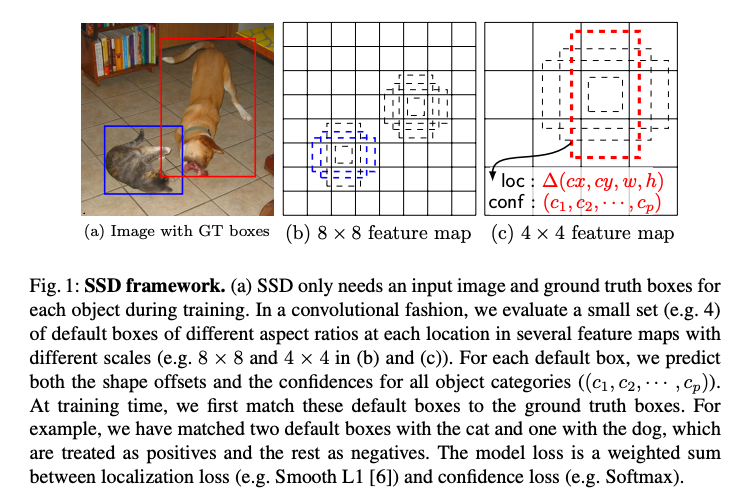
Source:https://arxiv.org/pdf/1512.02325.pdf
In SSD, after extracting the features using an arbitrary backbone, the bounding boxes are calculated at each resolution while reducing the resolution with Extra Feature Layers. MobilenetSSD will concatenate the output of the six levels of resolution and calculate a total of 3000 bounding boxes, and finally, filter out bounding boxes using non-maximum suppression (nms).
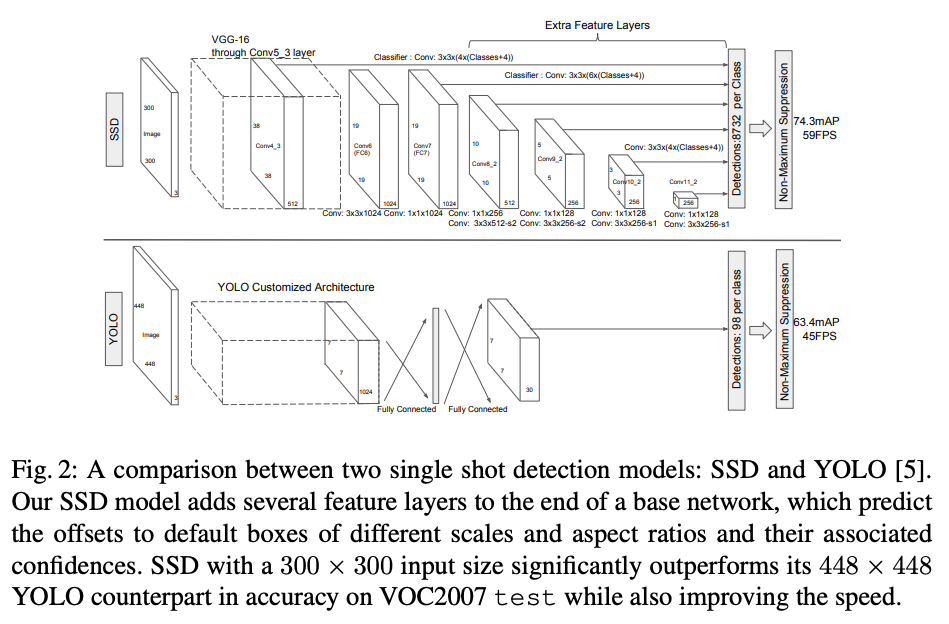
Source:https://arxiv.org/pdf/1512.02325.pdf
The configuration of MobilenetSSD is shown below. A default box size is defined in SSDSpec for each resolution.
image_size = 300
image_mean = np.array([127, 127, 127]) # RGB layout
image_std = 128.0
iou_threshold = 0.45
center_variance = 0.1
size_variance = 0.2specs = [
SSDSpec(19, 16, SSDBoxSizes(60, 105), [2, 3]),
SSDSpec(10, 32, SSDBoxSizes(105, 150), [2, 3]),
SSDSpec(5, 64, SSDBoxSizes(150, 195), [2, 3]),
SSDSpec(3, 100, SSDBoxSizes(195, 240), [2, 3]),
SSDSpec(2, 150, SSDBoxSizes(240, 285), [2, 3]),
SSDSpec(1, 300, SSDBoxSizes(285, 330), [2, 3])
]
SSDSpec is defined as follows.
SSDSpec = collections.namedtuple(‘SSDSpec’, [‘feature_map_size’, ‘shrinkage’, ‘box_sizes’, ‘aspect_ratios’])
In the case of SSDSpec(19, 16, SSDBoxSizes(60, 105), [2, 3]), a total of six boxes are defined with sizes 60x60, 105x105, as well as sizes 120x60, 60x120, 210x105 and 105x210 for the aspect ratio of 2.
Six levels of recognition results are concatenated, producing a total of 3000 bounding boxes.
Usage
The sample below demonstrates how to use MobilenetSSD with ailia SDK.
The following command runs the model on the web camera video stream.
$ python3 mobilenet_ssd.py -v 0

Input image (Source: https://pixabay.com/ja/photos/%E3%83%AD%E3%83%B3%E3%83%89%E3%83%B3%E5%B8%82-%E9%8A%80%E8%A1%8C-%E3%83%AD%E3%83%B3%E3%83%89%E3%83%B3-4481399/)
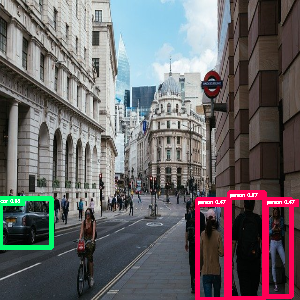
Inference result
Train MobilenetSSD on your own data
pytorch-ssd can be used to train MobilenetSSD on your own data.
Since pytorch-ssd uses lambda objects in DataLoader, it cannot be used on Windows, only Mac or Linux are supported.
The data format for training follows the open-image-dataset format. The following four files are required for training.
/dataset/open_images_mixed/sub-test-annotations-bbox.csv
/dataset/open_images_mixed/sub-train-annotations-bbox.csv
/dataset/open_images_mixed/train/images.jpg
/dataset/open_images_mixed/test/images.jpg
The format of the csv is as follows.
ImageID,Source,LabelName,Confidence,XMin,XMax,YMin,YMax,IsOccluded,IsTruncated,IsGroupOf,IsDepiction,IsInside,id,ClassName
ImageId is the file name of the image (without extension), Xmin to YMax is the bounding box from 0 to 1, and ClassName is the category. Here is an example.
img_591,xclick,/m/0gxl3,1,0.40920866666666667,0.08862621809744783,0.7894286666666666,0.6620986078886312,0,0,0,0,0,/m/0gxl3,Handgun
Place the training image in the train folder, where it will be referenced as ImageId.jpg
Training is done by transfer learning, so first download the trained model.
wget -P models https://storage.googleapis.com/models-hao/mb2-ssd-lite-mp-0_686.pth
And run the training script.
python3 train_ssd.py — dataset_type open_images — datasets ./dataset — net mb2-ssd-lite — pretrained_ssd models/mb2-ssd-lite-mp-0_686.pth — scheduler cosine — lr 0.001 — t_max 100 — validation_epochs 5 — num_epochs 100 — base_net_lr 0.001 — batch_size 5
The results of the training and open-images-model-labels.txt will be output to the models folder, which will take about 38 hours to train on a MacBookPro13 CPU.
Finally, check your training results.
python3 run_ssd_example.py mb2-ssd-lite models/mb2-ssd-lite-Epoch-80-Loss-2.4882763324521524.pth models/open-images-model-labels.txt input.jpg
Since ailia SDK requires export with opset=10, add opset_version=10 to torch.onnx.export in convert_to_caffe2_models.py
torch.onnx.export(net, dummy_input, model_path, verbose=False, output_names=[‘scores’, ‘boxes’], opset_version=10)
Export to ONNX so that it can be used with ailia SDK.
python3 convert_to_caffe2_models.py mb2-ssd-lite models/mb2-ssd-lite-Epoch-80-Loss-2.4882763324521524.pth models/open-images-model-labels.txt
See below for a sample that goes from training to conversion to ONNX.
ailia-ai/mobilenetssd-facePytorch 1.0 Windows is not working…github.com
Related topics
M2Det : Highly Accurate Object Detection Modelmedium.com
ailia Inc. has developed ailia SDK, which enables cross-platform, GPU-based rapid inference.
ailia Inc. provides a wide range of services from consulting and model creation, to the development of AI-based applications and SDKs. Feel free to contact us for any inquiry.