 ailia Tech BLOG
LlamaIndex : How to use ChatGPT on custom data
Introducing LlamaIndex, a framework that allows you to ask questions about your own data in ChatGPT.
Overview
By entering text, HTML, PDF, etc., to create an index file and then querying that index file, it is possible to ask questions about the latest information that ChatGPT has not been trained on.
Knowledge Base Extension
ChatGPT is trained on large text data, but suffers from a lack of knowledge about data that were not part of the training dataset. For example, if you were to question ChatGPT about a specific product, it would not have the information for that product, so it would not be able to answer appropriately.
This problem can be solved by embedding product information in the ChatGPT Prompt.
Let’s look at the example. Considering the following input query:
Why is it that the function ‘C’ is not available for product ‘A’?
and assuming the following new information have been fed to the knowledge base:
Product ‘A’ has a function called ‘B’ and a function called ‘C’, and the function called ‘B’ cannot be combined with the function called ‘C’
Then the input query can be automatically adjusted to
Product ‘A’ has a function called ‘B’ and a function called ‘C’, and the function called ‘B’ cannot be combined with the function called ‘C’. Why is it that the function ‘C’ is not available for product ‘A’?
and ChatGPT will be able to process it in a more meaningful way.
The Challenges
ChatGPT limits prompt length to 4096 tokens at the time of writing. The new knowledge to be considered (the product specification in the previous example) might be several MB, which goes over the limit.
LlamaIndex solves this problem by converting the text into a multi-segmented index and querying them in sequence.
Indexing Mechanism
The text of the additional knowledge is divided into multiple nodes, and embeddings are computed for each node. When a new query is made, the embeddings of the query are computed, N nodes with the closest distance are selected and used as prompts to ask questions to ChatGPT.
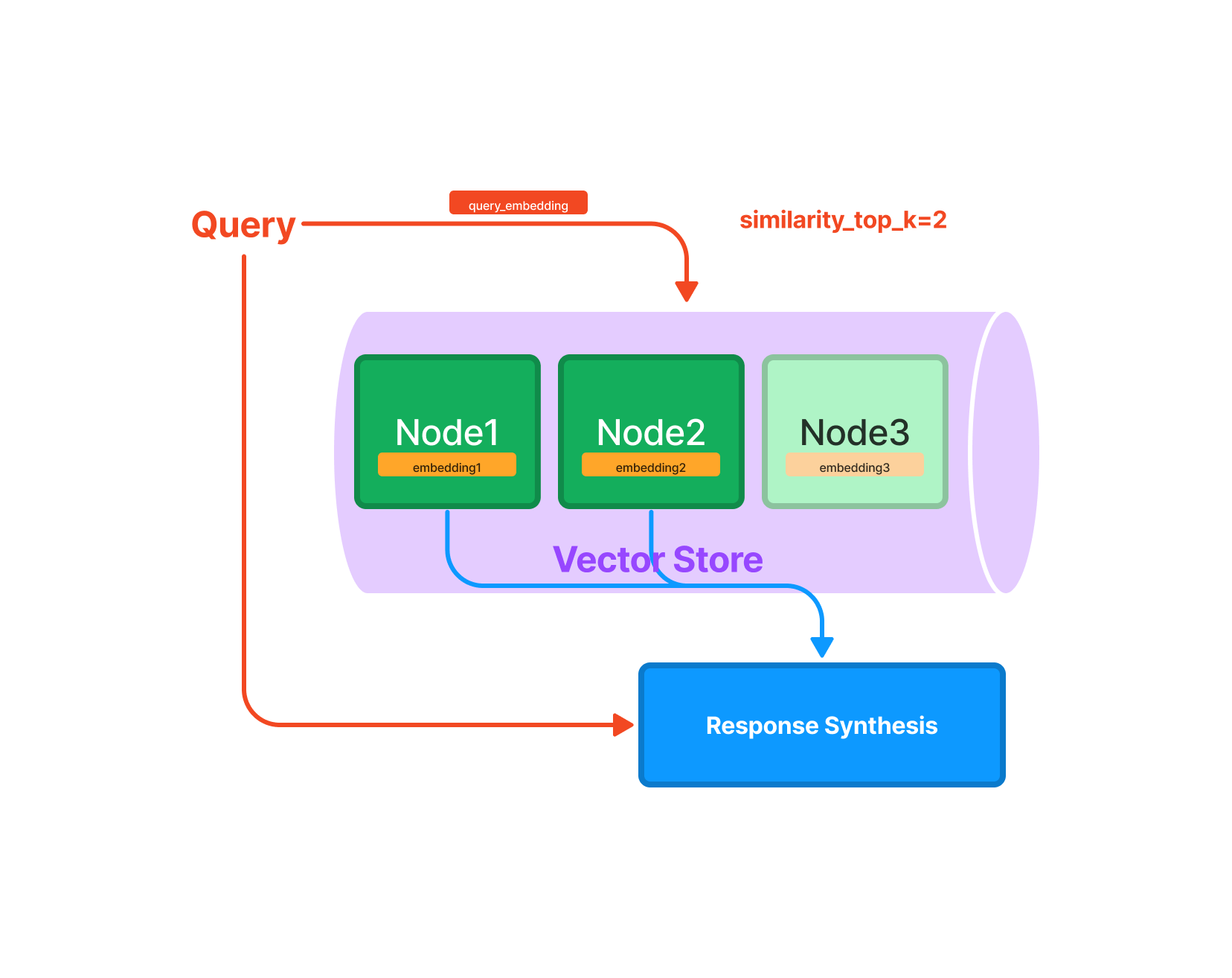
Querying mechanism (Source: https://gpt-index.readthedocs.io/en/v0.6.8/guides/primer/index_guide.html)
When a query requires multiple nodes, the answer of the first node is input to the next node, which is then refined to obtain the final output.
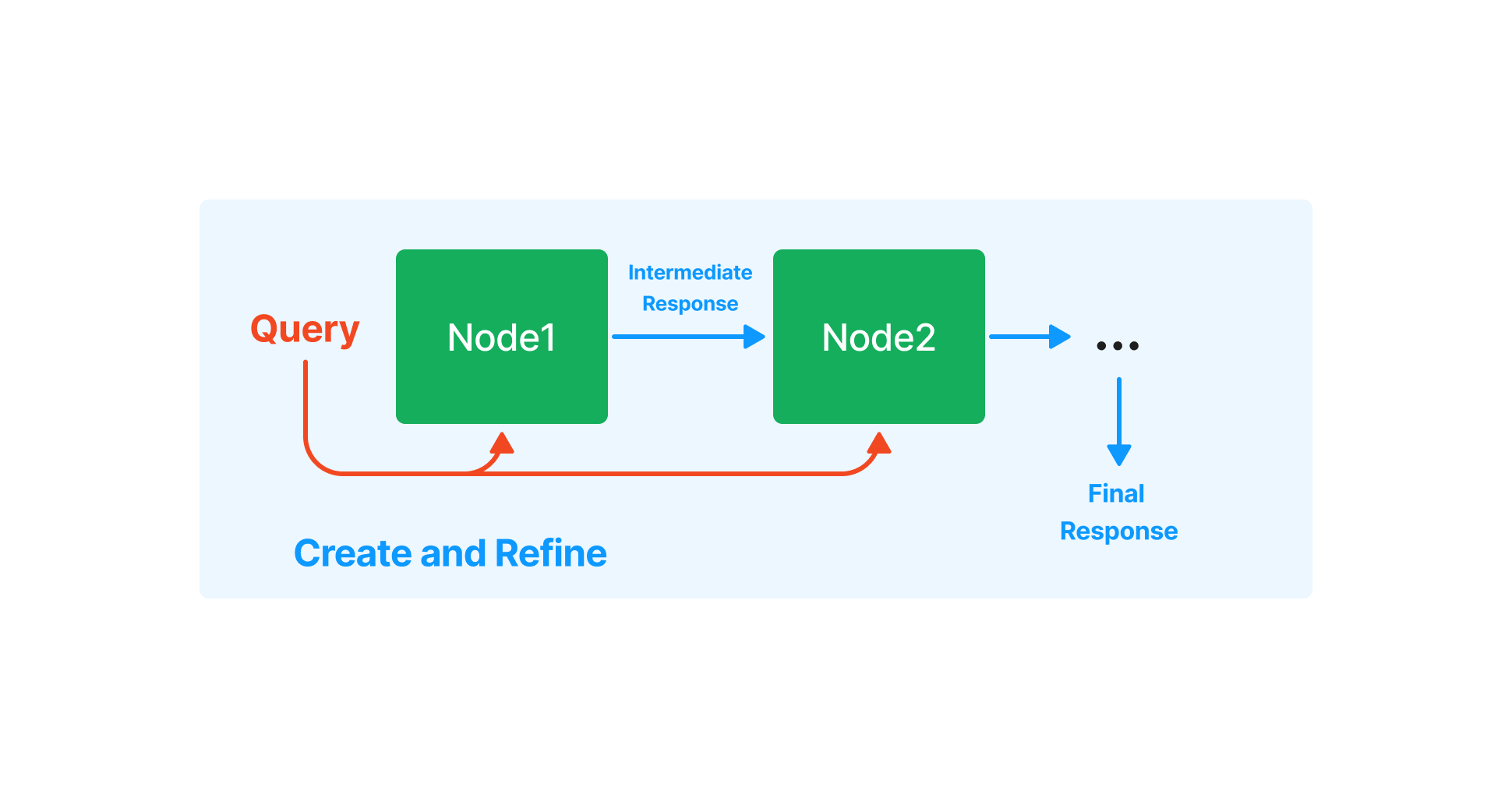
Response Synthesis (Source: https://gpt-index.readthedocs.io/en/v0.6.8/how_to/query/response_synthesis.html)
Usage
LlamaIndex requires python 3.8 or newer and can be installed using pip
pip install llama-index
The following example inputs the PDF of ailia SDK documentation and indexes it.
import os
os.environ["OPENAI_API_KEY"] = 'YOUR_OPENAI_API_KEY'

from llama_index import GPTSimpleVectorIndex, SimpleDirectoryReader
from llama_index import download_loader

CJKPDFReader = download_loader("CJKPDFReader")
loader = CJKPDFReader()

documents = loader.load_data("ailia_sdk.pdf")
index = GPTSimpleVectorIndex(documents)
index.save_to_disk('index.json')
Then query the index you’ve just created.
import os
os.environ["OPENAI_API_KEY"] = 'YOUR_OPENAI_API_KEY'

from llama_index import GPTSimpleVectorIndex, LLMPredictor
from langchain import OpenAI

query_text ="What operating systems does ailia SDK support?"

llm_predictor = LLMPredictor(llm=OpenAI(temperature=0, max_tokens=350))
index = GPTSimpleVectorIndex.load_from_disk('index.json')
response = index.query(query_text, llm_predictor=llm_predictor)

print("Q:", query_text)
print("A:", str(response))
Example
The 1.2MB PDF file of the ailia SDK documentation results in a 1.6MB index.
$ python3 create_index.py

INFO:llama_index.token_counter.token_counter:> [build_index_from_documents] Total LLM token usage: 0 tokens
INFO:llama_index.token_counter.token_counter:> [build_index_from_documents] Total embedding token usage: 72737 tokens
Let’s query the index:
$ python3 query_index.py

INFO:llama_index.token_counter.token_counter:> [query] Total LLM token usage: 3608 tokens
INFO:llama_index.token_counter.token_counter:> [query] Total embedding token usage: 24 tokens
Q: What operating systems does ailia SDK support?
A: Ailia SDK supports Windows, Mac, Linux, iOS, Android, Jetson, and RaspberryPi operating systems.
Troubleshooting
The following error might occur, when indexing PDF in written in Japanese for example.
ValueError: A single term is larger than the allowed chunk size
This issue is addressed in the issue below:
This error occurs because, unlike English, Japanese words are not separated by spaces, making sentences too long. It can be avoided by converting the sentence to include a space after the punctuation mark, as shown below.
doc.text = doc.text.replace("、", "、 ")
doc.text = doc.text.replace("。", "。 ")
Some queries in Japanese might also trigger the following error:
This model’s maximum context length is 4097 tokens, however you requested 4224 tokens
This error is also addressed in the issue below:
Pricing
LlamaIndex is using OpenAI’s paid APIs behind the scene.
Creating a 1.2MB index consumes 72737 tokens, at $0.002 / 1K tokens we are at a total of about $0.14.
A query for a 1.2MB index consumes 3632 tokens, at $0.002 / 1K tokens it’s about $0.007.
Sample Program
The sample code used in this blog post can be found below.
ailia Inc. has developed ailia SDK, which enables cross-platform, GPU-based rapid inference.
ailia Inc. provides a wide range of services from consulting and model creation, to the development of AI-based applications and SDKs. Feel free to contact us for any inquiry.