 ailia Tech BLOG
Gemma3: Local LLM with Multimodal Support
Source: https://blog.google/technology/developers/gemma-3/
Overview
Gemma3 is a local LLM released by Google on March 12, 2025. It supports 140 languages and is available in 1B, 4B, 12B, and 27B model sizes. Gemma3 now supports a long context of 128k tokens.
The 27B model of Gemma3 outperforms Deepseek-v3 671B model and offers performance comparable to Gemini-1.5-Pro. Additionally, the 4B model of Gemma3 delivers performance on par with Gemma2 27B model.
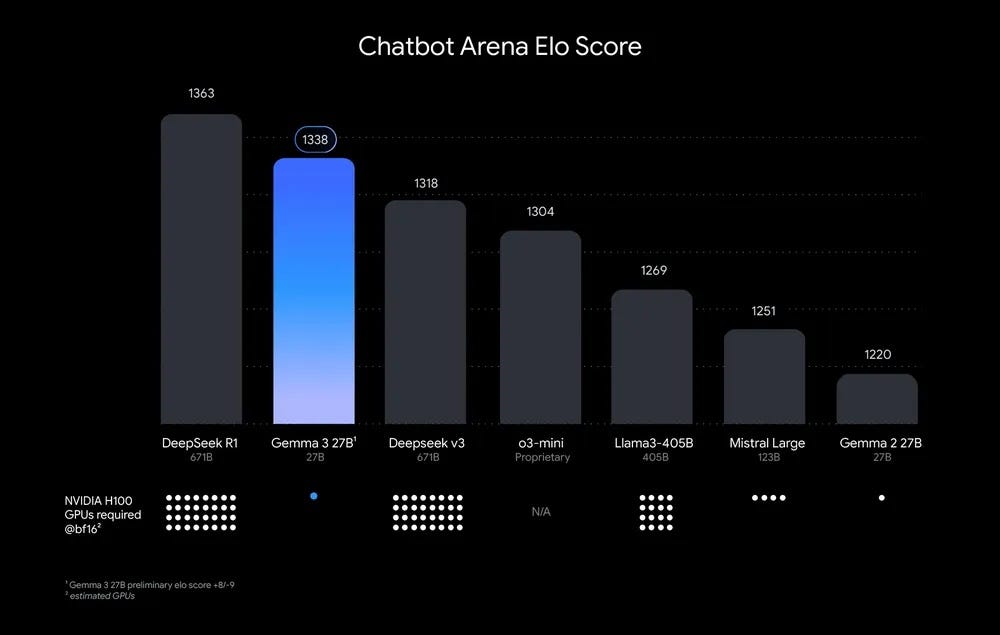
ELO Score (Source: https://blog.google/technology/developers/gemma-3/)
It’s also multimodal, allowing images to be used as input.
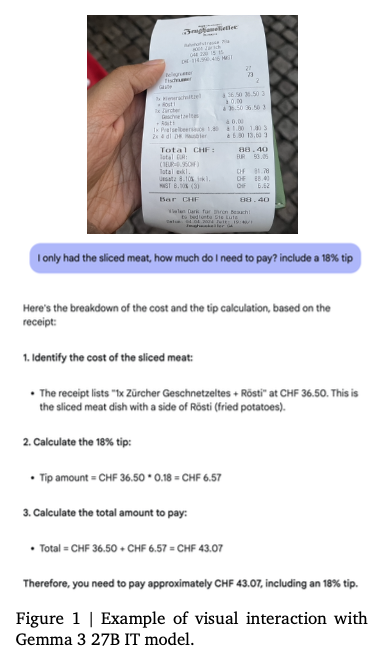
Example of multimodal input (Source: https://blog.google/technology/developers/gemma-3/)
Below is the official blog post and technical report.
Architecture
Vision Encoder
Gemma3 uses SigLIP for image encoding. SigLIP is a derivative model of CLIP that replaces CLIP Softmax with a Sigmoid, enabling it to compute probabilities even when only a single text input is provided.
Images are handled at a fixed resolution of 896x896. When a high-resolution image is provided, average pooling is applied to the encoded result of the high-resolution image, reducing it to a feature vector equivalent to 896x896.
Additionally, for images that are not square in aspect ratio or are high-resolution, an optional pan-and-scan method can be applied. Inspired by LLAVA, pan-and-scan is a newly proposed technique in Gemma3 that divides the image into non-overlapping crops of equal size, resizes each crop to 896x896 resolution, encodes them in batch direction, and tokenizes them as multiple images.
This pan-and-scan logic is implemented as described below.
def pan_and_scan(
        self,
        image: np.ndarray,
        pan_and_scan_min_crop_size: int,
        pan_and_scan_max_num_crops: int,
        pan_and_scan_min_ratio_to_activate: float,
        data_format: Optional[Union[str, ChannelDimension]] = None,
        input_data_format: Optional[Union[str, ChannelDimension]] = None,
    ):
        """
        Pan and Scan and image, by cropping into smaller images when the aspect ratio exceeds
        minumum allowed ratio.

        Args:
            image (`np.ndarray`):
                Image to resize.
            pan_and_scan_min_crop_size (`int`, *optional*):
                Minimum size of each crop in pan and scan.
            pan_and_scan_max_num_crops (`int`, *optional*):
                Maximum number of crops per image in pan and scan.
            pan_and_scan_min_ratio_to_activate (`float`, *optional*):
                Minimum aspect ratio to activate pan and scan.
            data_format (`str` or `ChannelDimension`, *optional*):
                The channel dimension format of the image. If not provided, it will be the same as the input image.
            input_data_format (`ChannelDimension` or `str`, *optional*):
                The channel dimension format of the input image. If not provided, it will be inferred.
        """
        height, width = get_image_size(image)

        # Square or landscape image.
        if width >= height:
            # Only apply PaS if the image is sufficiently exaggerated
            if width / height < pan_and_scan_min_ratio_to_activate:
                return []

            # Select ideal number of crops close to the image aspect ratio and such that crop_size > min_crop_size.
            num_crops_w = int(math.floor(width / height + 0.5))  # Half round up rounding.
            num_crops_w = min(int(math.floor(width / pan_and_scan_min_crop_size)), num_crops_w)

            # Make sure the number of crops is in range [2, pan_and_scan_max_num_crops].
            num_crops_w = max(2, num_crops_w)
            num_crops_w = min(pan_and_scan_max_num_crops, num_crops_w)
            num_crops_h = 1

        # Portrait image.
        else:
            # Only apply PaS if the image is sufficiently exaggerated
            if height / width < pan_and_scan_min_ratio_to_activate:
                return []

            # Select ideal number of crops close to the image aspect ratio and such that crop_size > min_crop_size.
            num_crops_h = int(math.floor(height / width + 0.5))
            num_crops_h = min(int(math.floor(height / pan_and_scan_min_crop_size)), num_crops_h)

            # Make sure the number of crops is in range [2, pan_and_scan_max_num_crops].
            num_crops_h = max(2, num_crops_h)
            num_crops_h = min(pan_and_scan_max_num_crops, num_crops_h)
            num_crops_w = 1

        crop_size_w = int(math.ceil(width / num_crops_w))
        crop_size_h = int(math.ceil(height / num_crops_h))

        # Don't apply PaS if crop size is too small.
        if min(crop_size_w, crop_size_h) < pan_and_scan_min_crop_size:
            return []

        crop_positions_w = [crop_size_w * i for i in range(num_crops_w)]
        crop_positions_h = [crop_size_h * i for i in range(num_crops_h)]

        if input_data_format == ChannelDimension.LAST:
            image_crops = [
                image[pos_h : pos_h + crop_size_h, pos_w : pos_w + crop_size_w]
                for pos_h, pos_w in itertools.product(crop_positions_h, crop_positions_w)
            ]
        else:
            image_crops = [
                image[:, pos_h : pos_h + crop_size_h, pos_w : pos_w + crop_size_w]
                for pos_h, pos_w in itertools.product(crop_positions_h, crop_positions_w)
            ]

        return image_crops
The tokens encoded from the crops are arranged in the prompt as shown below.
image_inputs = {}
        if images is not None:
            batched_images = make_nested_list_of_images(images)
            image_inputs = self.image_processor(batched_images, **output_kwargs["images_kwargs"])

            # Create empty text to be replaced with placeholders
            if not text:
                text = [" ".join([self.boi_token] * len(images)) for images in batched_images]

            if len(batched_images) != len(text):
                raise ValueError(
                    f"Received inconsistently sized batches of images ({len(batched_images)}) and text ({len(text)})."
                )

            # Replace image tokens by the full expanded sequence
            batch_num_crops = to_py_obj(image_inputs.pop("num_crops"))
            for batch_idx, (prompt, images, num_crops) in enumerate(zip(text, batched_images, batch_num_crops)):
                image_indexes = [m.start() for m in re.finditer(self.boi_token, prompt)]

                if len(images) != len(image_indexes):
                    raise ValueError(
                        f"Prompt contained {len(image_indexes)} image tokens but received {len(images)} images."
                    )

                # Insert additional image tokens for Pan-and-Scan crops
                for num, idx in reversed(list(zip(num_crops, image_indexes))):
                    if num:
                        formatted_image_text = (
                            f"Here is the original image {self.boi_token} and here are some crops to help you see better "
                            + " ".join([self.boi_token] * num)
                        )
                        prompt = prompt[:idx] + formatted_image_text + prompt[idx + len(self.boi_token) :]
                        text[batch_idx] = prompt

            # Expand placeholder image tokens to the full image token sequence
            text = [prompt.replace(self.boi_token, self.full_image_sequence) for prompt in text]
The model size of the Vision Encoder is fixed at 417M parameters.
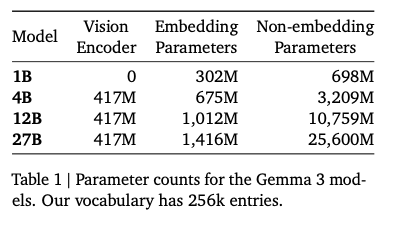
Parameter count for each model (Source: https://blog.google/technology/developers/gemma-3/)
Long Context
When extending to a 128k long context, there is a problem of enormous memory consumption for the KV cache.
KV cache is an algorithm that reduces computation by storing the Q and K from attention, as well as the result of the QK and V dot product. While DeepSeek adopts a method of compressing this KV cache, Gemma3 controls memory usage by dividing attention into global and local attention, and maintaining a token length of 1024 for local attention.
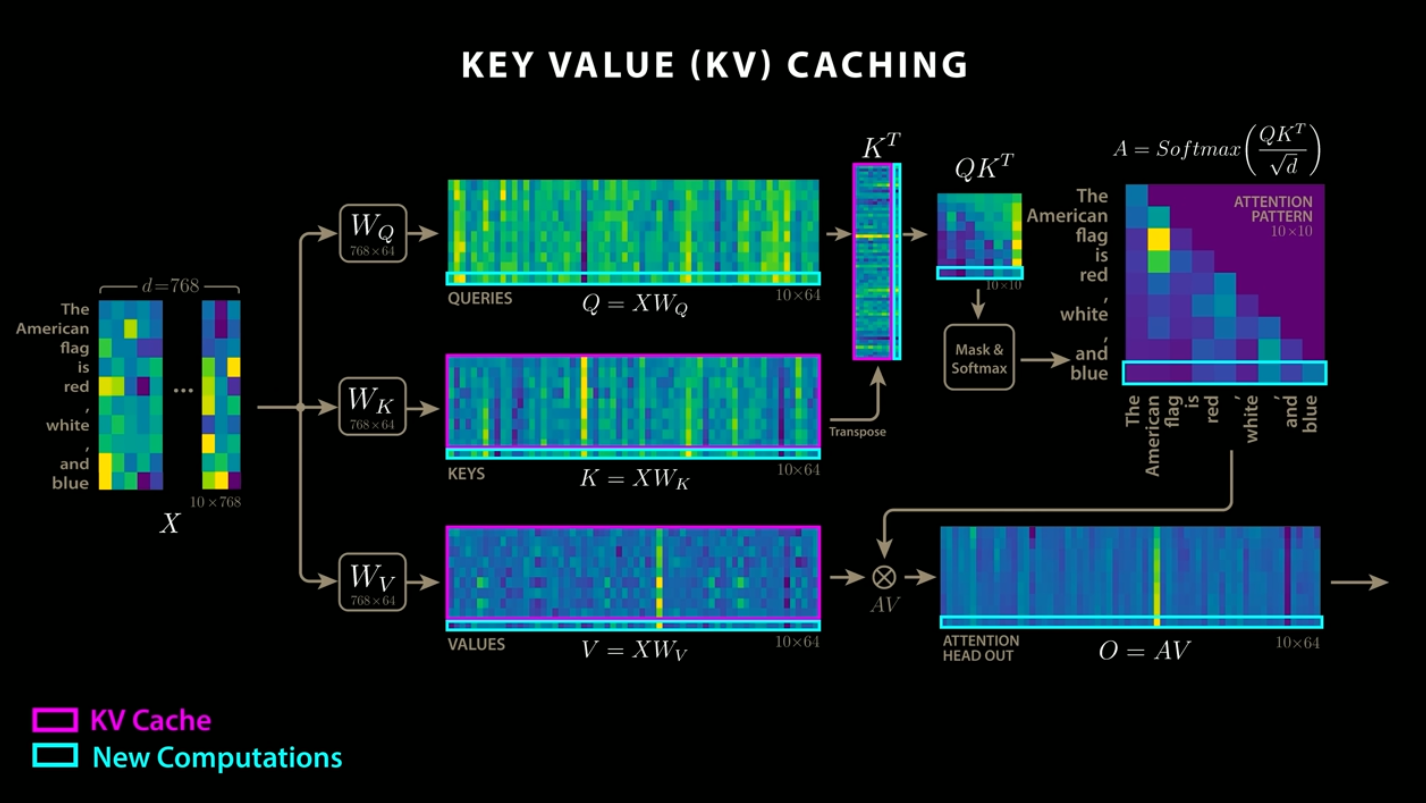
KV cache (Source: https://www.youtube.com/watch?app=desktop&v=0VLAoVGf_74)
To support long context, the frequency of ROPE used for encoding positional information in local attention is set to 10k, while the frequency for global attention is increased to 1M.
Tokenizer
The tokenizer is the same as in Gemma2. It is a SentencePiece tokenizer that performs number splitting, whitespace preservation, and byte-level encoding, with a vocabulary of 262,000. This tokenizer provides a more balanced performance for languages other than English.
Training
The 27B model is trained on 14T tokens, the 12B model on 12T tokens, the 4B model on 4T tokens, and the 1B model on 2T tokens. Like Gemma2, Gemma3 uses distillation, training to match the token probability distributions of a larger model.
For training, instead of NVIDIA GPUs, Google used their custom-developed ASICs TPUv4, TPUv5e, and TPUv5p.
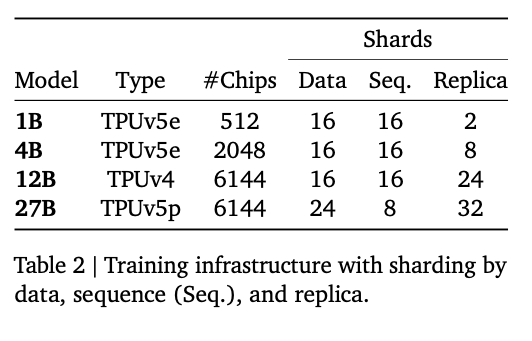
Training infra (Source: https://storage.googleapis.com/deepmind-media/gemma/Gemma3Report.pdf)
Quantization
Gemma3 officially provides quantized models. QAT (Quantization Aware Training) is used to create these models, and the models are fine-tuned in the process. In QAT, 5,000 training steps are performed to match the probability distributions of pre-training and post-training.
Performance
Gemma3 significantly outperforms Gemma2, and its 27B model delivers higher performance than Gemini 1.5 Flash.
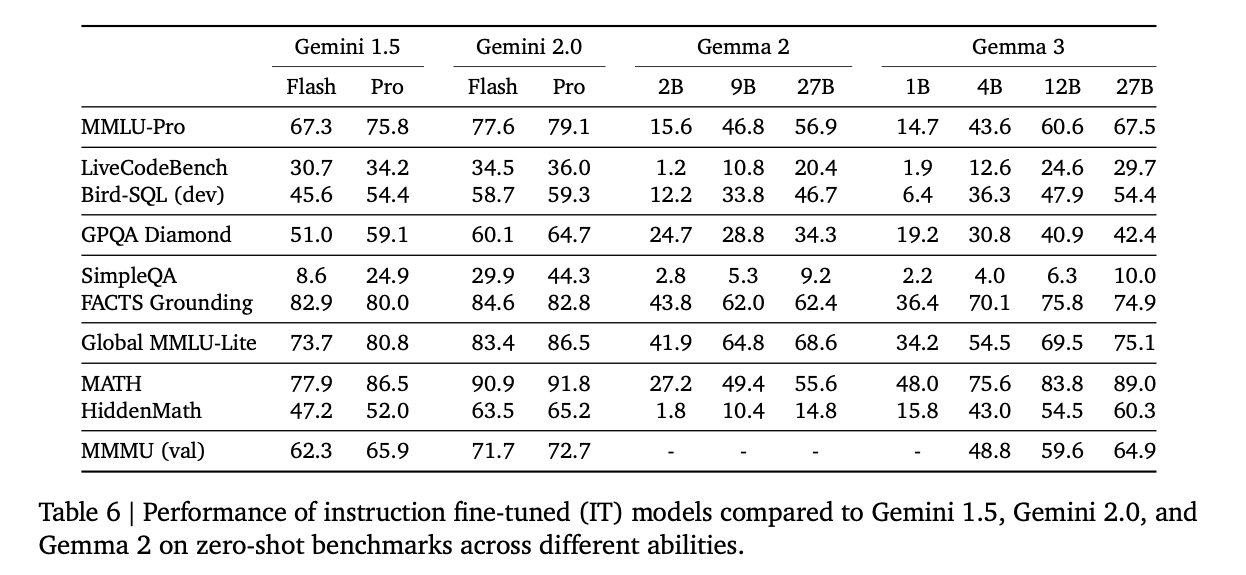
Benchmark (Source: https://storage.googleapis.com/deepmind-media/gemma/Gemma3Report.pdf)
Gemma3 surpasses Gemma2 in every metric.
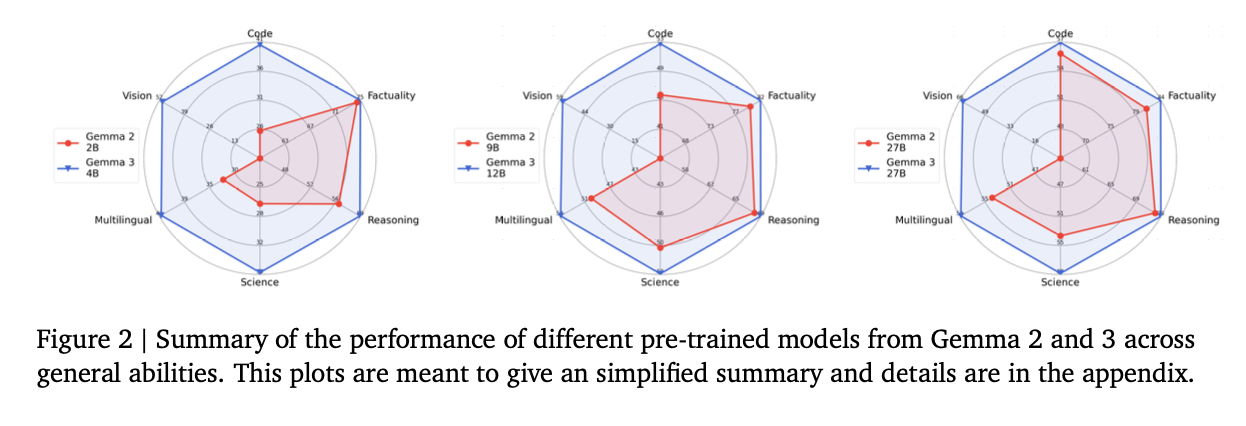
Benchmark (Source: https://storage.googleapis.com/deepmind-media/gemma/Gemma3Report.pdf)
Comparison with Qwen2VL
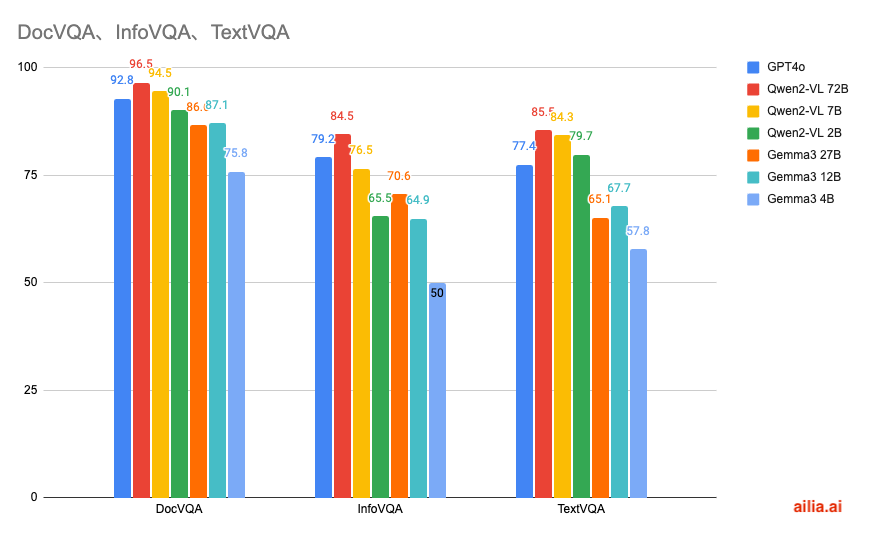
Here is a comparison of the scores for DocVQA, a dataset for questions about text and tables, InfoVQA, a dataset for questions about infographic, and TextVQA, a dataset for questions about natural images.
In terms of multimodal performance, Qwen2-VL demonstrates higher performance.
Examples from each dataset are shown below.
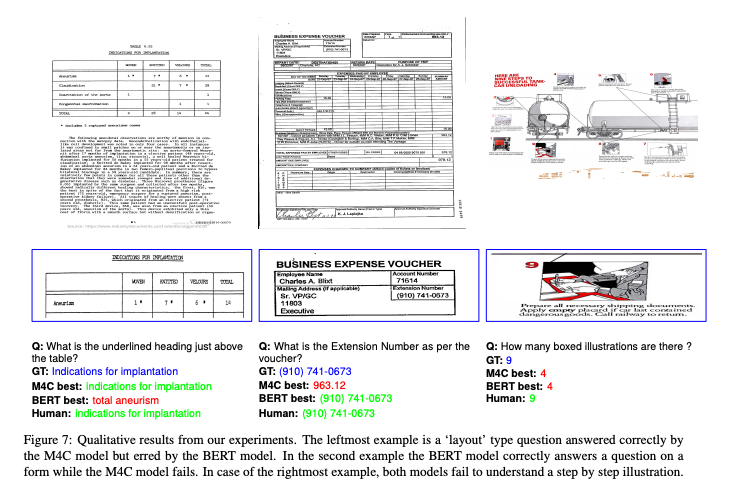
Sample from DocVQA (Source: https://arxiv.org/abs/2007.00398)
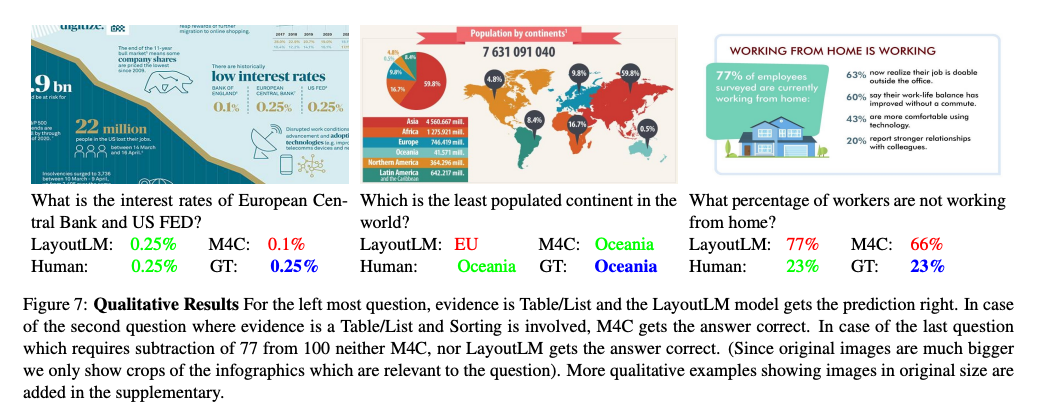
Sample from InfoVQA (Source: https://arxiv.org/abs/2104.12756)
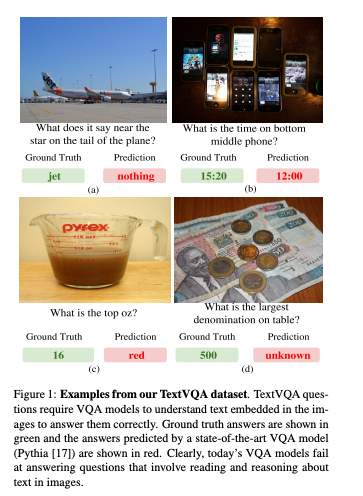
Sample from TextVQA (Source: https://arxiv.org/abs/1904.08920)
Here is the source data for the graph.
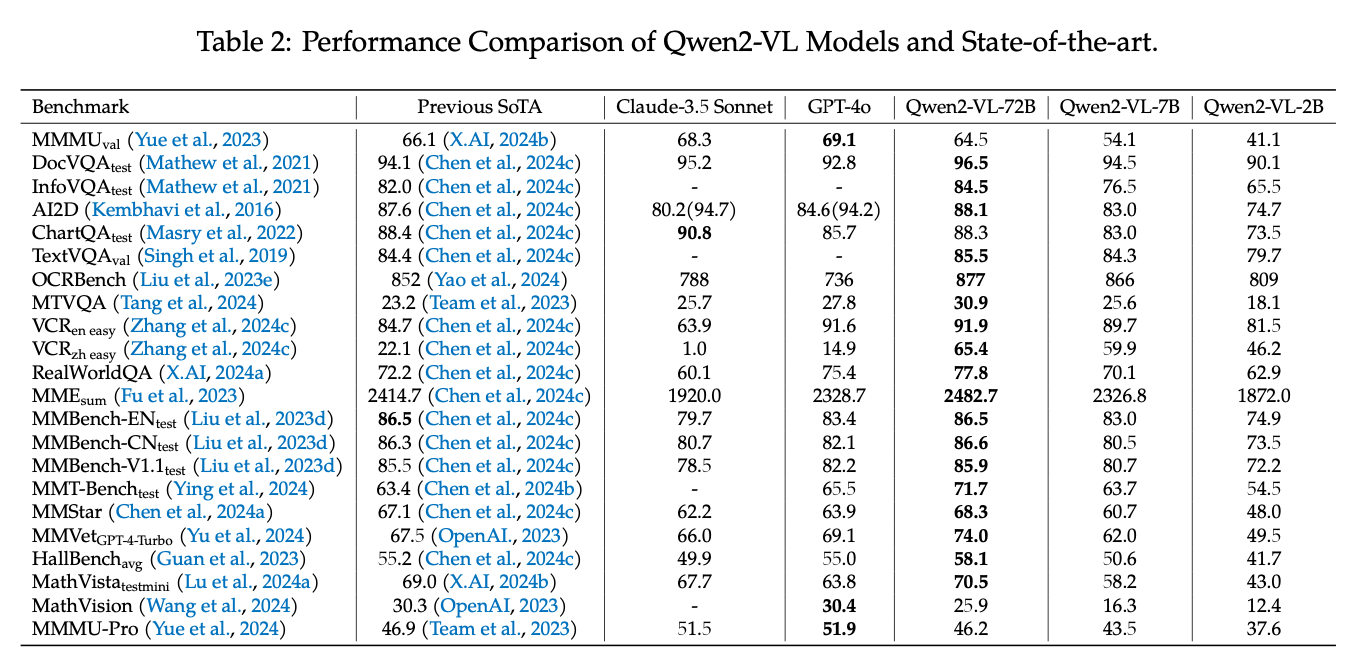
Qwen2VL (Source: https://arxiv.org/abs/2409.12191)
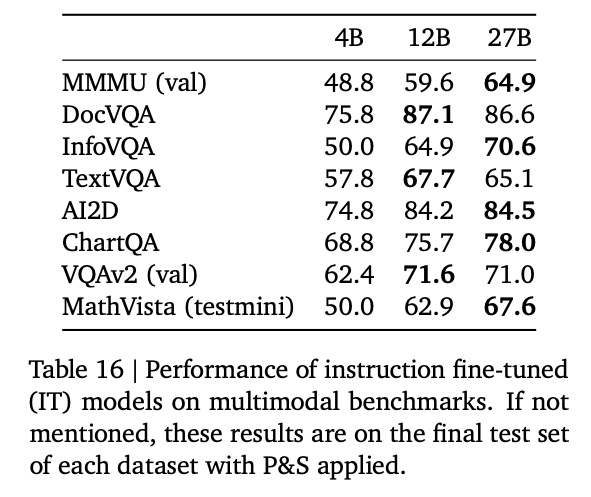
Gemma3 (Source: https://storage.googleapis.com/deepmind-media/gemma/Gemma3Report.pdf)
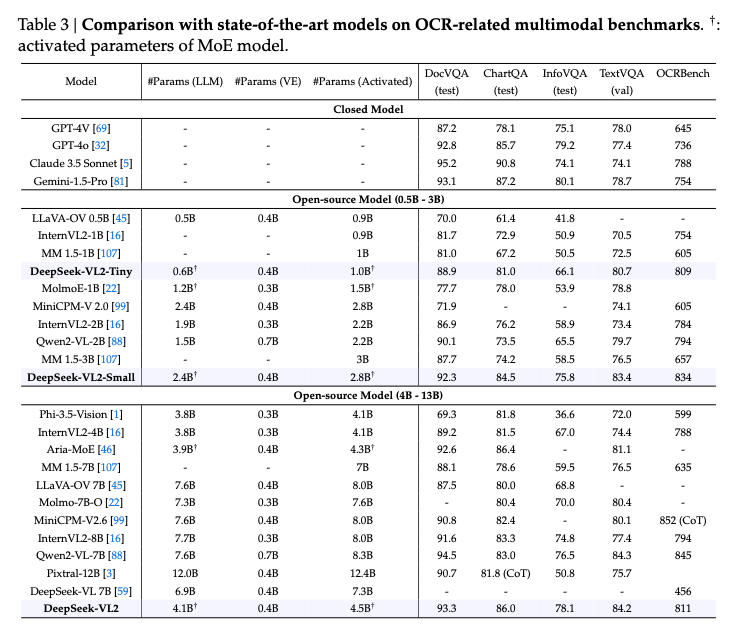
DeepSeek VL2 (Source: https://arxiv.org/abs/2412.10302)
llama.cpp support
Quantized models for llama.cpp are available at the link below.
llama.cpp supports Gemma3 starting from version b4875.
llama.cpp also supports image input through the following PR.
ailia LLM support
ailia LLM is a library that enables the use of llama.cpp from Flutter and Unity. It has supported Gemma3 since version 1.3.1.
The method for running it in Python is shown below. It works on macOS, Windows, and Linux. The initial run involves downloading a 4GB model, which may take some time.
pip3 install ailia-llm
import ailia_llm

import os
import urllib.request

model_file_path = "gemma-3-4b-it-Q4_K_M.gguf"
if not os.path.exists(model_file_path):
 print("begin model download")
 urllib.request.urlretrieve(
  "https://storage.googleapis.com/ailia-models/gemma/gemma-3-4b-it-Q4_K_M.gguf",
  model_file_path
 )
 print("end model download")

model = ailia_llm.AiliaLLM()
model.open(model_file_path)

messages = []
messages.append({"role": "system", "content": "語尾に「わん」をつけてください。"})
messages.append({"role": "user", "content": "あなたの名前は何ですか?"})

stream = model.generate(messages)

text = ""
for delta_text in stream:
 text = text + delta_text
print(text)

if model.context_full():
 raise Exception("Context full")

messages.append({"role": "assistant", "content": text})
ailia LLM : エッジデバイスにLLMを実装できるライブラリエッジデバイスにLLMを実装するためのライブラリであるailia LLMの紹介です。medium.com
ailia DX Insight support
ailia DX Insight is a GUI tool that allows local LLMs to be run easily. Support for Gemma3 has been available since the beta version of ailia DX Insight 1.2.1.
ailia Inc. has developed ailia SDK, which enables cross-platform, GPU-based rapid inference.
ailia Inc. provides a wide range of services from consulting and model creation, to the development of AI-based applications and SDKs. Feel free to contact us for any inquiry.