 ailia Tech BLOG
Feed Any Document to ChatGPT Using LangChain
Overview
Since ChatGPT cannot respond to data it has not been trained on, a method of extrapolating context has been developed. This method is called RAG (Retrieval Augmented Generation), which involves inserting external text into the query and having the Large Language Model (LLM) generate an answer based on this augmented input.
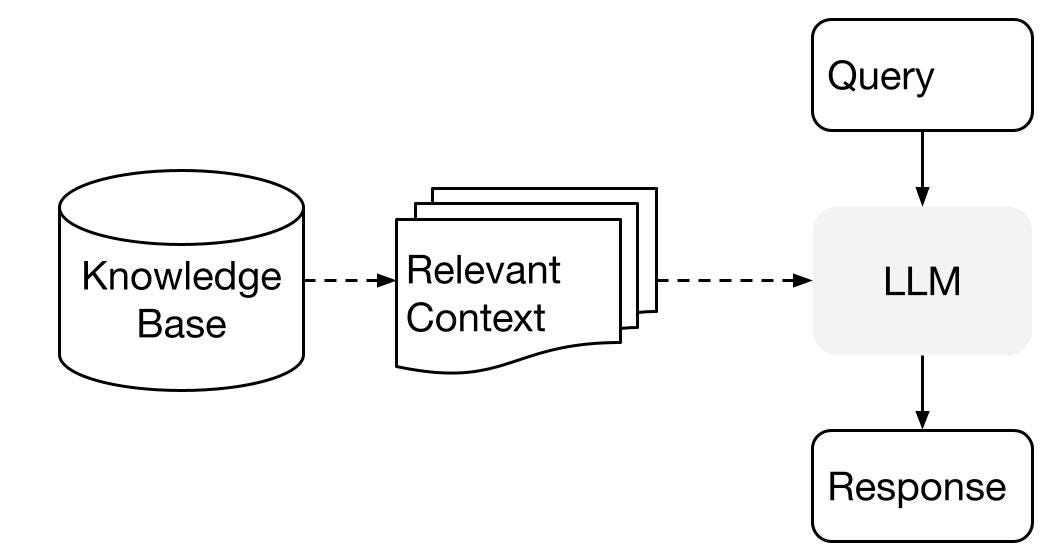
Source: https://gpt-index.readthedocs.io/en/latest/getting_started/concepts.html
By using LangChain, RAG can be easily implemented. It allows for the creation of an index from any document and allows you to ask queries based on the context of that document.
Index creation
To create an index from a PDF, the following process is used. First, the PDF is loaded (the documentation of ailia SDK AR02ALA_UM01_22E.pdf in the example below), and text is generated. Then, the text is divided into semantically relevant chunks using TextSplitter. After that, embeddings are calculated and written to ChromaDB, a local vector database.
from langchain.document_loaders import PDFMinerLoader

loader = PDFMinerLoader("AR02ALA_UM01_22E.pdf")
documents = loader.load()

from langchain.text_splitter import RecursiveCharacterTextSplitter
text_splitter = RecursiveCharacterTextSplitter(chunk_size=400, chunk_overlap=0)
texts = text_splitter.split_documents(documents)

from langchain.embeddings import OpenAIEmbeddings
embeddings = OpenAIEmbeddings()

from langchain.vectorstores import Chroma
db = Chroma.from_documents(texts, embeddings, persist_directory="./storage")
db.persist()
Querying the index
To obtain answers from an index, load the index into ChromaDB, obtain a retriever instance, and generate answers using RetrievalQA.
In the example below, the stuff argument is specified as chain_type in RetrievalQA, which means no refinement is performed and all the documents are “stuffed” into the final prompt. This involves only one call to the language model, but in case we have too many documents, the documents may not fit inside the context window.
from langchain.embeddings import OpenAIEmbeddings
embeddings = OpenAIEmbeddings()

from langchain.vectorstores import Chroma
db = Chroma(persist_directory="./storage", embedding_function=embeddings)
retriever = db.as_retriever()

from langchain.llms import OpenAI
llm = OpenAI(model_name="text-davinci-003", temperature=0, max_tokens=500)

from langchain.chains import RetrievalQA
qa = RetrievalQA.from_chain_type(llm=llm, chain_type="stuff", retriever=retriever)

import sys
args = sys.argv
if len(args) >= 2:
 query = args[1]
else:
 query = "What operating systems does ailia SDK support?"
answer = qa.run(query)

print("Q:", query)
print("A:", answer)
Advanced features
Streaming output
To use streaming output, give streaming=True to OpenAI and provide a custom callback handler.
llm = OpenAI(model_name="text-davinci-003", temperature=0, max_tokens=500,  streaming=True, callback_manager=CallbackManager([MyCustomCallbackHandler()]), )
from langchain.chains import RetrievalQA
qa = RetrievalQA.from_chain_type(llm=llm, chain_type="stuff", retriever=retriever)
query = "What is ailia SDK?"
answer = qa.run(query)
Register and filter multiple documents in ChromaDB
In the metadata’s sources of ChromaDB, filenames are included. By using the filtering search_kwargs as argument in as_retriever, it is possible to limit the search to specific documents only.
retriever = db.as_retriever(
            search_kwargs={
                "k": TOP_K,
                "filter": {"source":filter}
            })
Troubleshooting
Cannot install ChromaDB on macOS
The following error might occur when installing ChromaDB using pip3 on Mac.
clang -Wno-unused-result -Wsign-compare -Wunreachable-code -fno-common -dynamic -DNDEBUG -g -fwrapv -O3 -Wall -iwithsysroot/System/Library/Frameworks/System.framework/PrivateHeaders -iwithsysroot/Applications/Xcode.app/Contents/Developer/Library/Frameworks/Python3.framework/Versions/3.9/Headers -arch arm64 -arch x86_64 -Werror=implicit-function-declaration -I/private/var/folders/_5/1td0d93j50j3h3l13x3tbczm0000gn/T/pip-build-env-g6zyba0j/overlay/lib/python3.9/site-packages/pybind11/include -I/private/var/folders/_5/1td0d93j50j3h3l13x3tbczm0000gn/T/pip-build-env-g6zyba0j/overlay/lib/python3.9/site-packages/numpy/core/include -I./hnswlib/ -I/Applications/Xcode.app/Contents/Developer/Library/Frameworks/Python3.framework/Versions/3.9/include/python3.9 -c ./python_bindings/bindings.cpp -o build/temp.macosx-10.9-universal2-3.9/./python_bindings/bindings.o -O3 -march=native -stdlib=libc++ -mmacosx-version-min=10.7 -DVERSION_INFO=\"0.7.0\" -std=c++14 -fvisibility=hidden
  clang: error: the clang compiler does not support '-march=native'
  error: command '/usr/bin/clang' failed with exit code 1
In such a case, the problem can be avoided by doing the following:
export HNSWLIB_NO_NATIVE=1
Sample code
The sample code used in this article is available at the repository below.
ailia Inc. has developed ailia SDK, which enables cross-platform, GPU-based rapid inference.
ailia Inc. provides a wide range of services from consulting and model creation, to the development of AI-based applications and SDKs. Feel free to contact us for any inquiry.