 ailia Tech BLOG
CrnnSoundClassification : A Machine Learning Model for Classifying Sound
This is an introduction to「CrnnSoundClassification」, a machine learning model that can be used with ailia SDK. You can easily use this model to create AI applications using ailia SDK as well as many other ready-to-use ailia MODELS.
Overview
CrnnSoundClassification is a machine learning model that takes an audio file as input and classifies it into 10 categories.
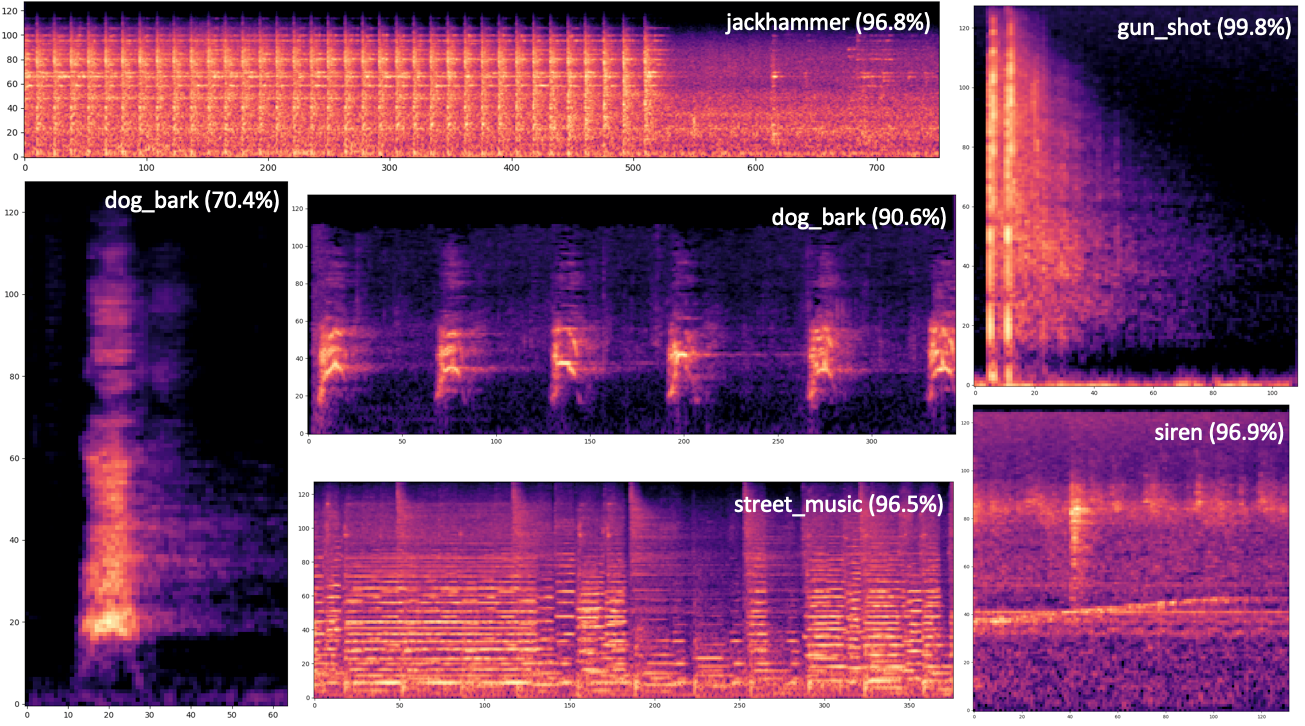
Source: https://github.com/ksanjeevan/crnn-audio-classification
The following categories of sound can be recognized.
air_conditioner, car_horn, children_playing, dog_bark, drilling, enginge_idling, gun_shot, jackhammer, siren, and street_music
Architecture
CrnnSoundClassification performs a mel spectrogram transformation on the input audio to convert it into a spectrum, then uses Convolutional Neural Network (CNN) and Long Short-Term Memory (LSTM) to compute features, and classifies it using FC and Softmax.
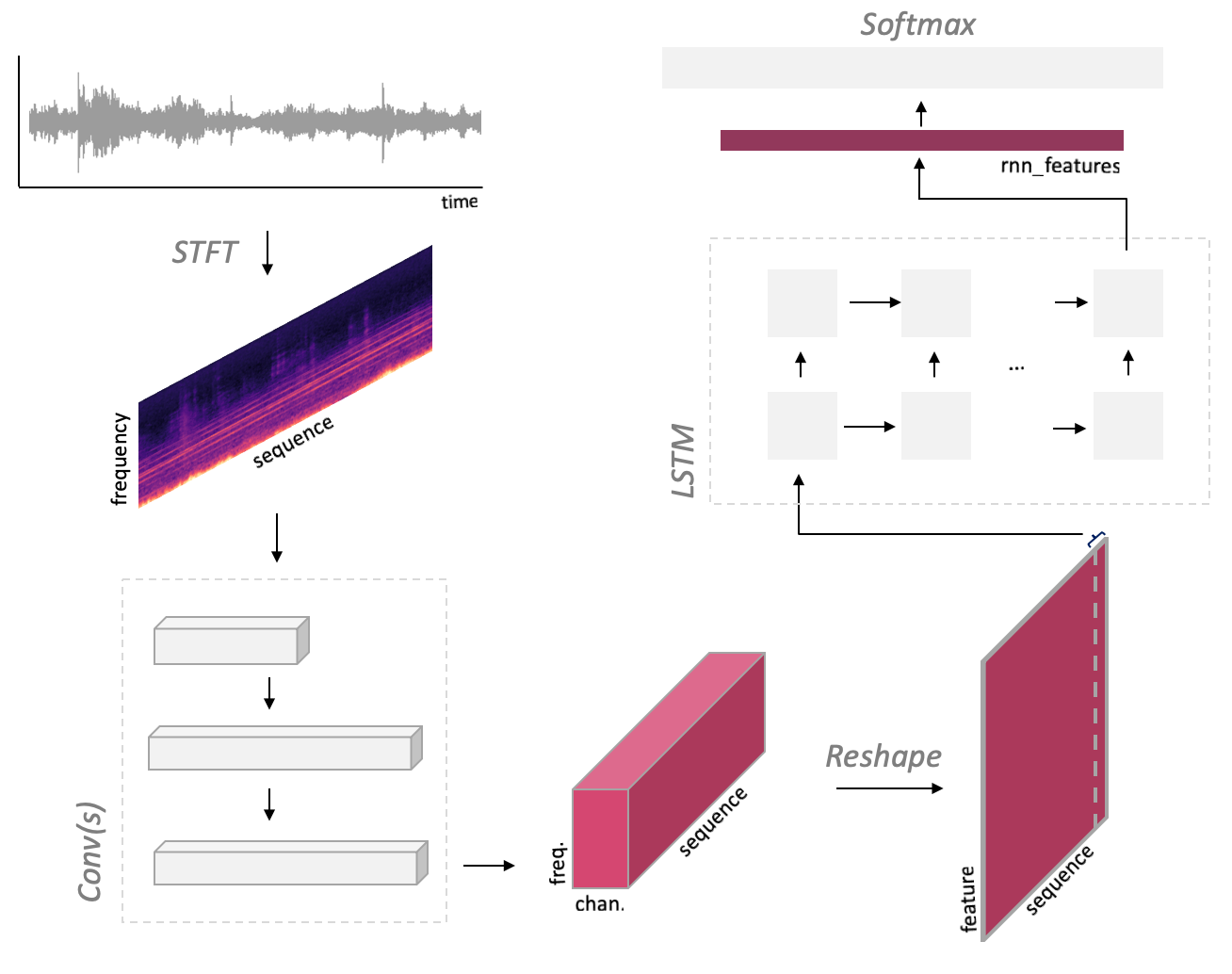
Source: https://github.com/ksanjeevan/crnn-audio-classification
The parameters for the spectral transformation are defined in net/model.py
self.spec = MelspectrogramStretch(hop_length=None, num_mels=128, fft_length=2048, norm=’whiten’, stretch_param=[0.4, 0.4])
The input has a variable size defined by (1,2,num_seconds * sample_rate). For example, given a 2-channel and 66026-sample wav file (66026, 2) as input, it will be converted to (1,66026,1), components being respectively (batch, samples, channel), by AudioInference.infer. This is then converted to a Mel spectrum, and the result (1, 1, 128, 65), components being respectively (batch, padding, bins, times), becomes the input of the CNN. Following the same logic, a wav file (99225, 2) will be transformed to (1,1,128,97) as input to Conv(s).
The CNN executes 3x3 maxpool once and 4x4 maxpools twice. If the width is (128,65), the given input size is (64x8x2) and the computed output size is (64x2x0), and an error *Output size is too small* occurs. This is the reason why padding is required for short samples.
CrnnSoundClassification has been trained using the UrbanSound8K dataset, a collection of field recordings uploaded to www.freesound.org
CrnnSoundClassification inference using Pytorch
You can use the trained model from the following Issue to run inference with Pytorch.
config.json specifies the training configuration, model.cfg defines the model architecture, and model_best.pth contains the weights.
Use the following command to run the inference.
$ python3 run.py dog.wav -r downloaded_model/model_best.pth
By default, model.cfg is loaded from the full path contained in the pth file (see run.py, line 168). If you want to use a different path on your machine, you need to rewrite the path to model.cfg after config = checkpoint[‘config’] in args.resume as follows.
config[“cfg”] = “./downloaded_model/model.cfg”
Internally, the network is built from model.cfg using torchparse. If this path is wrong, the following error will occur.
File “/crnn-audio-classification/net/model.py”, line 55, in forward
xt = self.net‘convs’
KeyError: ‘convs’
Retraining of CrnnSoundClassification
By creating a csv file following the format of UrbanSound8K, it is possible to retrain the model with your own data set.
./run.py train -c config.json — cfg arch.cfg
The layout of the data set is shown below.
UrbanSound8K/audio/fold1/*.wav
UrbanSound8K/audio/fold2/*.wav
UrbanSound8K/metadata/UrbanSound8K.csv
The csv file follow the following format.
slice_file_name , fsID , start , end , salience , fold , classID , class
100032–3–0–0.wav , 100032 , 0.0 , 0.317551 , 1 , 5 , 3 , dog_bark
Usage in ailia SDK
You can classify any input audio file using ailia SDK with the following command.
$ python3 crnn_sound_classification.py -i dog.wav
In this example, dog.wav will be classified as dog_bark.
dog_bark
0.8683825731277466
ailia Inc. has developed ailia SDK, which enables cross-platform, GPU-based rapid inference.
ailia Inc. provides a wide range of services from consulting and model creation, to the development of AI-based applications and SDKs. Feel free to contact us for any inquiry.