 ailia Tech BLOG
Convert Models From Pytorch to TFLite With AI Edge Torch
This article explains how AI Edge Torch can be used to convert PyTorch models into .tflite format, which can then be run with TensorFlow Lite (TFLite hereafter) and MediaPipe, on Android, iOS and IOT devices.
About AI Edge Torch
AI Edge Torch is a toolkit developed by Google and released in May 2024 for converting models from Pytorch to TFLite.
Previously, when converting Pytorch model to TFLite format, it was necessary to go through the ONNX format, using tools like onnx2tensorflow.
However, this method had issues where frequent Transpose operations were inserted due to the conversion between Pytorch’s default ChannelFirst format and TensorFlow’s ChannelLast format, resulting in slower inference speeds. Additionally, many conversion errors occurred when converting from ONNX to TensorFlow saved_model.
AI Edge Torch solves these problems by directly outputting TFLite from Pytorch.
Installation
Simply run the following command
pip3 install ai-edge-torch
Conversion from ResNet18 to TFLite (float)
By inputting the ResNet18 Torch model into ai_edge_torch.convert, you can convert it to TFLite.
import torch
import torchvision
import ai_edge_torch

resnet18 = torchvision.models.resnet18(torchvision.models.ResNet18_Weights.IMAGENET1K_V1)
sample_inputs = (torch.randn(1, 3, 224, 224),)
edge_model = ai_edge_torch.convert(resnet18.eval(), sample_inputs)
edge_model.export("resnet18.tflite")
The output model is very clean, with no unnecessary Transpose operations.
(visualisation using Netron)
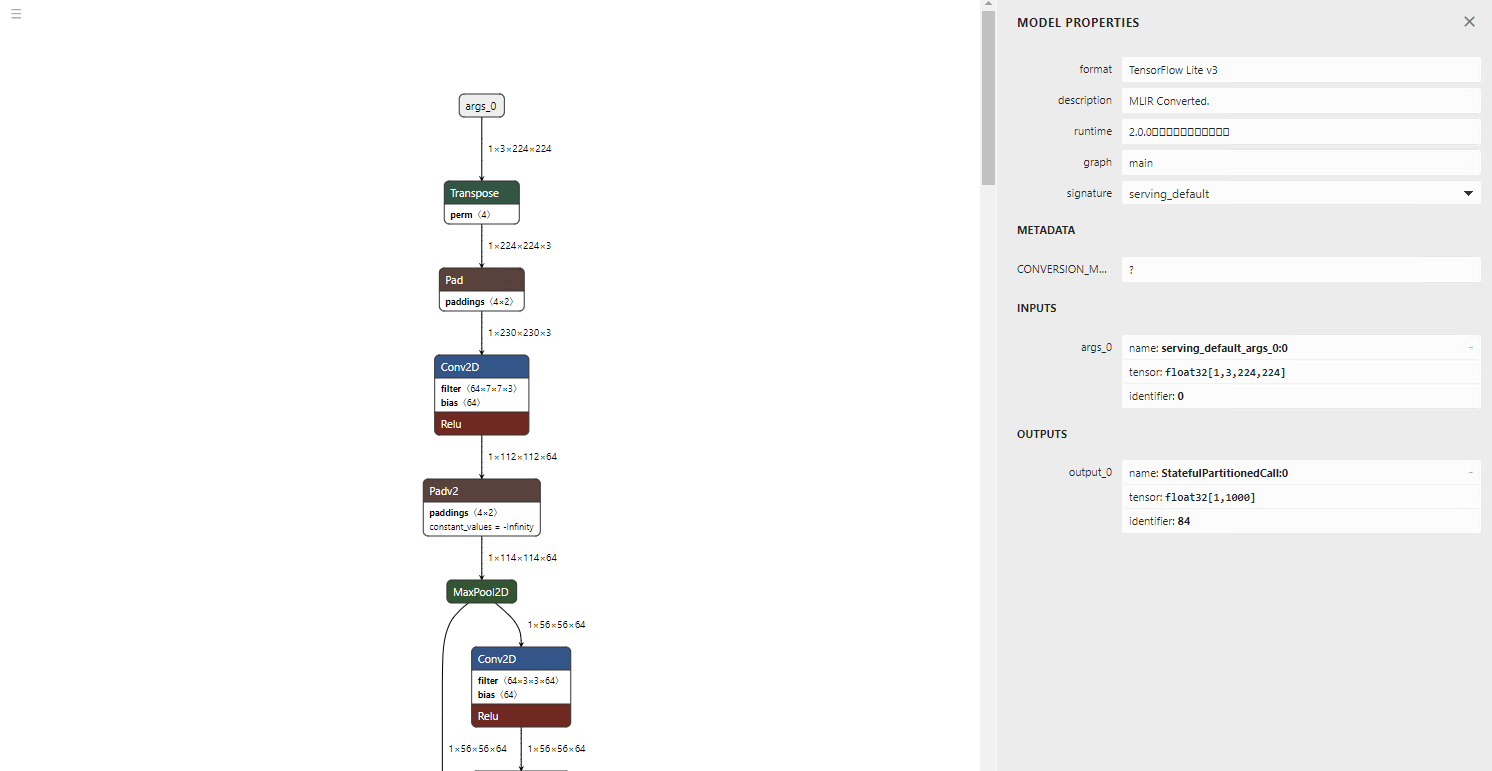
Of course, the inference result is also correct.
=============================================================
class_count=3
+ idx=0
  category=892[wall clock ]
  prob=13.361162185668945
  value=13.361162185668945
+ idx=1
  category=409[analog clock ]
  prob=12.400266647338867
  value=12.400266647338867
+ idx=2
  category=426[barometer ]
  prob=10.935765266418457
  value=10.935765266418457
Script finished successfully.
Conversion from ResNet18 to TFLite (int8) with quantization
AI Edge Torch also supports quantization. To perform quantization, use pt2e_quantizer. Calibration is done by performing inference between prepare_pt2e and convert_pt2e. In this example, one image is used, but in practice, inference is performed with multiple images for calibration.
import torch
import torchvision
import ai_edge_torch

from ai_edge_torch.quantize import pt2e_quantizer
from ai_edge_torch.quantize import quant_config
from torch.ao.quantization import quantize_pt2e

resnet18 = torchvision.models.resnet18(torchvision.models.ResNet18_Weights.IMAGENET1K_V1)
sample_inputs = (torch.randn(1, 3, 224, 224),)

quantizer = pt2e_quantizer.PT2EQuantizer().set_global(
    pt2e_quantizer.get_symmetric_quantization_config()
)
model = torch._export.capture_pre_autograd_graph(resnet18, sample_inputs)
model = quantize_pt2e.prepare_pt2e(model, quantizer)

import cv2
import numpy
img = cv2.imread("clock.jpg")
img = cv2.resize(img, (224, 224))
img = numpy.expand_dims(img, 0)
img = numpy.transpose(img, (0, 3, 1, 2))
img = img / 255.0
img = img.astype(numpy.float32)
model(torch.from_numpy(img)) # calibration

model = quantize_pt2e.convert_pt2e(model, fold_quantize=False)

with_quantizer = ai_edge_torch.convert(
    model,
    sample_inputs,
    quant_config=quant_config.QuantConfig(pt2e_quantizer=quantizer),
)
with_quantizer.export("resnet18_int8.tflite")
The model quantization is executed using torch.ao.quantization. AI Edge Torch can also converts models that have already been quantized in Torch into TFLite.
This sample was created based on the test code below.
The visualisation of the model architecture shows the inputs and outputs are in int8 format.
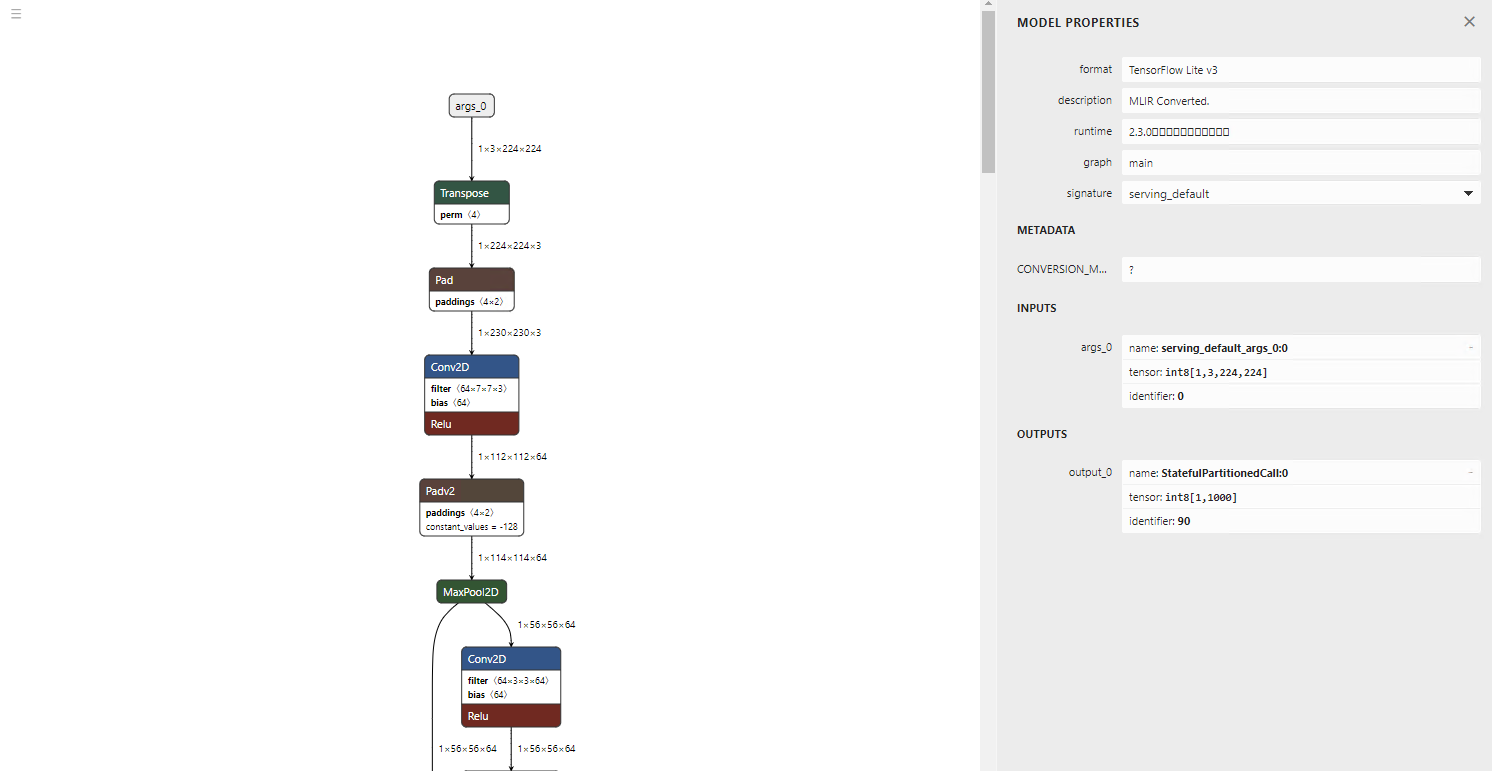
The inference result remains correct.
=============================================================
class_count=3
+ idx=0
  category=892[wall clock ]
  prob=13.09241008758545
  value=123
+ idx=1
  category=409[analog clock ]
  prob=12.106959342956543
  value=109
+ idx=2
  category=426[barometer ]
  prob=10.980731010437012
  value=93
Conversion of large-scale models
AI Edge Torch was developed with the conversion of LLM models in mind, so it is capable of converting large-scale models. Let’s try converting GFPGAN, details about the model in the article below.
GFPGAN: A Machine Learning Model for Enhancing the Quality of Facial ImagesThis is an introduction to「GFPGAN」, a machine learning model that can be used with ailia SDK. You can easily use this…medium.com
Here is a code example for converting GFPGAN to TFLite float.
import torch
import ai_edge_torch

import os
model_name = "GFPGANv1.3"
model_path = os.path.join('experiments/pretrained_models', model_name + '.pth')
upscale = 2
arch = 'clean'
channel_multiplier = 2
from gfpgan import GFPGANer
restorer = GFPGANer(
    model_path=model_path,
    upscale=upscale,
    arch=arch,
    channel_multiplier=channel_multiplier,
    bg_upsampler=None,
    device="cpu")
model = restorer.gfpgan
model.eval()

sample_inputs = (torch.randn(1, 3, 512, 512),)
edge_model = ai_edge_torch.convert(model, sample_inputs)
edge_model.export("gfpgan_float.tflite")
Below is the converted model visualisation. Since TFLite does not support LeakyReLU, it is converted into Gather, Mul, and Select operations.
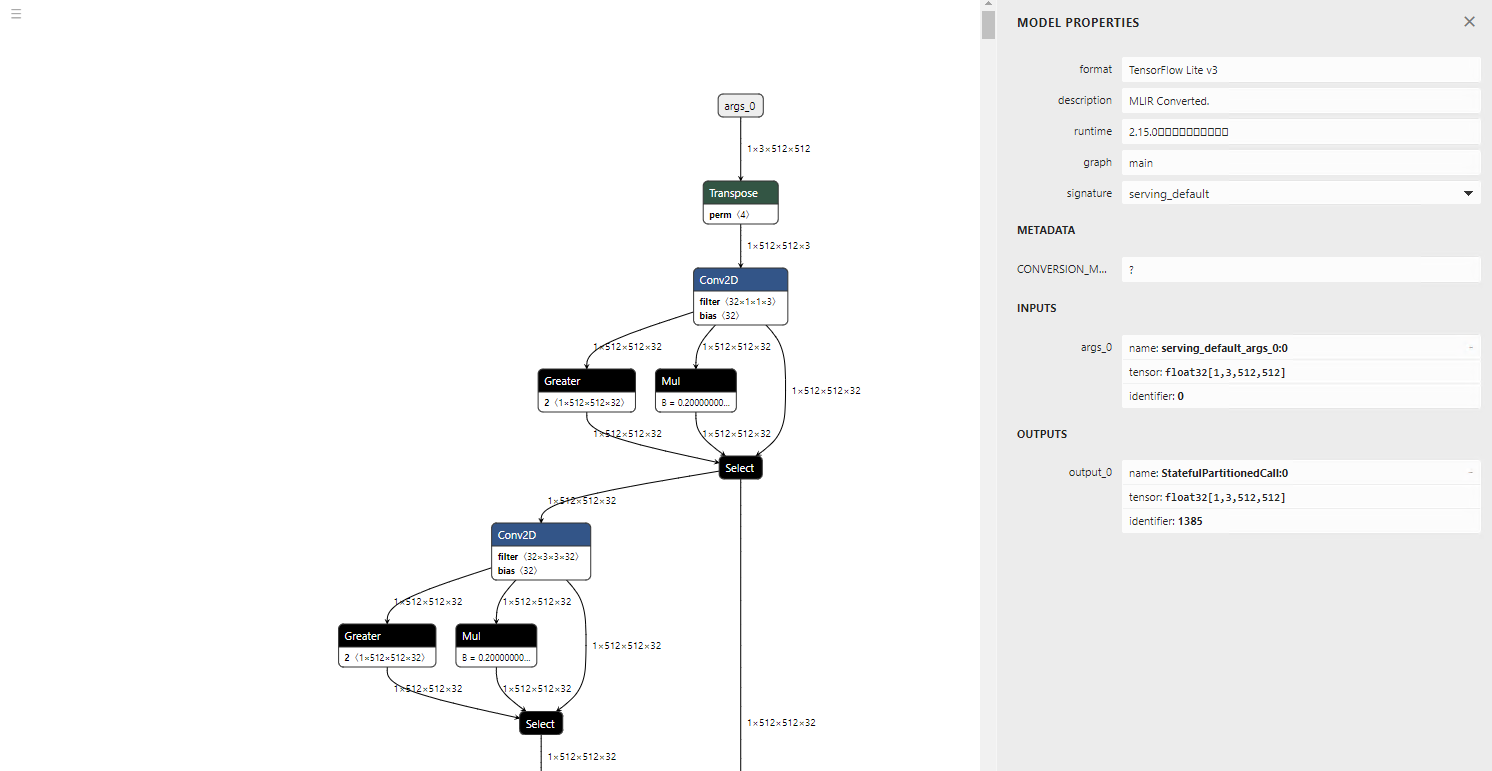
torch.randn is converted to a new operator called STABLEHLO_RNG_BIT_GENERATOR. As a result, it will cause an error in TensorFlow 2.12.0. However, inference runs correctly in TensorFlow 2.17.0.
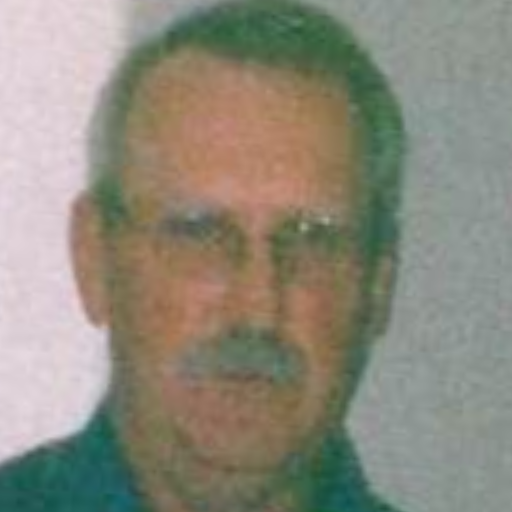
GFPGAN input image (Source: https://github.com/TencentARC/GFPGAN/blob/master/inputs/whole_imgs/10045.png)

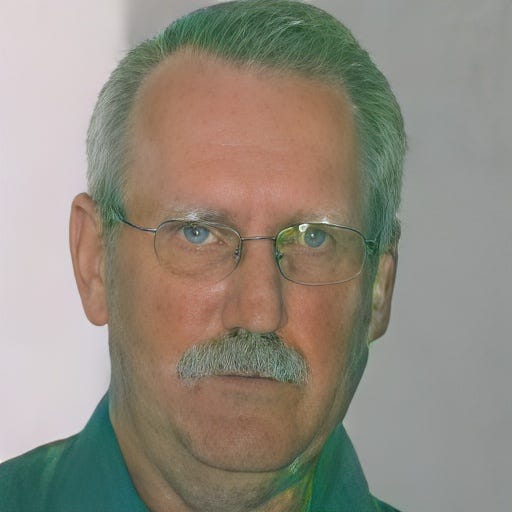
GFPGAN output image (Source: https://github.com/TencentARC/GFPGAN/blob/master/inputs/whole_imgs/10045.png)
Now let’s convert the same model to TFLite Int8.
# normal
import torch
import ai_edge_torch

import os
model_name = "GFPGANv1.3"
model_path = os.path.join('experiments/pretrained_models', model_name + '.pth')
upscale = 2
arch = 'clean'
channel_multiplier = 2
from gfpgan import GFPGANer
restorer = GFPGANer(
    model_path=model_path,
    upscale=upscale,
    arch=arch,
    channel_multiplier=channel_multiplier,
    bg_upsampler=None,
    device="cpu")
model = restorer.gfpgan
model.eval()

sample_inputs = (torch.randn(1, 3, 512, 512),)
edge_model = ai_edge_torch.convert(model, sample_inputs)
edge_model.export("gfpgan_float.tflite")

# quantize
from ai_edge_torch.quantize import pt2e_quantizer
from ai_edge_torch.quantize import quant_config
from torch.ao.quantization import quantize_pt2e

quantizer = pt2e_quantizer.PT2EQuantizer().set_global(
    pt2e_quantizer.get_symmetric_quantization_config()
)
model = torch._export.capture_pre_autograd_graph(model, sample_inputs)
model = quantize_pt2e.prepare_pt2e(model, quantizer)

import cv2
import numpy
for face in ["face_01.png", "face_02.png", "face_03.png"]:
    img = cv2.imread(face)
    img = cv2.cvtColor(img, cv2.COLOR_BGR2RGB)
    img = cv2.resize(img, (512, 512))
    img = numpy.expand_dims(img, 0)
    img = numpy.transpose(img, (0, 3, 1, 2))
    img = img / 255.0
    img = (img - 0.5) / 0.5
    img = img.astype(numpy.float32)
    print(img.shape)
    model(torch.from_numpy(img)) # calibration

model = quantize_pt2e.convert_pt2e(model, fold_quantize=False)

with_quantizer = ai_edge_torch.convert(
    model,
    sample_inputs,
    quant_config=quant_config.QuantConfig(pt2e_quantizer=quantizer),
)
with_quantizer.export("gfpgan_int8.tflite")
In the case of Int8, calibration fails with the following error:
Traceback (most recent call last):
  File "/mnt/c/Users/kyakuno/Desktop/tflite/GFPGAN/tflite.py", line 49, in <module>
    model(torch.from_numpy(img)) # calibration
  File "/home/kyakuno/.local/lib/python3.10/site-packages/torch/fx/graph_module.py", line 738, in call_wrapped
    return self._wrapped_call(self, *args, **kwargs)
  File "/home/kyakuno/.local/lib/python3.10/site-packages/torch/fx/graph_module.py", line 316, in __call__
    raise e
  File "/home/kyakuno/.local/lib/python3.10/site-packages/torch/fx/graph_module.py", line 303, in __call__
    return super(self.cls, obj).__call__(*args, **kwargs)  # type: ignore[misc]
  File "/home/kyakuno/.local/lib/python3.10/site-packages/torch/nn/modules/module.py", line 1553, in _wrapped_call_impl
    return self._call_impl(*args, **kwargs)
  File "/home/kyakuno/.local/lib/python3.10/site-packages/torch/nn/modules/module.py", line 1562, in _call_impl
    return forward_call(*args, **kwargs)
  File "<eval_with_key>.106", line 183, in forward
  File "/home/kyakuno/.local/lib/python3.10/site-packages/torch/_ops.py", line 667, in __call__
    return self_._op(*args, **kwargs)
RuntimeError: view size is not compatible with input tensor's size and stride (at least one dimension spans across two contiguous subspaces). Use .reshape(...) instead.
The conversion of the model without performing calibration is successful. However, during inference with TensorFlow 2.17.0, an exception occurs and the inference does not complete.
The model itself appears to be correctly quantized to Int8.
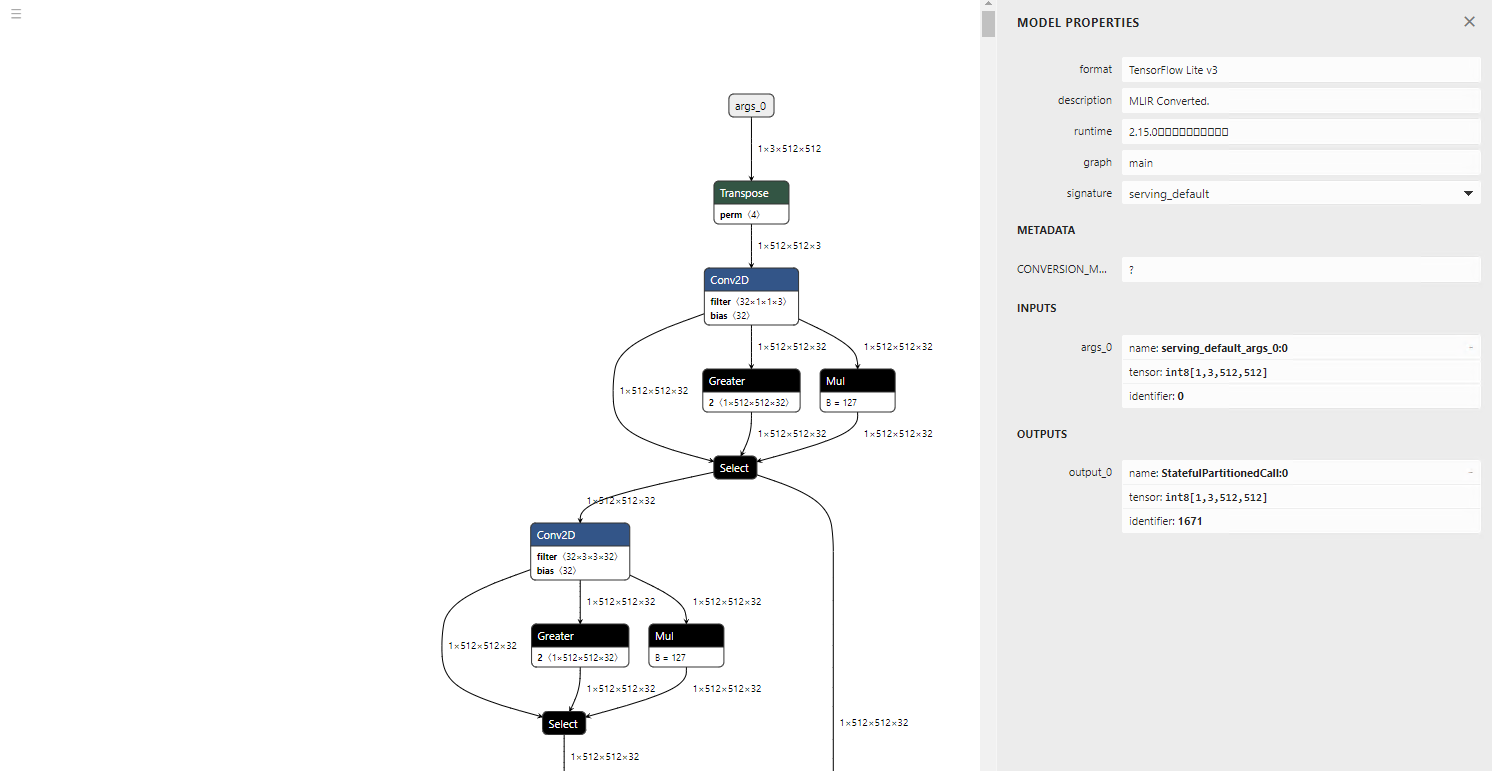
Conversion parameters
Regarding the Flex operator
When trying to convert operators like Relu6, which are not included in the TFLITE_BUILTIN set and require Flex operators, the following error occurs:
Some ops are not supported by the native TFLite runtime, you can enable TF kernels fallback using TF Select. See instructions: https://www.tensorflow.org/lite/guide/ops_select
TF Select ops: Relu6
In such cases, it is possible to enable Flex operators by using _ai_edge_converter_flags
import ai_edge_torch
 import tensorflow as tf
 sample_inputs = (input_image,)
 tfl_converter_flags = {'target_spec': {'supported_ops': [tf.lite.OpsSet.TFLITE_BUILTINS, tf.lite.OpsSet.SELECT_TF_OPS]}}
 edge_model = ai_edge_torch.convert(self.model, sample_inputs, _ai_edge_converter_flags=tfl_converter_flags)
 edge_model.export("image_encoder.tflite")
Regarding dynamic shapes
By default, all shapes are output as static. To use dynamic shapes, you can specify dynamic shapes by using the torch.dynamo functionality. In dynamo, shape validation runs during graph tracing. Therefore, if there are constraints like multiples of 4096, you need to define variables and apply constraints like * 4096 when defining the shape.
import ai_edge_torch
import tensorflow as tf
sample_inputs = (current_vision_feats[0], memory_1, memory_2, current_vision_pos_embeds[0], memory_pos_embed_1, memory_pos_embed_2)
tfl_converter_flags = {'target_spec': {'supported_ops': [tf.lite.OpsSet.TFLITE_BUILTINS]}}
n_1 = torch.export.Dim("n_1", min=1, max=256)
n_4096 = n_1 * 4096
n_2 = torch.export.Dim("n_2", min=1, max=256)
n_4 = n_2 * 4
dynamic_shapes={
    'curr': None,
    'memory_1': {0: n_4096},
    'memory_2': {0: n_4},
    'curr_pos': None,
    'memory_pos_1': {0: n_4096},
    'memory_pos_2': {0: n_4}
}
edge_model = ai_edge_torch.convert(self.memory_attention, sample_inputs, _ai_edge_converter_flags=tfl_converter_flags, dynamic_shapes=dynamic_shapes)
edge_model.export("model/memory_attention_"+model_id+".tflite")
About quantization
The quantization process using PT2EQuantizer is implemented in quantize/pt2e_quantizer.py
The operators targeted for quantization are explicitly specified, and the resulting TFLite model will be in mixed precision.
# static quantization ops (both PTQ and QAT)
  STATIC_OPS = [
      "linear",
      "addmm",
      "conv_relu",
      "conv",
      "adaptive_avg_pool2d",
      "gru_io_only",
      "max_pool2d",
      "add_relu",
      "add",
      "mul_relu",
      "mul",
      "cat",
      "fixed_qparams",
  ]

  DYNAMIC_OPS = [
      "linear",
      "addmm",
      "conv",
      "conv_relu",
  ]
Conclusion
With AI Edge Torch, conversion from Torch to TFLite and deployment to devices has become easier. The backend technology, STABLEHLO, seems to be designed with JAX usage in mind, so it appears that Google envisions deploying models trained in both Pytorch and JAX to devices via TFLite.
Troubleshooting
Unknown PJRT_DEVICE ‘CUDA’
To run on the CPU in an environment without CUDA, execute export PJRT_DEVICE=CPU beforehand.
torch._dynamo.exc.Unsupported: call_function ConstantVariable
It seems that using size(0) to retrieve the batch size from a Tensor's shape results in this error. Replacing it with shape[0] resolves the issue.
reset_histogram type error during quantization
The CPU implementation of torch.histc only supports float. Therefore, if the tensor in the graph contains an int64 tensor, the following error will occur.
torch.histogram: input tensor and hist tensor should have the same dtype, but got input long int and hist float
To resolve this issue, modify reset_histogram function in torch/ao/quantization/observer.py as shown below:
def reset_histogram(self, x: torch.Tensor, min_val: torch.Tensor, max_val: torch.Tensor) -> None:
        self.min_val.resize_(min_val.shape)
        self.min_val.copy_(min_val)
        self.max_val.resize_(max_val.shape)
        self.max_val.copy_(max_val)
        assert (
            min_val.numel() == 1 and max_val.numel() == 1
        ), "histogram min/max values must be scalar."
        if x.dtype != torch.float32: # 追加
            x = x.float() # 追加
        torch.histc(
            x, self.bins, min=min_val, max=max_val, out=self.histogram  # type: ignore[arg-type]
        )
dtype error during quantization
The following dtype error may occur during quantization.
File "/home/kyakuno/.local/lib/python3.10/site-packages/torch/_subclasses/fake_tensor.py", line 1757, in _dispatch_impl
    r = func(*args, **kwargs)
  File "/home/kyakuno/.local/lib/python3.10/site-packages/torch/_ops.py", line 667, in __call__
    return self_._op(*args, **kwargs)
  File "/home/kyakuno/.local/lib/python3.10/site-packages/torch/ao/quantization/fx/_decomposed.py", line 81, in quantize_per_tensor_meta
    assert input.dtype == torch.float32, f"Expecting input to have dtype torch.float32, but got dtype: {input.dtype}"
torch._dynamo.exc.TorchRuntimeError: Failed running call_function quantized_decomposed.quantize_per_tensor.default(*(FakeTensor(..., size=(), dtype=torch.int64), 0.007843137718737125, -128, -128, 127, torch.int8), **{}):
Expecting input to have dtype torch.float32, but got dtype: torch.int64
It is no longer be full integer quantization (where both tensors and operations are Int8), but instead become dynamic quantization (where tensors are Float and weights are Int8). However, by passing is_dynamic=True as an argument to get_symmetric_quantization_config, the export will succeed.
quantizer = pt2e_quantizer.PT2EQuantizer().set_global(
    pt2e_quantizer.get_symmetric_quantization_config(is_dynamic=True)
)
model = torch._export.capture_pre_autograd_graph(self.model, sample_inputs)
model = quantize_pt2e.prepare_pt2e(model, quantizer)
model(input_image) # calibration (you need to edit reset_histogram function)
model = quantize_pt2e.convert_pt2e(model, fold_quantize=False)
error: redefinition of symbol named ‘gelu_decomp_0’
AI Edge Torch requires tf-nightly>=2.18.0.dev20240607. If you run pip3 install tensorflow, it will revert to the regular TensorFlow instead of tf-nightly, so after running pip3 uninstall tf-nightly, please run pip3 install tf-nightly.
Introducing ailia TFLite Runtime
Our company offers the ailia TFLite Runtime, which enables fast inference using NNAPI and NPU in Android environments. By using AI Edge Torch, it is expected that more models can be converted to tflite than before, making NPU inference on Android and embedded environments easier to use.
ailia Inc. has developed ailia SDK, which enables cross-platform, GPU-based rapid inference.
ailia Inc. provides a wide range of services from consulting and model creation, to the development of AI-based applications and SDKs. Feel free to contact us for any inquiry.