 ailia Tech BLOG
ailia SDK Tutorial (Memory Saving Mode)
ailia SDK is a cross-platform inference engine which enables memory-saving inference for machine learning models. More information on ailia SDK can be found here.
Memory management for machine learning models
During the inference of machine learning models, an input tensor is processed through a neural network to obtain an output tensor as a result. In this computation, various tensors are allocated in tCPU or GPU memory throughout the operators of the graph.
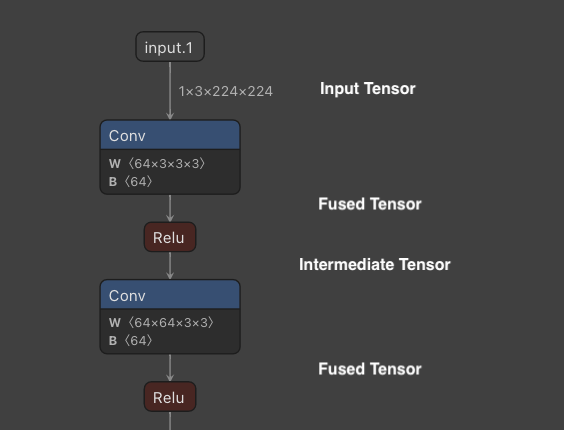
Example of intermediate tensors
Intermediate tensors produced by Activation and BatchNormalization are automatically removed by layer fusion.
Other intermediate tensors are, by default, allocated in a separate memory space for better performance. Since intermediate tensors that do not become actual output are temporary memory, they can be allocated and released to save memory.
Overview of Memory Saving Mode
For applications where the available memory is limited, such as inference on mobile devices and or managed servers, two memory-saving modes can be selected: Reduce Interstage and Reuse Interstage.
Reduce Interstage allocates memory when the tensor is needed, and releases it as soon as when it is no longer in use. This is the most efficient way to save memory. However, since repetitive memory allocations and releases make the inference run slower, it is best-suited for one-time inference.
In Reuse Interstage, memory is shared by tensors of the same size. Since machine learning models often involve multiple iterations of the same size Conv -> Activation, it is possible to reduce memory consumption without much impact on performances. However, for certain models, graphs that can be computed in parallel may be processed sequentially instead, which may result in a decrease in speed.
Note that Reduce Interstage and Reuse Interstage remove intermediate tensors that are not specified as output, therefore they cannot be used with models such as PaDiM that retrieve and use intermediate tensors. When trying to retrieve deleted tensors using get_input_blob_data, it returns an AILIA_STATUS_DATA_REMOVED error.
Usage of Memory Saving Mode
Using the Python API, memory mode retrieved using ailia.get_memory_mode can be set when instantiating ailia.Net
memory_mode=ailia.get_memory_mode(True,True,True,False)
net = ailia.Net(MODEL_PATH, WEIGHT_PATH, env_id=args.env_id, memory_mode=memory_mode)
In C++, set AILIA_MEMORY_* to the AILIANetwork instance. This must be done before calling OpenStreamFile.
ailiaSetMemoryMode(instance, AILIA_MEMORY_OPTIMAIZE_DEFAULT | AILIA_MEMORY_REDUCE_INTERSTAGE)
When using Unity, set Ailia.AILIA_MEMORY_* to the AiliaModel instance. This must be done before calling Open.
model.SetMemoryMode(Ailia.AILIA_MEMORY_REUSE_INTERSTAGE);
Memory usage comparison
Here is a comparison of memory usage in u2net. The memory usage of ailia SDK is displayed in blue.
Default: Allocate all tensors in separate memory
Maximum memory usage: 557.2MB
getMemoryMode result is true,true,false,false
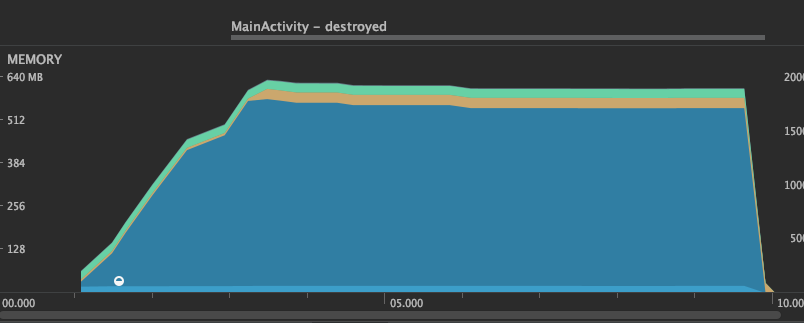
Default mode
Reduce Interstage : Allocate and release tensors each time
Maximum memory usage: 176.4MB
getMemoryMode result is true,true,true,false
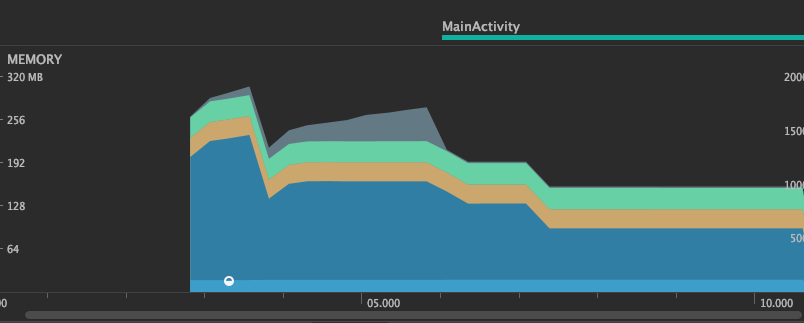
Reduce Interstage mode
Reuse Interstage : Reuse memory for tensors of same size
Maximum memory usage: 296.8MB
getMemoryMode result is true,true,false,true
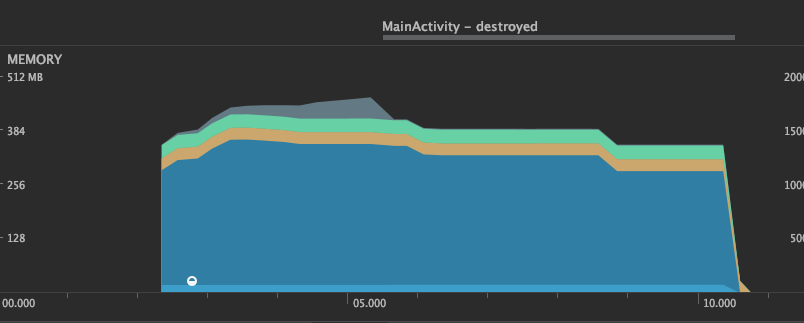
Reuse Interstage mode
Comparison of inference speed
Here is a comparison of the performance of u2netp on a MacBookPro13 (Intel Core i5 2.3GHz Iris Plus Graphics 655), showing the inference time for each of the five inferences.
Default: Allocate all tensors in separate memory
This is our baseline inference speed. The first inference takes a little longer since it has to allocates memory.
CPU
INFO u2net.py (104) : ailia processing time 269 ms
INFO u2net.py (104) : ailia processing time 178 ms
INFO u2net.py (104) : ailia processing time 176 ms
INFO u2net.py (104) : ailia processing time 177 ms
INFO u2net.py (104) : ailia processing time 175 ms
GPU
INFO u2net.py (104) : ailia processing time 475 ms
INFO u2net.py (104) : ailia processing time 153 ms
INFO u2net.py (104) : ailia processing time 132 ms
INFO u2net.py (104) : ailia processing time 125 ms
INFO u2net.py (104) : ailia processing time 122 ms
Reduce Interstage : Allocate and release tensors each time
In the default mode above, inference after the second run is faster, but Reduce Interstage requires the same initialization procedure at every run. Also, there is a larger penalty on GPU for allocating and freeing memory.
CPU
INFO u2net.py (104) : ailia processing time 268 ms
INFO u2net.py (104) : ailia processing time 253 ms
INFO u2net.py (104) : ailia processing time 254 ms
INFO u2net.py (104) : ailia processing time 255 ms
INFO u2net.py (104) : ailia processing time 248 ms
GPU
INFO u2net.py (104) : ailia processing time 667 ms
INFO u2net.py (104) : ailia processing time 627 ms
INFO u2net.py (104) : ailia processing time 609 ms
INFO u2net.py (104) : ailia processing time 600 ms
INFO u2net.py (104) : ailia processing time 644 ms
Reuse Interstage : Reuse memory for tensors of same size
Although memory usage is reduced by sharing tensor allocations, memory is only allocated in the first inference, therefore following inferences are faster. This mode provides a good balance between speed and memory consumption.
CPU
INFO u2net.py (104) : ailia processing time 236 ms
INFO u2net.py (104) : ailia processing time 167 ms
INFO u2net.py (104) : ailia processing time 171 ms
INFO u2net.py (104) : ailia processing time 169 ms
INFO u2net.py (104) : ailia processing time 172 ms
GPU
INFO u2net.py (104) : ailia processing time 461 ms
INFO u2net.py (104) : ailia processing time 158 ms
INFO u2net.py (104) : ailia processing time 145 ms
INFO u2net.py (104) : ailia processing time 139 ms
INFO u2net.py (104) : ailia processing time 129 ms
ailia Inc. has developed ailia SDK, which enables cross-platform, GPU-based rapid inference.
ailia Inc. provides a wide range of services from consulting and model creation, to the development of AI-based applications and SDKs. Feel free to contact us for any inquiry.