 ailia Tech BLOG
ailia LLM: Implementation of LLM on Edge Devices
This is an introduction to ailia LLM, a library for implementing LLM on edge devices including Android and iOS.
Introduction
While cloud-based LLMs, such as those from OpenAI ChatGPT, are well-known, recently smaller and highly accurate local LLM models like Google’s Gemma2, Meta’s Llama3.2, and Alibaba’s Qwen2.5 have been introduced, opening the door to on-edge-device implementations.
ailia LLM structure
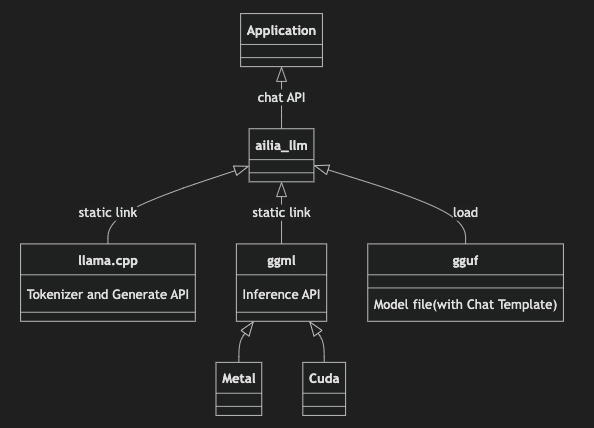
ailia LLM uses llama.cpp as a backend and adopts the GGUF model format. It abstracts the complexity of llama.cpp, making it accessible with a simple API. Additionally, ailia LLM provides pre-built binaries for various platforms, including Windows, iOS, macOS, Linux, and Android, as well as bindings for C++, Unity, Flutter, and Python.
About GGUF
GGUF is the standard model format for llama.cpp. In ailia LLM, by simply changing the GGUF file, you can run various LLMs.
GGUF files can be obtained from HuggingFace, but the can also be created from Pytorch model files using the tools included with llama.cpp.
In GGUF, the model weights are stored in a quantized format. For a 7B model, encoding the weights in Float32 would require 28GB of storage. However, by quantizing the weights to 4-bit, the size can be reduced to 3.5GB. The quantized weights are stored in VRAM, while tensors are kept in FP16. During inference, the weights are partially decompressed to FP16 at runtime and multiplied to perform the inference process.
In the GGUF file naming convention, the “Q4” part of “Q4_K_M” for example, refers to the number of bits used for quantization. Typically, Q4_K_M is the base choice, and if accuracy is insufficient, you can opt for Q5_K_M for improved precision.
In the case of Q4, the weights are quantized to 4 bits. “K_M” is the recommended standard quantization format. When using Q4_K_M, most tensors are quantized to 4 bits, while certain tensors that require higher precision are quantized to 6 bits. On the other hand, Q4_K_S quantizes all tensors uniformly at 4 bits. Both Q4_K_M and Q4_K_S use distribution-based quantization without calibration.
IQ4 is a new quantization method that uses Importance Matrix and quantization based on the distribution of inference results while running inference on calibration data. The IQ quantization is generally a more advanced and higher-quality quantization technique than the legacy K-quant methods. It is particularly effective when the quantization bit count is lower than 4 bits. Since this method depends on the characteristics of the calibration data, it’s important to ensure that the calibration data represents your use case. For example make sure to include data in Japanese when working with Japanese language models.
In addition to model weights, GGUF files also contain the tokenizer’s dictionary and chat templates.
The tokenizer dictionary contains the information needed to convert strings into token IDs that the LLM can process. In the case of ONNX, the tokenizer is external, so tools like ailia Tokenizer are required. However, with GGUF, the information necessary for the tokenizer is embedded within the file, so there is no need to prepare a separate tokenizer.
The chat template is used to define how to format the input prompt. Since LLMs are stateless, the chat history and system prompt are combined into a single text before being fed into the LLM. During this process, information on where a “turn” starts and ends is encoded using text that corresponds to Special Tokens. These Special Tokens and formatting conventions vary across different LLMs, so chat templates are used to standardize the process. An example of a chat template for Llama3 is shown below. Since the chat template is included within the GGUF file, users of ailia LLM don’t need to worry about managing or applying the chat template separately.
ailia LMM recommended models
Gemma 2
Developed by Google.
Llama3.2
Developed by Meta.
Qwen2.5
Developed by Alibaba.
Usage
Here is an example of using the ailia LLM. You open the GGUF model with the Open command, send a query using SetPrompt, and generate text with Generate. For the role in the prompt, you can specify system for system prompts, user for user queries, and assistant for LLM responses. Since ailia LLM queries are stateless, the chat history must be included in the query passed to SetPrompt. When conducting a continuous conversation, you add the previous LLM-generated response to the prompt for each new query.
C API
#include "ailia_llm.h"

int main(int argc, char *argv[]){
    struct AILIALLM* llm;
    unsigned int n_ctx = 512;
    ailiaLLMCreate(&llm);
    ailiaLLMOpenModelFileA(llm, "../models/gemma-2-2b-it-Q4_K_M.gguf", n_ctx);

    std::vector<AILIALLMChatMessage> messages;
    AILIALLMChatMessage message;

    message.role = "system";
    message.content = "Always answer in French";
    messages.push_back(message);

    message.role = "user";
    message.content = "Hello";
    messages.push_back(message);

    ailiaLLMSetPrompt(llm, &messages[0], messages.size());

    std::string text = "";
    while(true) {
        unsigned int done = 0;
        int status = ailiaLLMGenerate(llm, &done);
        if (done == 1 || status != AILIA_LLM_STATUS_SUCCESS){
            break;
        }
        unsigned int size = 0;
        ailiaLLMGetDeltaTextSize(llm, &size);
        std::vector<char> delta(size);
        ailiaLLMGetDeltaText(llm, &delta[0], delta.size());
        text = text + std::string(&delta[0]);
    }

    ailiaLLMDestroy(llm);

    return 0;
}
C# API
AiliaLLMModel llm = new AiliaLLMModel();
private List<AiliaLLMChatMessage> messages = new List<AiliaLLMChatMessage>();

string asset_path = Application.streamingAssetsPath;
string model_path = "gemma-2-2b-it-Q4_K_M.gguf";

llm.Create();
llm.Open(asset_path + "/" + model_path);

AiliaLLMChatMessage message = new AiliaLLMChatMessage();
message.role = "system";
message.content = "Always answer in French";
messages.Add(message);

AiliaLLMChatMessage message2 = new AiliaLLMChatMessage();
message2.role = "user";
message2.content = "Hello";
messages.Add(message2);
inputFiled.text = "";

llm.SetPrompt(messages);
bool done = false;
string text = "";
while (true){
    bool status = llm.Generate(ref done);
    if (done == true || status == false){
        break;
    }
    string deltaText = llm.GetDeltaText();
    text = text + deltaText;
}
Debug.Log(text);

message = new AiliaLLMChatMessage();
message.role = "assistant";
message.content = text;
messages.Add(message);
Python API
import ailia_llm

import os
import urllib.request

model_file_path = "gemma-2-2b-it-Q4_K_M.gguf"
if not os.path.exists(model_file_path):
 urllib.request.urlretrieve(
  "https://storage.googleapis.com/ailia-models/gemma/gemma-2-2b-it-Q4_K_M.gguf",
  model_file_path
 )

model = ailia_llm.AiliaLLM()
model.open(model_file_path)

messages = []
messages.append({"role": "system", "content": "Always answer in French"})
messages.append({"role": "user", "content": "Hello"})

stream = model.generate(messages)

text = ""
for delta_text in stream:
 text = text + delta_text
print(text)

if model.context_full():
 raise Exception("Context full")

messages.append({"role": "assistant", "content": text})
Give it a try!
You can apply to try ailia LLM at the link below. The form is in Japanese but feel free to write in English.
AILIA-LLM Evaluationaxip-console.appspot.com
To use ailia LLM in Unity please check the repositories below.
The repositories below are for Flutter users.
For Python users, you can simply use pip.
pip3 install ailia_llm
In addition, we are currently working on integrating ailia LLM into ailia DX Insight, which is a frontend application for LLM. Like LM Studio, it will allow you to easily try out various local LLMs.
Documentation
Connection with ailia AI Speech and ailia AI Voice
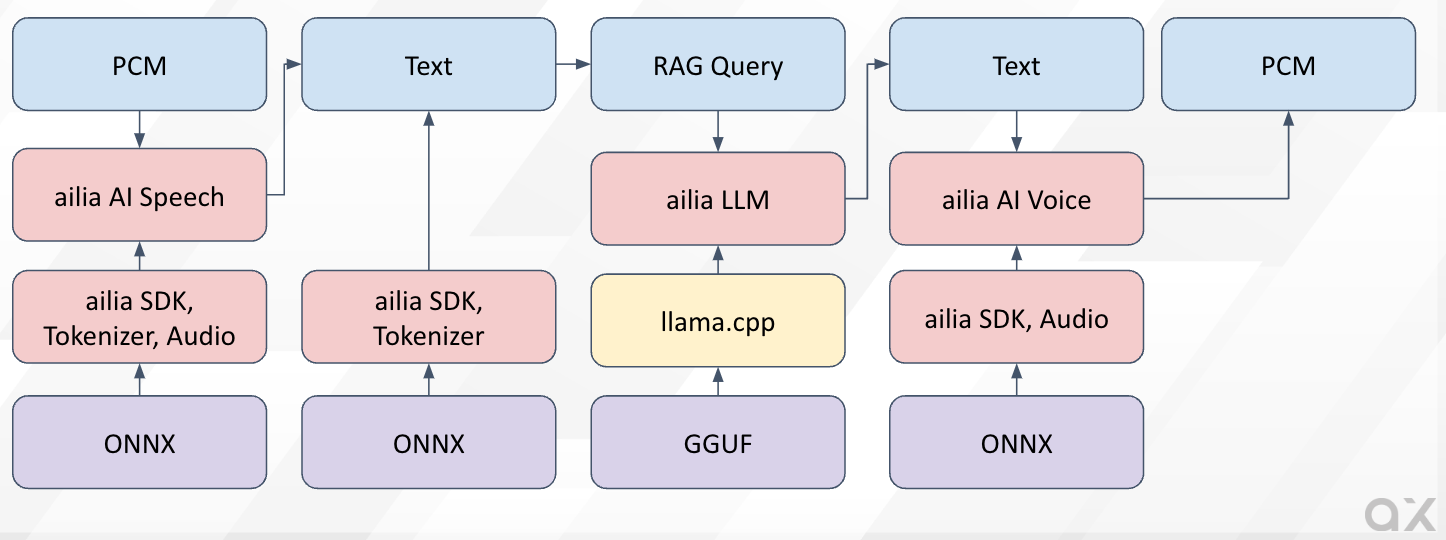
ailia LLM can also be used in combination with other ailia products. By using ailia AI Speech for speech recognition, ailia AI Voice for speech synthesis, and ailia SDK for RAG (Retrieval-Augmented Generation), it becomes easy to develop applications that allow completely offline interaction with avatars or support chat.
ailia AI Agent Solution
In the following repository, we have published a sample program that uses ailia AI Speech, ailia AI Voice, and ailia LLM from Python to practice English conversation.
Since ailia does not use any server, there are no additional costs. Also, there are no communication failures, and no need to monitor servers, allowing for reduced service operation costs. Moreover, AI models are not updated automatically, ensuring consistent behavior, making it easier to verify for mass production.
ailia Inc. has developed ailia SDK, which enables cross-platform, GPU-based rapid inference.
ailia Inc. provides a wide range of services from consulting and model creation, to the development of AI-based applications and SDKs. Feel free to contact us for any inquiry.