 ailia Tech BLOG
ai-edge-torchでPytorchからtfliteに変換する
ai-edge-torchを使用して、Pytorchからダイレクトにtfliteを出力する方法を解説します。
ai-edge-torchについて
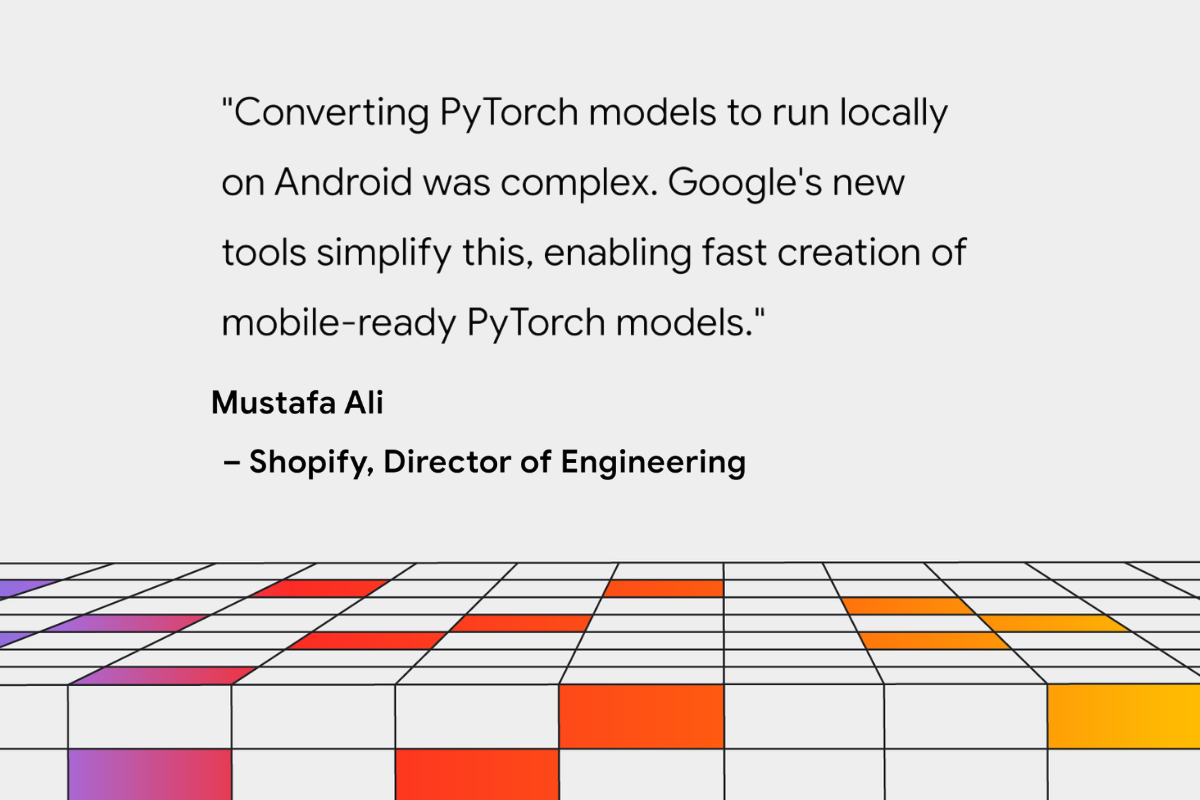
ai-edge-torchはGoogleが開発し、2024年5月に公開された、Pytorchからtfliteを出力するためのツールキットです。
従来、Pytorchからtfliteを出力する場合、ONNXを経由し、onnx2tensorflowなどでsaved_modelに変換し、tfliteに出力していました。
しかし、ONNXを経由する方法では、Pytorch標準のChannelFirstと、TensorFlow標準のChannelLastの変換で、Transposeが頻繁に挿入され、推論速度が低下するという課題がありました。また、ONNXからTensorFlowのsaved_modelへの変換で、変換エラーが多く発生していました。
ai-edge-torchは、Pytorchから直接、tfliteを出力することで、これらの問題を解消します。
ai-edge-torchのインストール
ai-edge-torchは、下記のコマンドでインストールします。
pip3 install ai-edge-torch
ResNet18からtflite (float) への変換
ResNet18からFloatのtfliteを出力するには下記のようにします。Torchのモデルを、ai_edge_torch.convertに入力することで、tfliteへの変換が可能です。
import torch
import torchvision
import ai_edge_torch

resnet18 = torchvision.models.resnet18(torchvision.models.ResNet18_Weights.IMAGENET1K_V1)
sample_inputs = (torch.randn(1, 3, 224, 224),)
edge_model = ai_edge_torch.convert(resnet18.eval(), sample_inputs)
edge_model.export("resnet18.tflite")
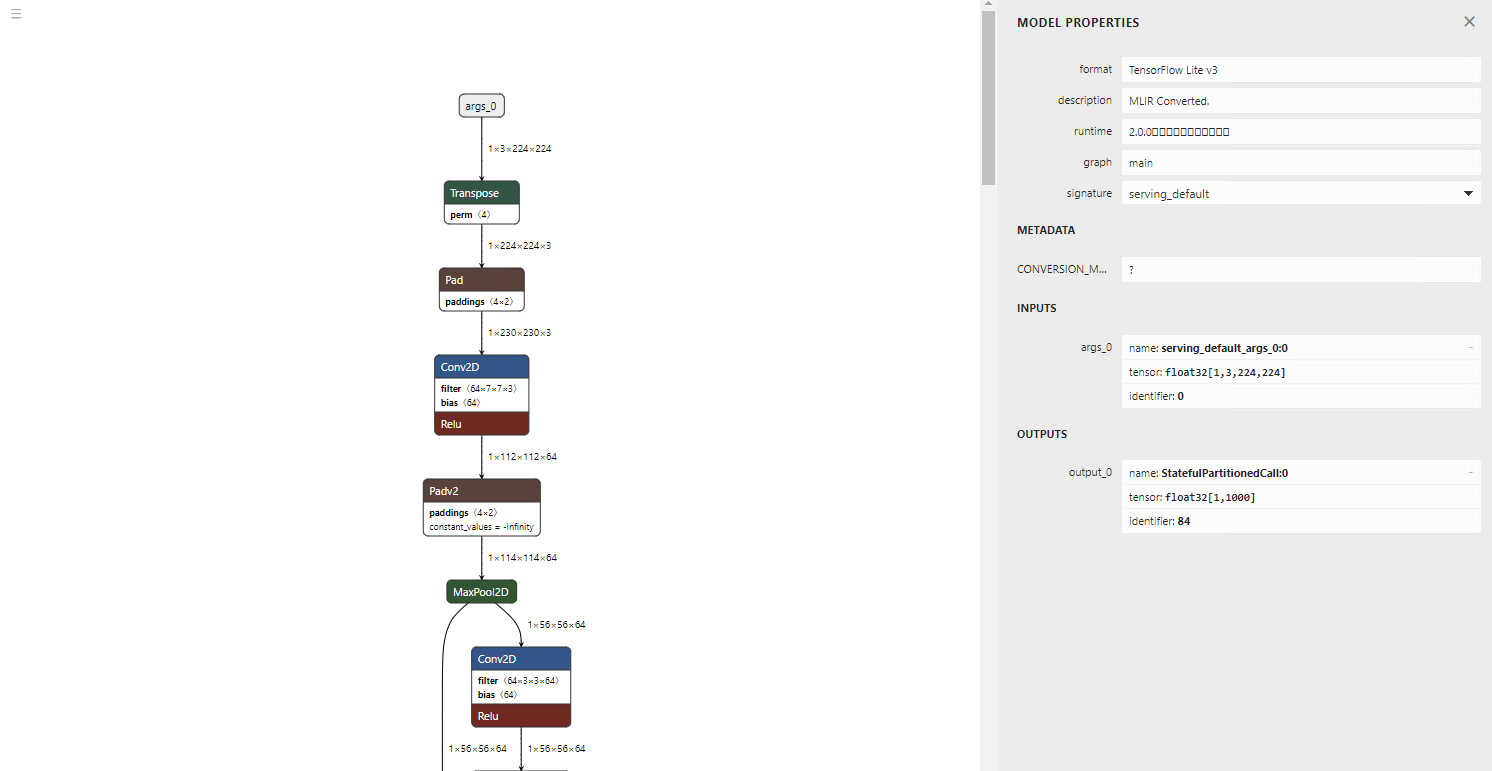
出力されたモデルです。不要なTransposeがなく、非常に綺麗です。
推論例です。正しく、時計を認識することができます。
=============================================================
class_count=3
+ idx=0
  category=892[wall clock ]
  prob=13.361162185668945
  value=13.361162185668945
+ idx=1
  category=409[analog clock ]
  prob=12.400266647338867
  value=12.400266647338867
+ idx=2
  category=426[barometer ]
  prob=10.935765266418457
  value=10.935765266418457
Script finished successfully.
ResNet18からtflite (int8) への変換(量子化)
ai-edge-torchでは、量子化もサポートしています。量子化するには、pt2e_quantizerを使用します。キャリブレーションは、prepare_pt2eとconvert_pt2eの間で推論することで行います。このサンプルでは、1枚の画像を使用しますが、実際にはキャリブレーション用の複数の画像で推論します。
import torch
import torchvision
import ai_edge_torch

from ai_edge_torch.quantize import pt2e_quantizer
from ai_edge_torch.quantize import quant_config
from torch.ao.quantization import quantize_pt2e

resnet18 = torchvision.models.resnet18(torchvision.models.ResNet18_Weights.IMAGENET1K_V1)
sample_inputs = (torch.randn(1, 3, 224, 224),)

quantizer = pt2e_quantizer.PT2EQuantizer().set_global(
    pt2e_quantizer.get_symmetric_quantization_config()
)
model = torch._export.capture_pre_autograd_graph(resnet18, sample_inputs)
model = quantize_pt2e.prepare_pt2e(model, quantizer)

import cv2
import numpy
img = cv2.imread("clock.jpg")
img = cv2.resize(img, (224, 224))
img = numpy.expand_dims(img, 0)
img = numpy.transpose(img, (0, 3, 1, 2))
img = img / 255.0
img = img.astype(numpy.float32)
model(torch.from_numpy(img)) # calibration

model = quantize_pt2e.convert_pt2e(model, fold_quantize=False)

with_quantizer = ai_edge_torch.convert(
    model,
    sample_inputs,
    quant_config=quant_config.QuantConfig(pt2e_quantizer=quantizer),
)
with_quantizer.export("resnet18_int8.tflite")
モデルの量子化はtorch.ao.quantizationが実行しています。ai-edge-torchは、Torchで量子化済みのモデルを、tfliteに変換します。
このサンプルは、下記のテストコードをベースに作成しました。
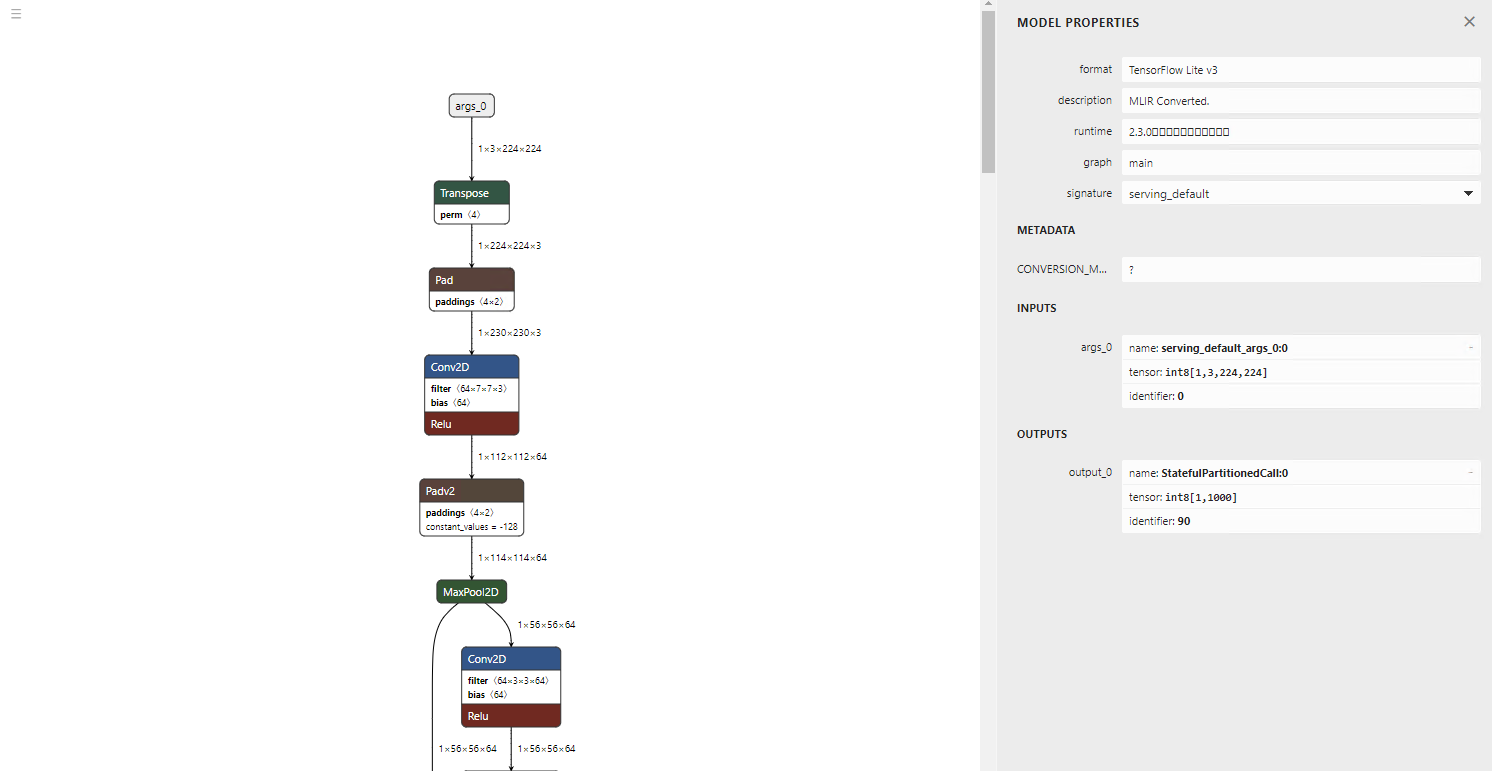
出力されたモデルです。入出力がint8になっています。
推論例です。Floatと同様に、時計を正しく時計と認識可能です。
=============================================================
class_count=3
+ idx=0
  category=892[wall clock ]
  prob=13.09241008758545
  value=123
+ idx=1
  category=409[analog clock ]
  prob=12.106959342956543
  value=109
+ idx=2
  category=426[barometer ]
  prob=10.980731010437012
  value=93
大規模なモデルの変換
ai-edge-torchは、LLMモデルの変換を想定して開発されたため、大規模なモデルも変換可能です。今回は、GFPGANを変換してみます。
Floatの変換のコード例です。
import torch
import ai_edge_torch

import os
model_name = "GFPGANv1.3"
model_path = os.path.join('experiments/pretrained_models', model_name + '.pth')
upscale = 2
arch = 'clean'
channel_multiplier = 2
from gfpgan import GFPGANer
restorer = GFPGANer(
    model_path=model_path,
    upscale=upscale,
    arch=arch,
    channel_multiplier=channel_multiplier,
    bg_upsampler=None,
    device="cpu")
model = restorer.gfpgan
model.eval()

sample_inputs = (torch.randn(1, 3, 512, 512),)
edge_model = ai_edge_torch.convert(model, sample_inputs)
edge_model.export("gfpgan_float.tflite")
Floatの出力です。tfliteはLeakyReluをサポートしていないので、Gather、Mul、Selectに変換されます。
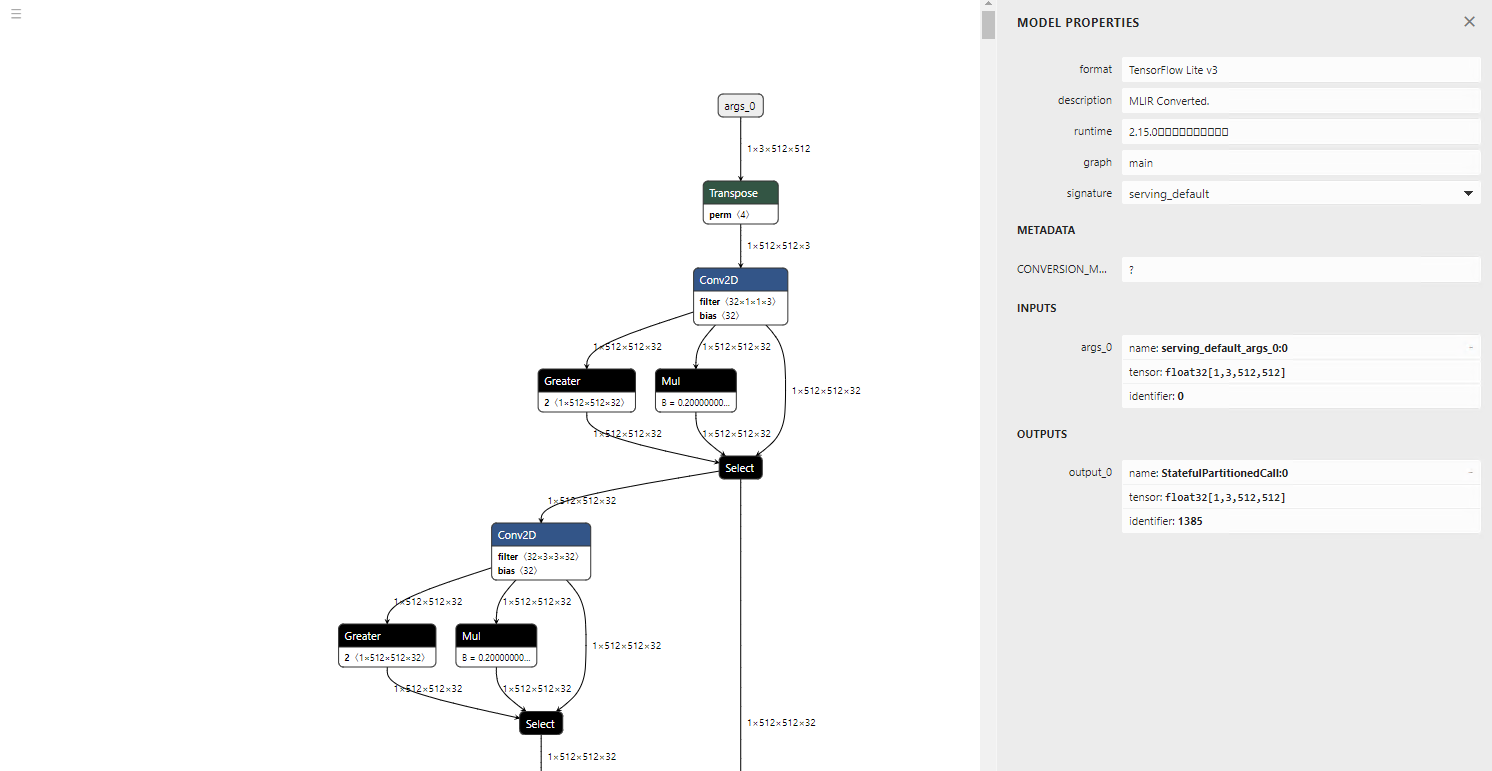
torch.randnはSTABLEHLO_RNG_BIT_GENERATORという新しいオペレータに変換されます。そのため、TensorFlow 2.12.0だとエラーになります。TensorFlow 2.17.0だと正常に推論可能です。

GFPGANの入力画像(テスト画像:https://github.com/TencentARC/GFPGAN/blob/master/inputs/whole_imgs/10045.png)

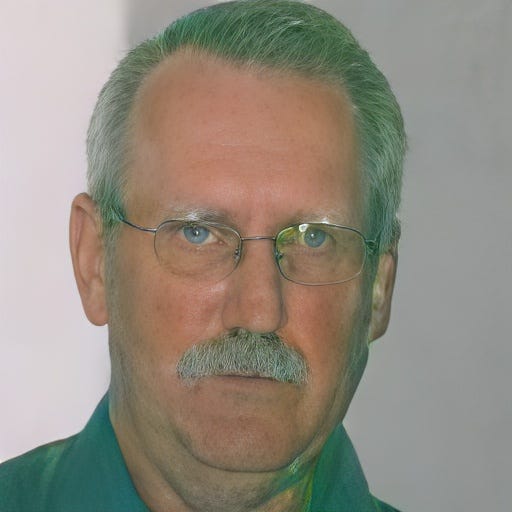
GFPGANの出力画像(テスト画像:https://github.com/TencentARC/GFPGAN/blob/master/inputs/whole_imgs/10045.png)
tflite変換のオプション
Flexオペレータに対応する
Relu6など、TFLITE_BUILDINには含まれておらず、Flexのオペレータが必要なものを変換しようとすると、下記のエラーが発生します。
Some ops are not supported by the native TFLite runtime, you can enable TF kernels fallback using TF Select. See instructions: https://www.tensorflow.org/lite/guide/ops_select
TF Select ops: Relu6
その場合、_ai_edge_converter_flagsを使用することで、Flexのオペレータを有効にすることが可能です。
 import ai_edge_torch
 import tensorflow as tf
 sample_inputs = (input_image,)
 tfl_converter_flags = {'target_spec': {'supported_ops': [tf.lite.OpsSet.TFLITE_BUILTINS, tf.lite.OpsSet.SELECT_TF_OPS]}}
 edge_model = ai_edge_torch.convert(self.model, sample_inputs, _ai_edge_converter_flags=tfl_converter_flags)
 edge_model.export("image_encoder.tflite")
Dynamic Shapeに対応する
デフォルトでは、すべてのShapeはStaticで出力されます。Dynamic Shapeを使用するには、torch.dynamoの機能を使用して、Dynamic Shapeに指定します。dynamoでは、グラフのTraceでShapeが正しいかのValidationが走ります。そのため、4096の倍数などの制約がある場合は、変数を定義した上で、* 4096などの制約をかけて定義する必要あがります。
import ai_edge_torch
import tensorflow as tf
sample_inputs = (current_vision_feats[0], memory_1, memory_2, current_vision_pos_embeds[0], memory_pos_embed_1, memory_pos_embed_2)
tfl_converter_flags = {'target_spec': {'supported_ops': [tf.lite.OpsSet.TFLITE_BUILTINS]}}
n_1 = torch.export.Dim("n_1", min=1, max=256)
n_4096 = n_1 * 4096
n_2 = torch.export.Dim("n_2", min=1, max=256)
n_4 = n_2 * 4
dynamic_shapes={
    'curr': None,
    'memory_1': {0: n_4096},
    'memory_2': {0: n_4},
    'curr_pos': None,
    'memory_pos_1': {0: n_4096},
    'memory_pos_2': {0: n_4}
}
edge_model = ai_edge_torch.convert(self.memory_attention, sample_inputs, _ai_edge_converter_flags=tfl_converter_flags, dynamic_shapes=dynamic_shapes)
edge_model.export("model/memory_attention_"+model_id+".tflite")
ただし、TensorFlow Liteのランタイム側のDynamic Shape対応が不十分で、Dynamic Shapeのモデルは推論エラーになることが多いです。そのため、Static Shapeを推奨します。
TensorFlowで量子化する
デフォルトではtorchのquantizerを使用して量子化しますが、_ai_edge_converter_flagsを使用することで、TensorFlowを使用して量子化することも可能です。
具体的に、下記のように、supported_opsにTFLITE_BUILTINS_INT8を指定した上で、representative_datasetとしてキャリブレーションデータを与えます。
sample_inputs = (torch.randn(32, 128),)

def representative_dataset():
    for _ in range(100):
      data = np.random.rand(32, 128)
      yield [data.astype(np.float32)]

tfl_converter_flags = {
    'optimizations': [tf.lite.Optimize.DEFAULT],
    'representative_dataset': representative_dataset,
    'target_spec.supported_ops': [tf.lite.OpsSet.TFLITE_BUILTINS_INT8],
    'inference_input_type': tf.int8,
    'inference_output_type': tf.int8,
}

tfl_fullint_model = ai_edge_torch.convert(
    model, sample_inputs, _ai_edge_converter_flags=tfl_converter_flags
)

tfl_fullint_model.export('layernorm.tflite')
torchで量子化すると、layer_normの前後にDequantize、Quantizeが挟まり、Floatで実行されます。
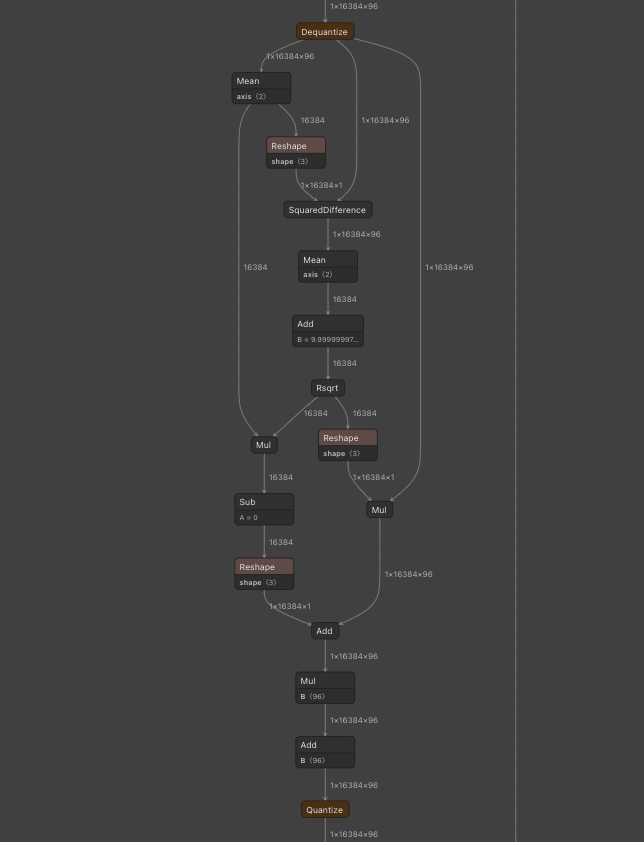
torchでlayer_normを量子化
TensorFlowで量子化すると、全てInt8のモデルを構築することが可能です。
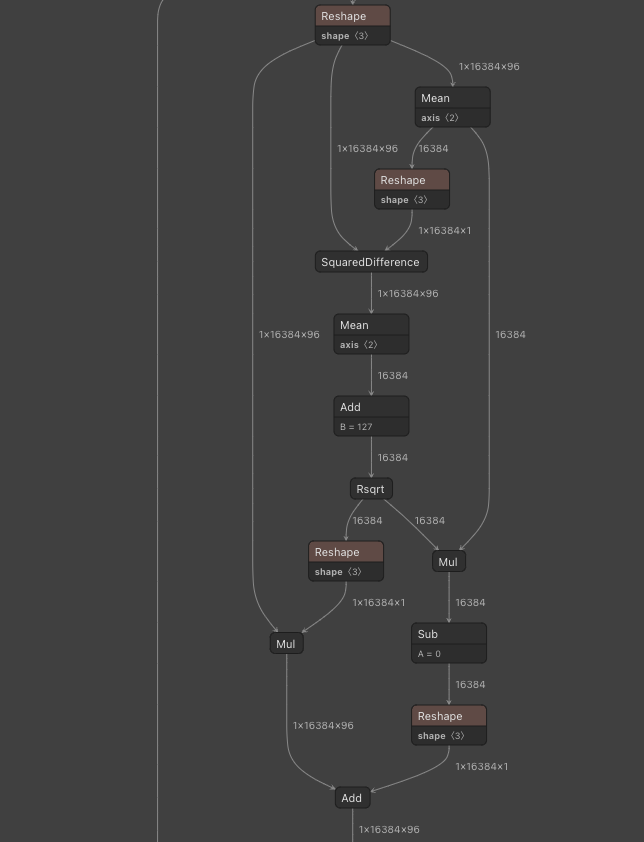
TensorFlowでlayer_normを量子化
まとめ
ai-edge-torchの登場により、Torchからtfliteへの変換と、デバイスへのデプロイが容易になりました。バックエンドで使用されているSTABLEHLOは、Jaxでの使用も想定されているようなので、Googleとしては、Pytorch、Jaxで学習したモデルを、tfliteでデバイスにデプロイすることを想定しているようです。
トラブルシューティング
Unknown PJRT_DEVICE ‘CUDA’が発生する
CUDAのない環境でCPU実行するには、export PJRT_DEVICE=CPUを実行しておきます。
torch._dynamo.exc.Unsupported: call_function ConstantVariableが発生する
TensorのShapeからバッチサイズを取得する際にsize(0)を使用するとこのエラーになるようです。shape[0]に置き換えると動作します。
量子化時にreset_histogramのtype errorが発生する
torch.histcのCPU実装はfloatしか対応していません。そのため、グラフ内のテンソルにint64のテンソルが含まれると下記のエラーになります。
torch.histogram: input tensor and hist tensor should have the same dtype, but got input long int and hist float
この問題を解消するには、torch/ao/quantization/observer.pyのreset_histogramを書き換えます。
    def reset_histogram(self, x: torch.Tensor, min_val: torch.Tensor, max_val: torch.Tensor) -> None:
        self.min_val.resize_(min_val.shape)
        self.min_val.copy_(min_val)
        self.max_val.resize_(max_val.shape)
        self.max_val.copy_(max_val)
        assert (
            min_val.numel() == 1 and max_val.numel() == 1
        ), "histogram min/max values must be scalar."
        if x.dtype != torch.float32: # 追加
            x = x.float() # 追加
        torch.histc(
            x, self.bins, min=min_val, max=max_val, out=self.histogram  # type: ignore[arg-type]
        )
量子化時にdtypeエラーが発生する
量子化時に下記のようなdtypeエラーが発生する場合があります。
  File "/home/kyakuno/.local/lib/python3.10/site-packages/torch/_subclasses/fake_tensor.py", line 1757, in _dispatch_impl
    r = func(*args, **kwargs)
  File "/home/kyakuno/.local/lib/python3.10/site-packages/torch/_ops.py", line 667, in __call__
    return self_._op(*args, **kwargs)
  File "/home/kyakuno/.local/lib/python3.10/site-packages/torch/ao/quantization/fx/_decomposed.py", line 81, in quantize_per_tensor_meta
    assert input.dtype == torch.float32, f"Expecting input to have dtype torch.float32, but got dtype: {input.dtype}"
torch._dynamo.exc.TorchRuntimeError: Failed running call_function quantized_decomposed.quantize_per_tensor.default(*(FakeTensor(..., size=(), dtype=torch.int64), 0.007843137718737125, -128, -128, 127, torch.int8), **{}):
Expecting input to have dtype torch.float32, but got dtype: torch.int64
これは、量子化対象のグラフの入力テンソルがfloat32でないといけないのに対して、torch.arrangeを使用した場合に、torch.arrangeの出力がint64のconstantになり、グラフの入力として内部的に定義されるために発生します。
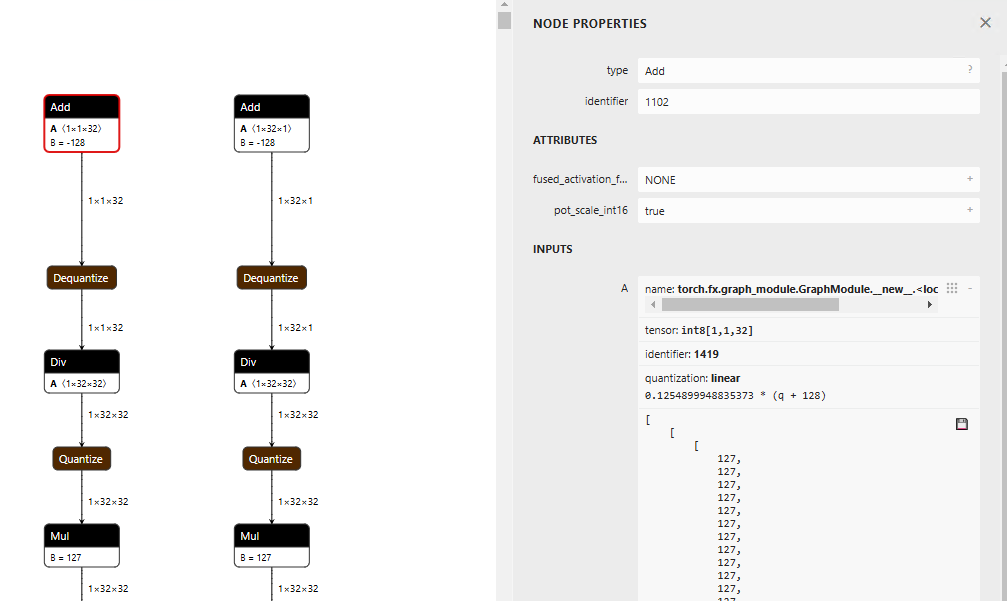
そのため、torch.arrangeの出力に対して演算をした結果をfloat32に変換してfloat32の定数として持つことで問題を解消することができます。
なお、Full Integer Quantization(テンソルも演算もInt8)ではなくなり、Dynamic Quantizationn(テンソルはFloat、ウエイトはInt8)になりますが、get_symmetric_quantization_configの引数にis_dynamic=Trueを与えることでも、エクスポートは成功します。
quantizer = pt2e_quantizer.PT2EQuantizer().set_global(
    pt2e_quantizer.get_symmetric_quantization_config(is_dynamic=True)
)
model = torch._export.capture_pre_autograd_graph(self.model, sample_inputs)
model = quantize_pt2e.prepare_pt2e(model, quantizer)
model(input_image) # calibration (you need to edit reset_histogram function)
model = quantize_pt2e.convert_pt2e(model, fold_quantize=False)
error: redefinition of symbol named ‘gelu_decomp_0’が発生する
ai-edge-torchはtf-nightly>=2.18.0.dev20240607が必要です。pip3 install tensorflowなどをしてしまうと、tf-nightlyではなく通常のtensorflowに戻ってしまうので、pip3 uninstall tf-nightlyした後、pip3 install tf-nightlyしてください。
また、現在は、tensorflow==2.18.0が正式にリリースされたため、tf-nightlyではなく、tensorflow==2.18.0を使用するのが良いと思います。
AttributeError: ‘OptimizeLayoutTransposesPass’ object has no attribute ‘get_paired_q_dq_ops’が発生する
ai-edge-torchのTransposeの挿入アルゴリズムのエラーになります。デフォルトではMINCUTになっているので、GREEDYにすると改善する場合があります。
export AIEDGETORCH_LAYOUT_OPTIMIZE_PARTITIONER=GREEDY
ailia TFLite Runtimeの紹介
アイリア株式会社では、Android環境でNNAPIとNPUを使用した高速推論を行える、ailia TFLite Runtimeを提供しています。ai-edge-torchを使用することで、今までよりも多くのモデルのtfliteへの変換が可能になり、Androidや組み込み環境でのNPU推論が使いやすくなることが期待されます。ぜひ、お気軽にお問い合わせください。
アイリア株式会社はAIを実用化する会社として、クロスプラットフォームでGPUを使用した高速な推論を行うことができるailia SDKを開発しています。アイリア株式会社ではコンサルティングからモデル作成、SDKの提供、AIを利用したアプリ・システム開発、サポートまで、 AIに関するトータルソリューションを提供していますのでお気軽にお問い合わせください。